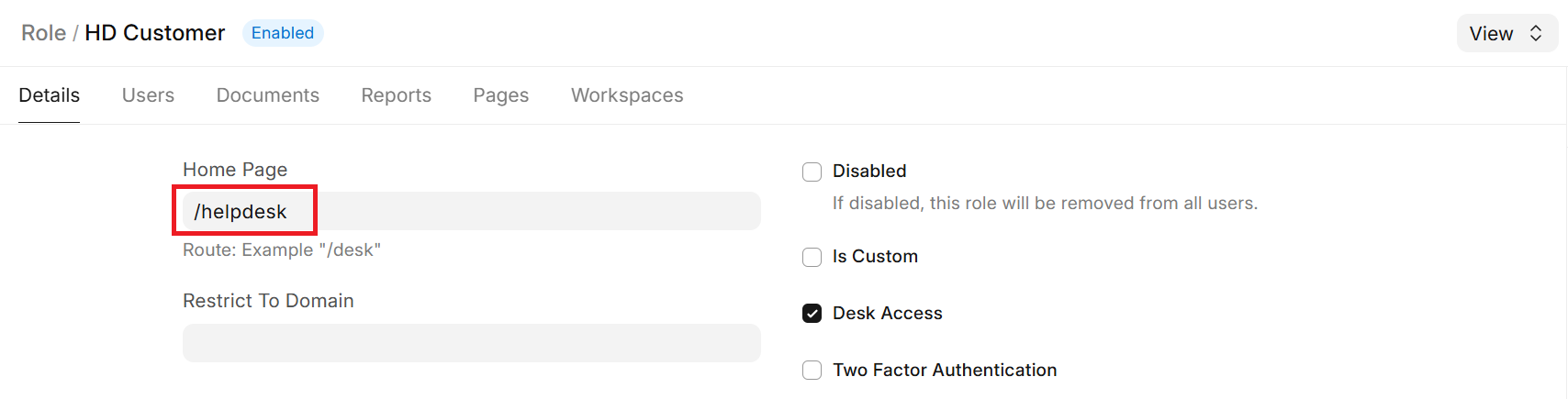
The Helpdesk app is aggressively overriding the application’s login routes and causing serious routing issues.
Even when the Portal Settings are explicitly configured to prevent the Helpdesk app from being accessible, the application continues redirecting users to Helpdesk. What makes this issue even worse is that even after completely uninstalling or removing the Helpdesk app, the application still attempts to redirect to Helpdesk and throws errors.
This is extremely frustrating and indicates a fundamental problem with how routing and login redirection are implemented.
Why should an application have such a rigid and intrusive control over the routing system? An app should never impose its own routes and login behavior in a way that overrides global settings or interferes with the rest of the platform.
This is a serious architectural flaw, not just a minor configuration issue.
At the very least:
Helpdesk should fully respect the Portal Settings.
Login and authentication routes should not be forcibly overridden by an individual app.
Uninstalling or disabling Helpdesk should completely remove its routing hooks and redirections.
Users and administrators should have full control over their application’s login and portal routing behavior.
This level of coupling and lack of flexibility is simply unacceptable. Applications should extend the platform, not take control of its fundamental routing mechanisms or make themselves impossible to disable cleanly.
Please reconsider this implementation and provide a proper solution. This behavior is fundamentally wrong and creates unnecessary problems for anyone who does not intend to use Helpdesk.
Thanks for the explanation. I understand that clearing the Home Page field from the Helpdesk-related Role resolves the immediate redirection issue.
However, I believe this misses the actual point of the problem.
Why should installing the Helpdesk app modify a Role’s Home Page and effectively take control of the application’s global login redirection behavior in the first place?
This is fundamentally the wrong approach. An individual application should not impose its own homepage on users by modifying Role configurations in a way that overrides the administrator’s intended portal behavior.
Portal Settings exist precisely to give administrators control over portal accessibility and redirection. Having a Role-level Home Page silently take precedence over those settings creates unexpected behavior and makes the system unnecessarily difficult to manage.
The fact that users have to manually identify and clear Role configurations just to prevent an app from hijacking their login experience is not a proper solution.
The issue is not how to work around this behavior. The issue is why this behavior was implemented in the first place.
Helpdesk should be an optional application, not something that dictates how the entire Frappe login and routing system behaves. Its routing and homepage configuration should be isolated, predictable, and should never interfere with the administrator’s global settings.
I strongly believe this implementation needs to be reconsidered at the architectural level, rather than expecting administrators to work around it manually.
I wouldn’t say it’s an architectural issue. Architecturally, it seems valid that roles should have the ability to override portal configurations. But, the way helpdesk sets defaults does seem invasive.
If you feel it should be changed, the option available to you is to file an issue ( Issues · frappe/helpdesk · GitHub ). The maintainers may or may not share your view, but that’s the path ahead for getting it on record.
I’ve already filed an issue on GitHub. I was simply interested in hearing the community’s perspective on this behavior and whether others consider it an invasive implementation.
I appreciate your explanation and understand that the maintainers may have a different opinion. My intention here was to open a discussion and get feedback from the community, not just to find a workaround for the problem.