Hi,
I have made a button in the onload javascript event and made the details appear using msgprint.
thanks @rmehta
Frankly that example was a little bit hard for me to digest  since I am a beginner.
frappe.ui.form.on("Student", "user",function(frm)
	{
        frappe.call({
            "method": "frappe.client.get",
            args: {
                doctype: "User",
                name: frm.doc.user
            },
            callback: function (data) {
                frappe.model.set_value(frm.doctype,frm.docname, "full_name",
                    data.message.first_name + (data.message.middle_name ?
                        (" " + data.message.middle_name) : "")+ (data.message.last_name ?
                        (" " + data.message.last_name) : "") );
            frm.add_custom_button(__('User Details'), function(){
				var msg = '<img src="'+data.message.user_image+'"/><br/>';
				msg = msg + 'Email : ' + data.message.email+'<br/>';
				msg = msg + 'Gender : ' + data.message.gender+'<br/>';
				msg = msg + 'Birthdate : ' + data.message.birth_date + '<br/>';
				msgprint(__(msg));
				});
            }
        })
    });
frappe.ui.form.on("Student", "onload", function(frm)
{
	if(frm.doc.user!=undefined)
	{
        frappe.call({
            "method": "frappe.client.get",
            args: {
                doctype: "User",
                name: frm.doc.user
            },
            callback: function (data) {
            frm.add_custom_button(__('User Details'), function(){
				var msg = '<img src="'+data.message.user_image+'"/><br/>';
				msg = msg + 'Email : ' + data.message.email+'<br/>';
				msg = msg + 'Gender : ' + data.message.gender+'<br/>';
				msg = msg + 'Birthdate : ' + data.message.birth_date + '<br/>';
				msgprint(__(msg));
				});
            }
        })
     }
});
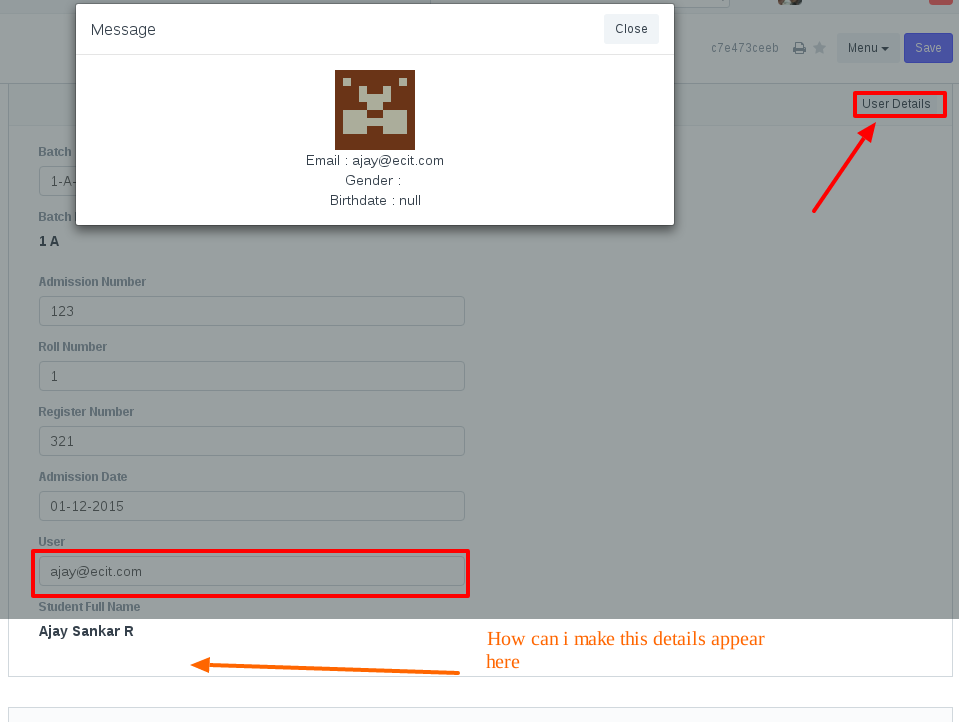
Please suggest a better way of doing this.
How can I make the details append to the bottom of the page. Do i need to add any custom fields for that? Please help me with that.
And why is that button on the top right corner? can i make it to the bottom of the page?