The short answer is you run this command:
bench update
Now here’s the longer explanation. This command does a lot of small tasks. Tasks you “could” do yourself manually, in your console. There’s no magic here: Bench is just saving you some keystrokes. Here is the general idea of what happens when you run that command.
For each App you have installed (Frappe, ERPNext, others):
- A
'git pull'command is executed in your App’s root directory. Your local code and files are updated, based on whatever is currently in GitHub/GitLab for your git ‘branch’. - Python packages are installed/updated based on the new contents of the App’s
'requirements.txt'file. Updates are (mostly) made from PyPi.org repositories. - Node.js packages are installed/updated, based on the new contents of the App’s
'package.json'files. (using the yarn package manager) - JS and CSS assets are “rolled up” (minified, concatenated, bundled) to create new asset files.
- Based on DocType schema definitions inside .json text files, your MariaDB SQL database’s schema is updated (tables, columns, indexes)
- If it exists, “patch code” is run. By “patch code”, I mean scripts that update your SQL database’s existing records, based on the new schema and requirements from step 5.
If everything goes well, then that’s it. You’re on the newest minor and patch version.
To upgrade a major version (e.g. v13 → v14), we used to type this command:
bench update --upgrade
Does this command still work today? I have no idea. The official documentation never explains how to upgrade. 
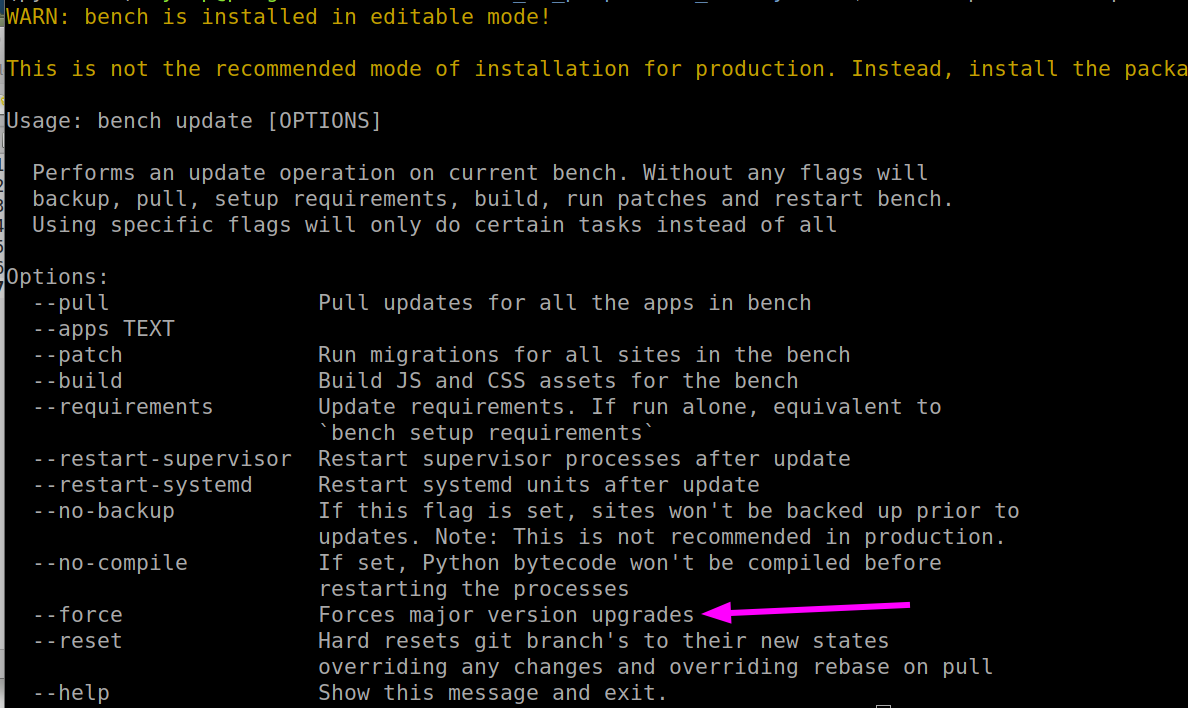
I tried to answer this for myself, by running bench update --help. However, the '--upgrade' flag is gone. There’s a --force flag, but I’m reluctant to say that’s the answer (in most CLI I’ve seen, --force is a suffix usually reserved for doing something potentially breaking.)
So who knows.
Hopefully this information helps, @alpresidente. I stopped using ‘bench update’ years ago, so I’m not an expert. Hopefully someone else can chime in about the major version upgrades.