Normally when I see node gyp errors, the root cause is incompatible versions of:
- Python (yes, Node actually depends on Python. This was surprising at first)
- Node
- Node Sass.
To find out if that’s the problem, try this:
- Find out what version of Node you have:
node -v
- Find out what version of Node SASS you have.
# This shows what -should- have installed:
cd [path_to_your_bench_directory]
cat apps/frappe/package.json | grep node-sass
OR alternately
# This shows what is -actually- installed:
cd [path_to_your_bench_directory]
cd apps/frappe
yarn list --depth 0 | grep sass
- The link and screenshot below shows the compatibility (only first 2 columns important):
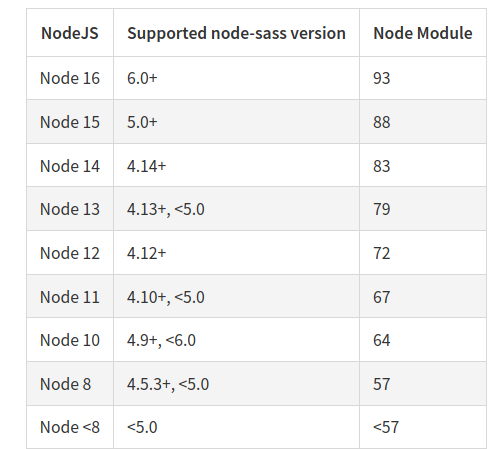
If your versions are not compatible, it’s a bit easier (imo) to change your Node version to match.
Changing your Node SASS version is more-difficult, because 'package.json' and 'yarn.lock' are part of the Frappe git repository. So modifying them technically means you’re forking it. Which is fine. But adds some extra maintenance for you.