Hi everyone,
I’m trying to configure Frappe HR so that work done on official (public) holidays is automatically calculated as overtime, but I couldn’t find a way to make it work.
What I want to achieve:
When an employee checks in/works on a day that is listed in the Holiday List, the worked hours should automatically be treated as overtime (with the overtime rate/multiplier) without any manual adjustment.
What is happening:
- The holidays are defined in the Holiday List and assigned to the employees.
- Attendance/check-ins on those days are recorded, but the hours are not counted as overtime in the salary slip.
- I currently have to add the overtime manually (e.g., through an Additional Salary).
What I’ve checked:
- Holiday List is assigned correctly to the employees
- Shift Type / Attendance settings
- Salary Structure and salary components
Questions:
- Is there a built-in setting to treat work on public holidays as overtime automatically?
- If not, what is the recommended approach (custom salary component, formula using attendance on holidays, or a custom script)?
Version: Frappe HR [16.50.0]
Any guidance would be appreciated. Thanks!
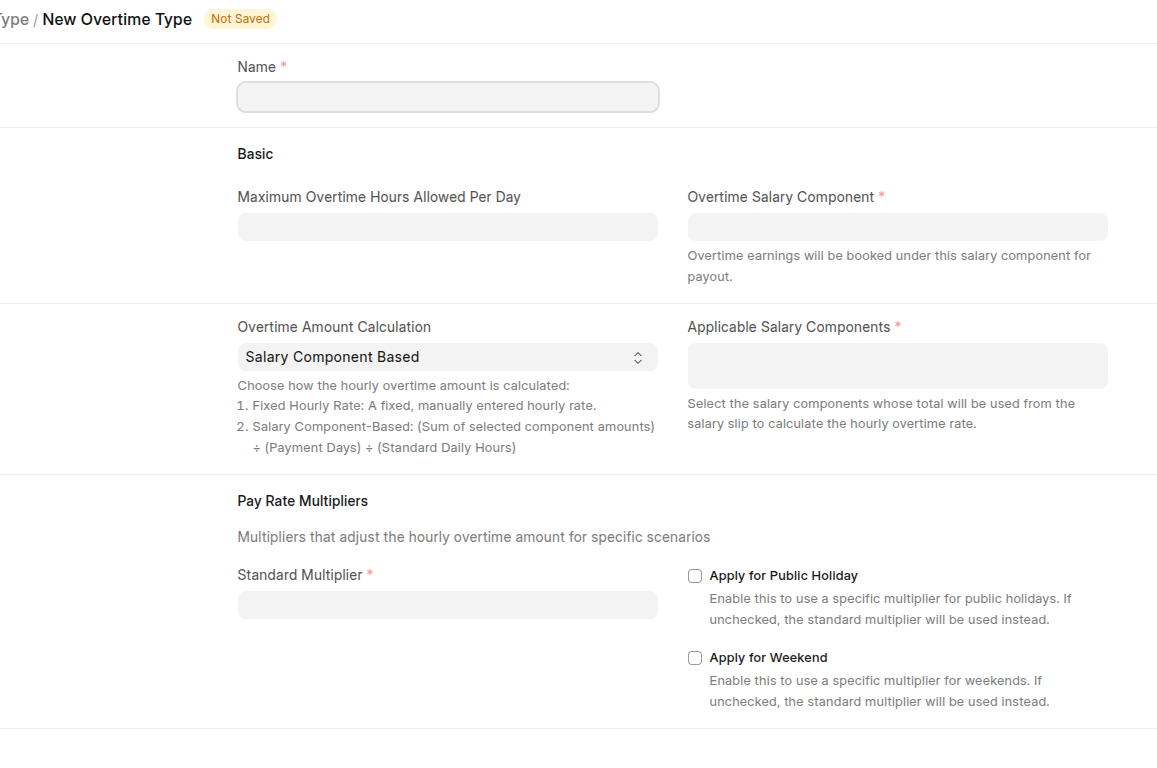
Create an Overtime Type :
- Set the Overtime Salary Component (an Earning component).
- Choose the Overtime Calculation Method: either the hourly rate you enter, or one derived from Applicable Salary Components, such as Basic.
- Under the pay rate multipliers, set a Standard Multiplier, for example 1.5.
- Tick Applicable for Public Holiday and set the Public Holiday Multiplier, for example 2.0. If you leave it unticked, the standard multiplier applies on holidays too.
- Tick Applicable for Weekend if weekly-offs need their own multiplier.
- Link it to the Shift Type: tick Allow Overtime and select the Overtime Type. The Attendance record then gets the overtime_type and standard_working_hours from the shift. Overtime Slips only pick up Attendance records that have an overtime type.
- Create Overtime Slips for the period, either directly or through Payroll Entry. The slip reads each Attendance’s overtime hours.
- It looks up the date in the employee’s Holiday List.
- If the date is a weekly-off, it uses the weekend multiplier.
- If it’s a non-weekly-off holiday, it uses the public holiday multiplier.
- It then creates an Additional Salary for the overtime component on submit. This replaces your manual Additional Salary step.