I will add my 2 cents here with a concrete example on why the ability to choose which column to display in a given report is an important.
I’m using a Macbook Pro (15’’ screen size I believe). I am assuming that a majority of accountants and people working with stocks are working with computers / laptop (not cellphone).
I am using the stock balance report. See below.
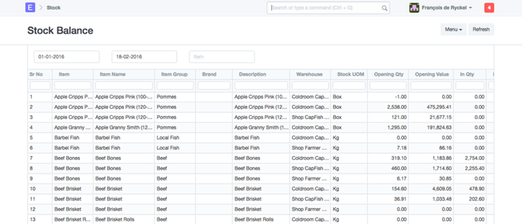
So I have a decent size screen and a stock balance report where I have lots of information but not my stock balance on it.
OK yes, I can scroll on the right size to see stock quantity, but then I have this:
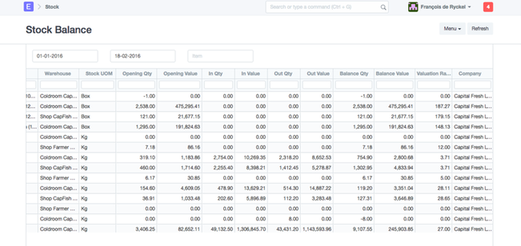
A stock quantity without anymore for what product it is.
So here we go. One of the most important report for any company (its stock level) is not very practical at all.
Hence the ability to choose which column we want in our report.
I am not a programmer at all, and it was quite a task to come up with a useful report like below where the information is available into one screen :
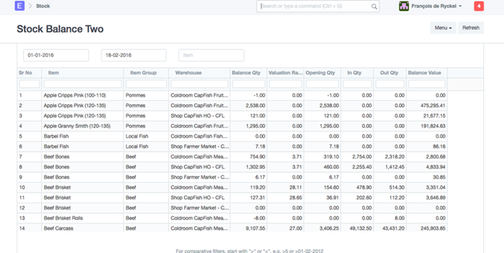
.
Normally one should not have to digg into coding to do this kind of report.
But again as @abelinux I am not a developer either and so I have not clue as well if this is feasible or not and how easy of a fix it can be. From a user & business owner perspective (with lots of transaction daily) , report like stock balance and stock ledger are way too big to be useful and it is quite hard for simple user (non-developer) to make them useful.
That said, I love ERPNext, it is a fantastic product and it is an inconvenience I can live with.