Is there a stock report that allows us to view the inventory of item templates with variants? In other words, can the total stock of all variants be displayed as the stock quantity of the corresponding item template?
Hey mate, as far as I know the standard Stock Balance report doesn’t roll variants up to the template, but there are a few ways to get the number:
- Item Variant Details report (search it in the awesome bar). Set Item = your template. It lists every variant with its attribute values, Current Stock, In Production and Open Sales Orders. Two limits: Current Stock is the sum of actual qty across all warehouses (there is no warehouse filter), and there’s no total row, so export it and sum the column.
- Stock Balance report: select the variants in the Items filter (it’s multi-select), set Warehouses if you need a warehouse view, and tick Show Variant Attributes. You still add the variants up yourself, but you get balance, in/out qty and value per warehouse.
- If you need a template total regularly, a small custom Script/Query Report that sums
Bin.actual_qtygrouped byItem.variant_of(optionally by warehouse) does it. Who can create such reports depends on your version and role permissions, so check that first.
Which version are you on? If you mainly need one number per template per warehouse, option 3 is the cleanest.
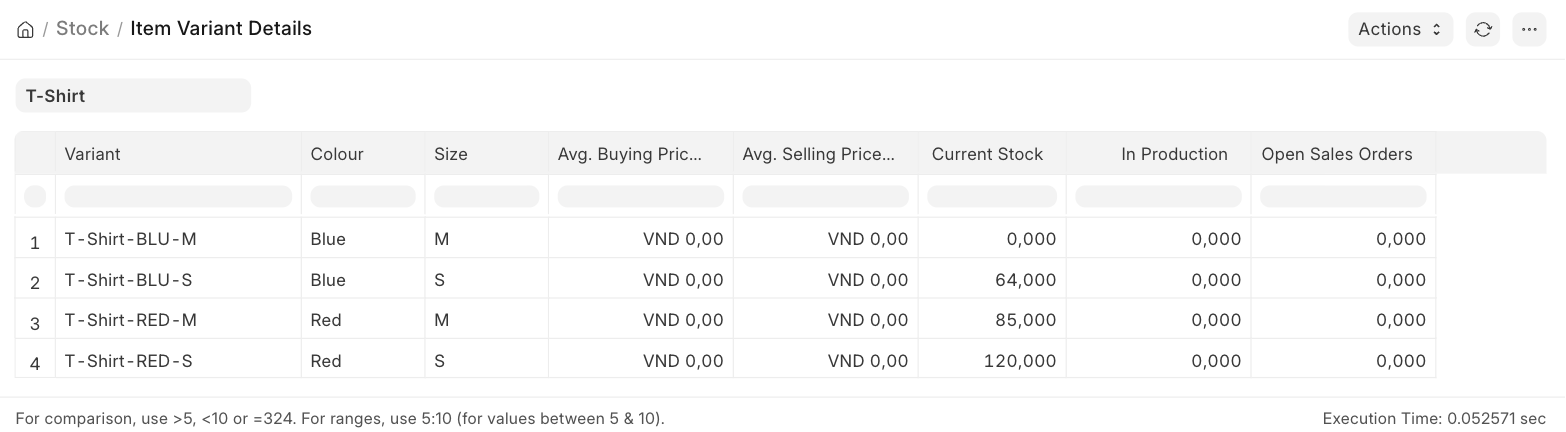
Hello. I also have this same requirement.. stock value needs to be shown in aggregate across the various variants. This is crucial for us to plan our replenishments.. as we replenish in BULK (essentially at the template level) and then do repacking to various variants.
The report ‘Item Variant Details’ is not very helpful, because of the two key limitations: (1) It does not have warehouse filter, and (2) It forces to see only one template item at a time.. Ideally we want to get a report downloaded where we can see the aggregate stock across a range of template items (we have more than 50 such template items that need replenishment planning at template / BULK level)
Manual workaround / solution that we are currently using:
- Create a custom field called ‘Template Item Name’ in the item doctype (variants tab). Populate with the item name based on ‘variant of’ field
- Add this column ‘Template Item Name’ to the Stock Balance Report
- Run stock balance across all items and download to Excel
- Create a Pivot table in Excel to sum up the stock balance by ‘Template Item Name’ .. this will give us the aggregate stock across each variant for all the selected template items
Its a bit of manual work, but once its setup, it takes us about 30 mins to do this as part of our weekly stock replenishment cycle.
Would be great if anyone has a way to accomplish this within ERPNext so we don’t have to go through the manual work.. But for now, this is what we are using as our solution to this problem.
I have made this PR. If it does what you and @phbehparvar-blip want, I can merge it. Let me know.
Hi @mihir-kandoi . In the PR you have suggested above, will the item variant details still be available for only one template item at a time? Or will there be possibility to extract information across multiple template items together?
Thanks
Both the new warehouse filter and the old template filter will be MultiSelect
Ok, that will be excellent. I would request, if possible, can you also add the Item Group filter to the report. And the Item Group should be in the output as well.
Reason is that Item Group is the main hierarchy and replenishment is managed in this way. For example, Dry Fruits are managed by one person, and Pulses by a different person etc.