hello my name is San Linn Phyo. I am new to here. So do to ERPNext. Nice to meet you all. Right now, I am working at a manufacturing company which buys raw materials from suppliers, produce products and sell them to the retail shops. As far as I know the normal flow for manufacturing product in erpnext is with BOM, job cards, etc. That way requires fix amount and fix way. But our company cannot follow that way because our company needs more flexible way. So, after a lot of research and testing, I choose this way. I use material issues for tracking using raw materials to manufacture. I use material receipt for tracking products. For the other expenses which are related with manufacturing but hard to track, I use journal entry.
The problem is that when I use profit and loss statement, I got stock adjustments negative. Could you guys help me?
@devsanlphyo Correct the process first, then your reports will show the right numbers. ":
A manufacturing process that cannot follow a fixed BOM and a fixed output can still be planned and managed on ERPNext. The BOM will be an estimate recipe.
Plan the work on a Work Order against it. Issue material with Material Transfer for Manufacture as much as you need, then finish with the Manufacture stock entry. The system gives quantities as per the BOM config. You can change them to the actual quantity.
I suggest “Backflush Raw Materials Based On” set to Material Transferred for Manufacture. Raw material stock then keeps reducing like you do now with Material Issue.
Material Issue and Material Receipt post their value difference to Stock Adjustment. That is why it shows in your P&L.
Other expenses known at the time of the Manufacture stock entry: add them in the “Additional Costs” table.
Not known at that time: create a Project and mention it in the Journal Entry. Check profitability in the P&L with the Project filter. If you use the Project, fill it everywhere: Sales Order/Invoice, Manufacturing documents, Journal Entries, Purchase Order/Invoice.
Hi @Mohammad_Ahmad_Zulfi
In Manufacturing module settings there is an option of “Allow Excess Material Transfer - Allow transferring raw materials even after the Required Quantity is fulfilled”
Can that make it like a flexible BOM and serve his purpose?
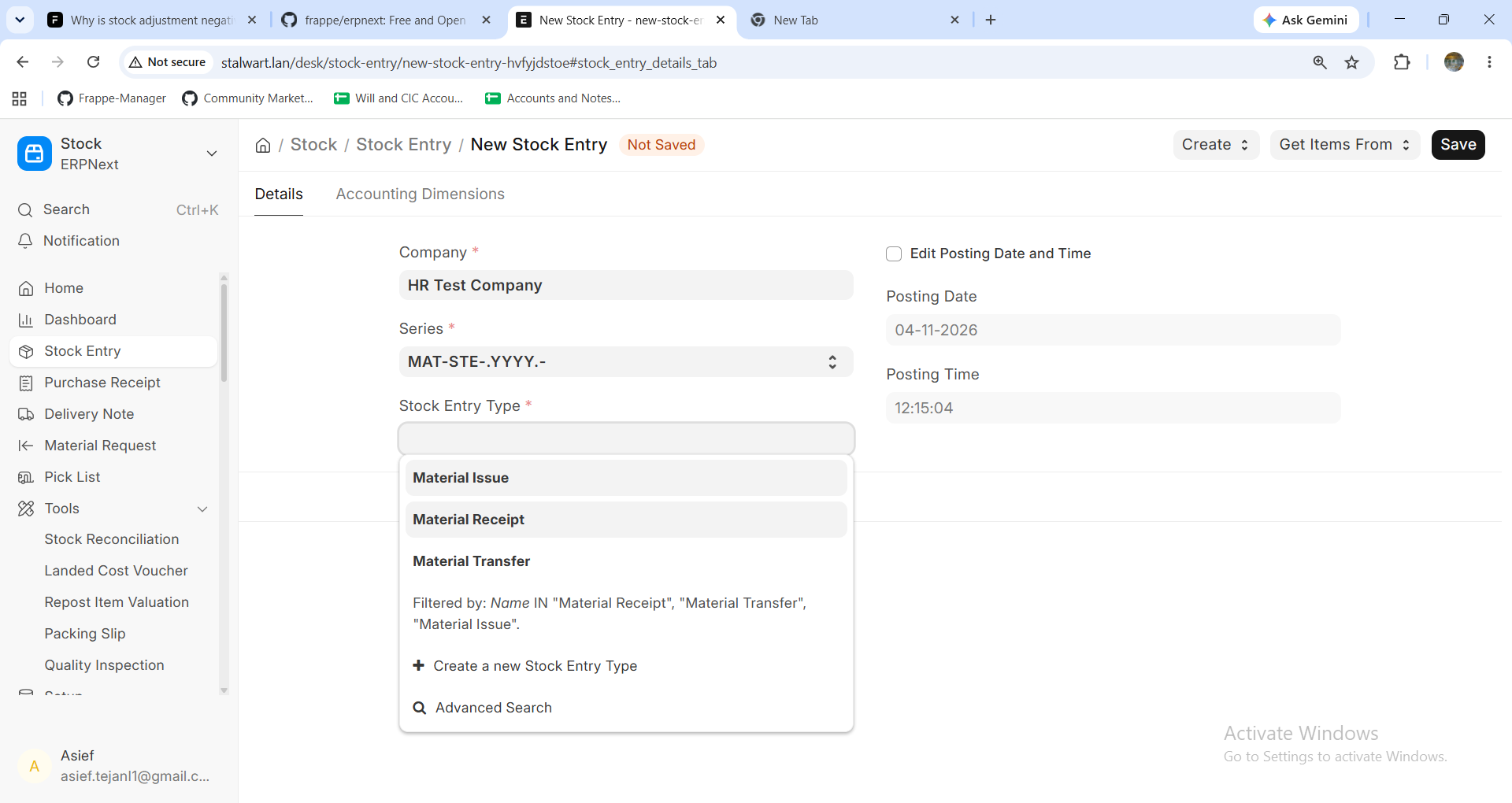
Also a side question - when I try just to do a manufacture stock entry I only find 3 options in the stock entry type - Material Issue/Transfer/Receipt.
In v15 this was not the case. Has it been restricted to BOM operations or is there a setting I am missing somewhere?
Thanks
@asieftejani There are two settings that can help, but each one works in a different place. I tested on v16.
-
Allow Excess Material Transfer works on a Job Card. It adds Create > Material Transfer after all material is moved. It does nothing on a Work Order without Job Cards.
-
Transfer Extra Raw Materials to WIP (%) works on the Work Order. It adds Make > Additional Material Transfer. The limit is the Work Order qty plus this percentage.
For the Job Card, set “Backflush Raw Materials Based On” to Material Transferred for Manufacture. With “BOM”, the Stock Entry stops you: “Maximum transferable quantity is 0”. With the other value, the system trusts what you moved, not the BOM.
For your side question: on my v16 site, Manufacture and the other 12 types all show. Please check User Permissions on Stock Entry Type and any Client Script on Stock Entry.
@Mohammad_Ahmad_Zulfi
Thanks for your reply. It seems there is a filter in place that is stopping me from accessing the other 9 options.
Lets see if I update erpnext.
Thanks again
Yes, it definitely looks like someone added custom client script for this query or someone added filters via the Customize Form. Check on both sides.
You are welcome
You are very welcome 
If my response solved your task then please mark it as the accepted answer so others may get benefit from it too.