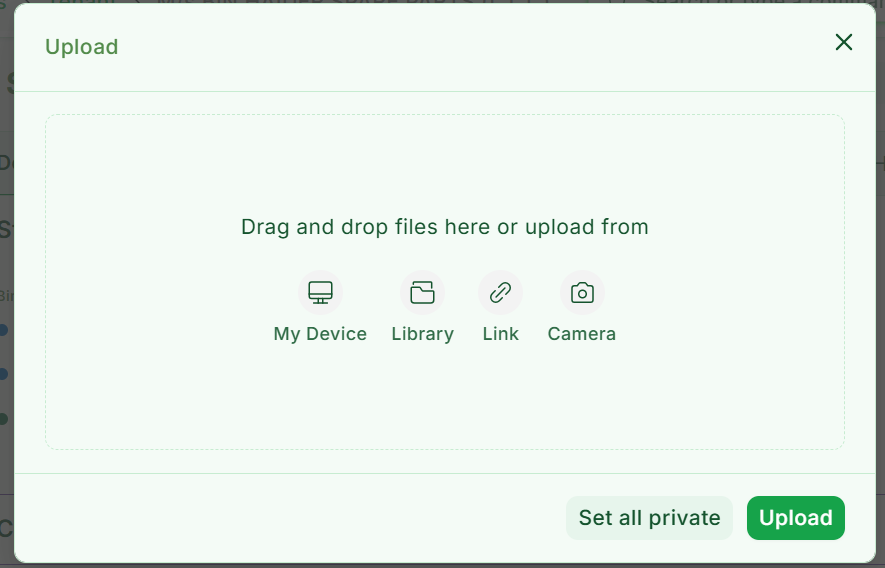
How could add a new button to the Frappe’s FileUploader. I am trying to add a scan button, but failing.
I have added a file under public/js/FileUploader.js, then added that in the hooks in app_include_js, but still nothing works.
Current code:
frappe.require("file_uploader.bundle.js", () => {

    const Base = frappe.ui.FileUploader;

    if (!Base) {

        console.error("Uploader not loaded");

        return;

    }

    // 🚨 IMPORTANT: patch the SAME reference used by Vue

    const originalUploadOptions =

        Base.UploadOptions =

        Base.UploadOptions || [];


    // prevent duplicates

    const exists = originalUploadOptions.some(

        o => o.label === "Scan Document"

    );

    if (!exists) {

        originalUploadOptions.push({

            label: "Scan Document",

            icon: `

                <circle cx="15" cy="15" r="15" fill="var(--subtle-fg)" />

                <path d="M8 10h8M8 14h8M8 18h5"

                      stroke="var(--text-color)"

                      stroke-linecap="round"/>

            `

            action: async ({ uploader, doctype, docname }) => {

                frappe.show_alert({

                    message: "Scanning...",

                    indicator: "blue"

                });


                const res = await frappe.call({

                    method: "app.api.scan_document",

                    args: { doctype, docname }

                });

                if (!res.message?.file_url) return;


                const file = await fetch(res.message.file_url)

                    .then(r => r.arrayBuffer())

                    .then(buf => new File([buf], "scan.png", {

                        type: "image/png"

                    }));

                uploader.add_files([file]);

                frappe.show_alert({

                    message: "Scan added",

                    indicator: "green"

                });

            }

        });


    }

});