Hi Guys,
I can’t seem to find cost center and project in my journals, purchase invoices or sales invoice. It shows up in the build DocType. Have I hidden them by mistake or is there a setting I missed somewhere?
This issue is still open so I dont think it has been implemented
opened 09:35AM - 19 Jan 26 UTC
feature-request
Currently, the system is enabling the project and cost center both as default ac… counting dimensions and adding the section and fields in all the DocTypes. In many cases, the user does not require it, so enabling it based on the user's need would be a good idea.
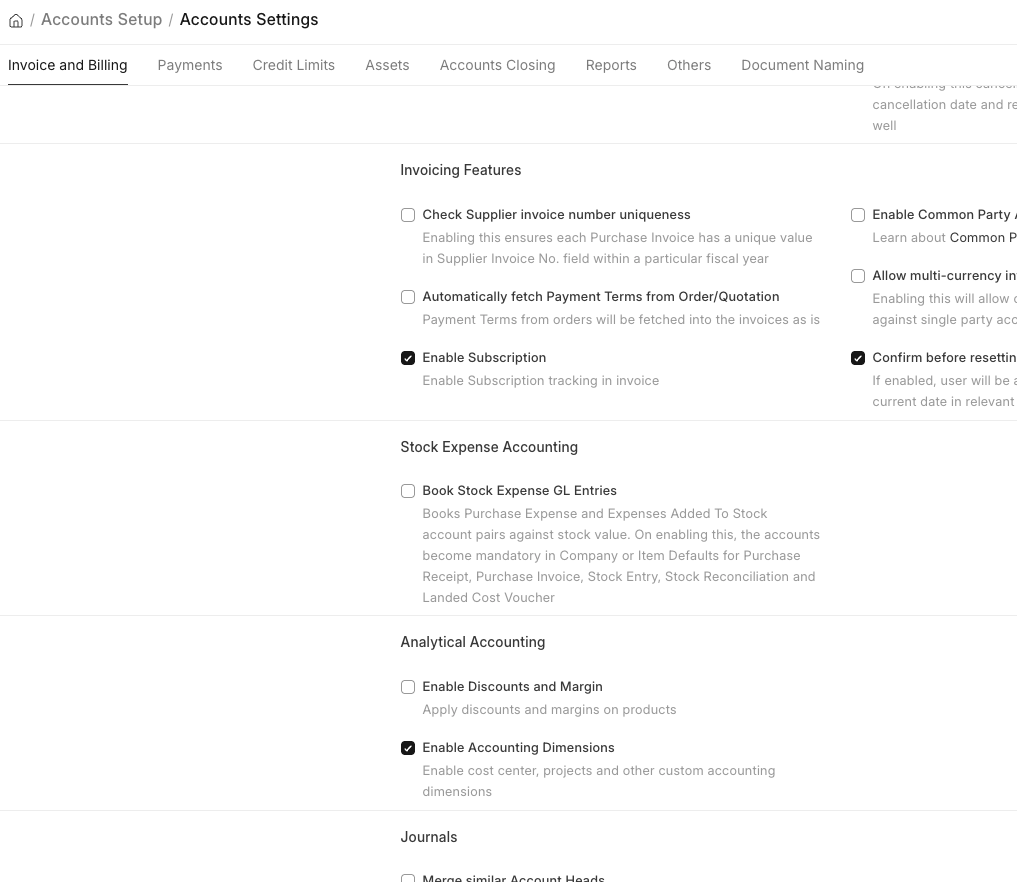
In v16, we have introduced a new setting for enabling the accounting dimension, which works only for a custom accounting dimension. Still, all the accounting dimensions should be enabled based on this setting. There should be an option with the user to select which accounting dimension they want to use. For example, some users will need a cost centre, but they don't need a project, and some may want a project but not a cost center and some users might want custom, but not the cost centre and project.
Also, the current system is making the main cost centre the default and tagging it to the transaction. If possible, this should work only if the cost centre is enabled.
Enable or show the Accounting Dimension section and its field in all the DocTypes only if it's enabled
I can find it on v15 but not in v16. Can someone check their site and let me know
Thanks
After enabling it in Account Settings (erpnext: 16.33.0 (version-16)), I can see the fields in Sales Invoice.