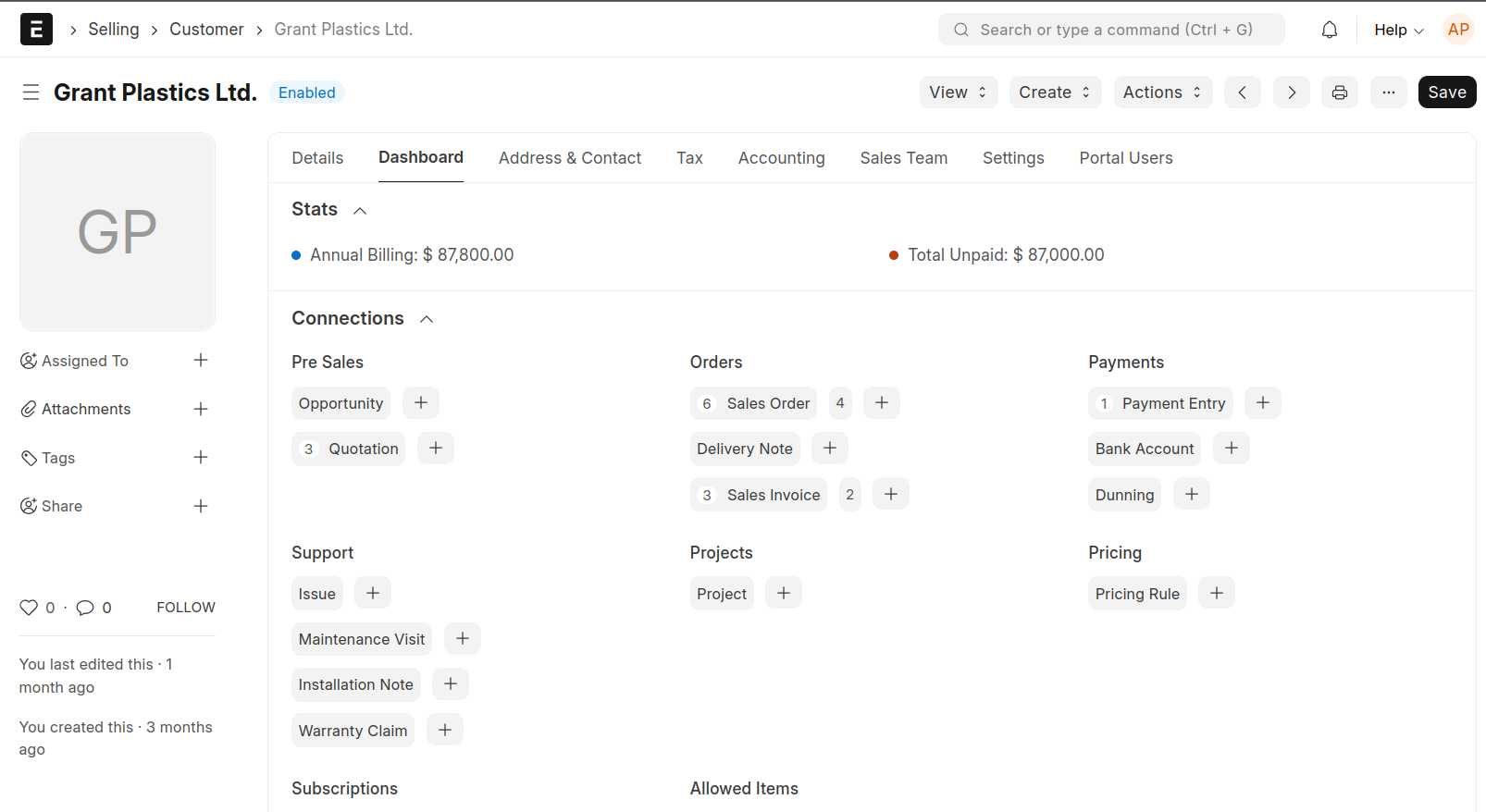
In customer > dashboard, there’s stats with Annual billing and Total Unpaid.
How to hide that depending on Roles?
Here is the screenshot of the Customer > Dashboard.
In customer > dashboard, there’s stats with Annual billing and Total Unpaid.
How to hide that depending on Roles?
Here is the screenshot of the Customer > Dashboard.
Hello Anthony, Since this is provided by ERPNext Utils I don’t think you can limit it without a Client Script. I can give you a ready made Client Script, if you like
Thank you very much for replying and letting me know that it can only be done using client script.
If you are willing to share with the whole erpnext community here, that would be great.
If not, I respect your decision.
Feel free to adjust according to the comments. If it works kindly mark it as answer so as to help others who might be in need
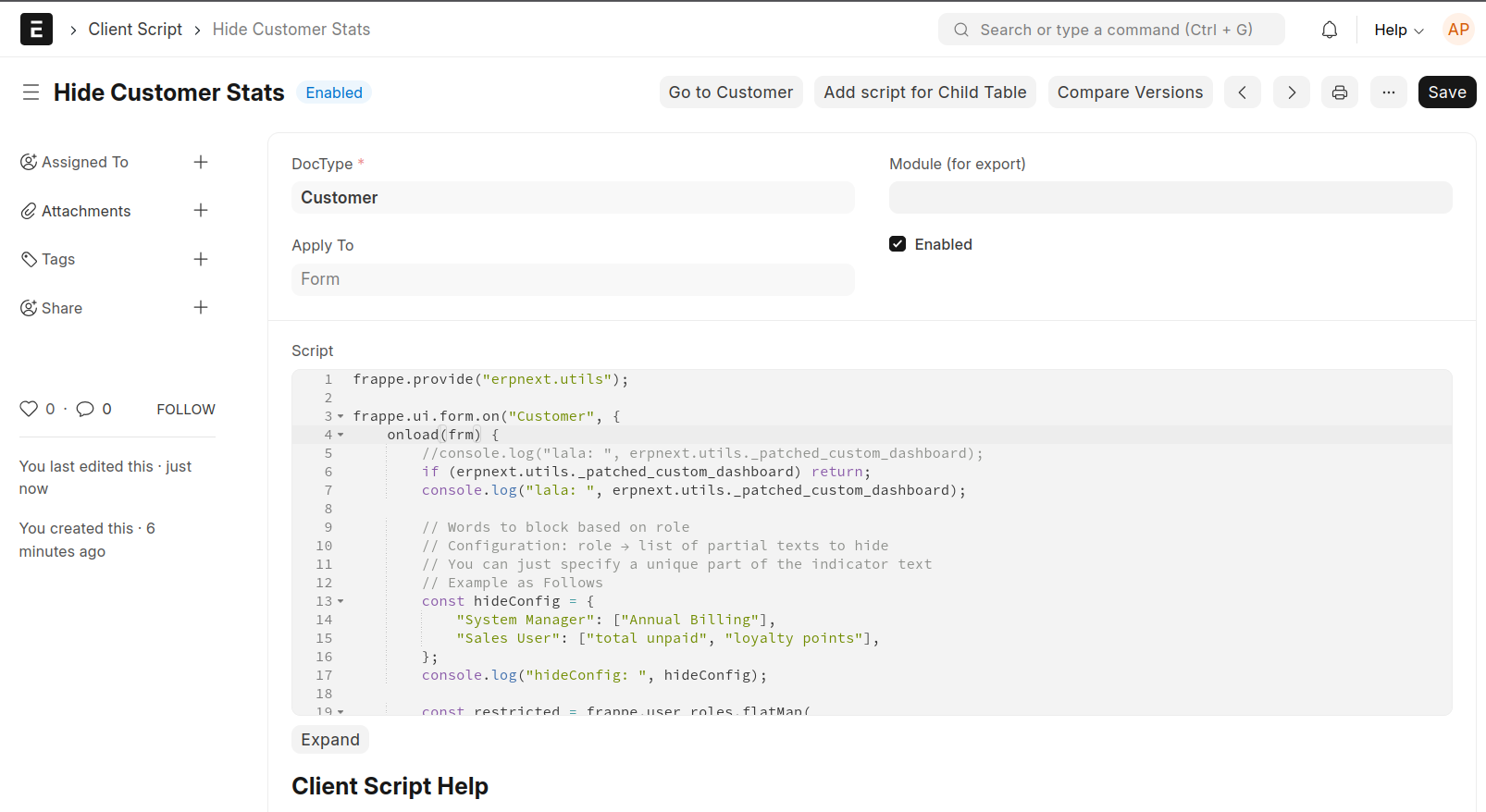
frappe.provide("erpnext.utils");

frappe.ui.form.on("Customer", {
    onload(frm) {
        if (erpnext.utils._patched_custom_dashboard) return;

        // Words to block based on role
        // Configuration: role → list of partial texts to hide
        // You can just specify a unique part of the indicator text
        // Example as Follows
        const hideConfig = {
            "System Manager": ["Annual Billing"],
            "Sales User": ["total unpaid", "loyalty points"],
        };

        const restricted = frappe.user_roles.flatMap(
            role => hideConfig[role] || []
        ).map(s => s.toLowerCase());

        // Save original function
        const originalAddIndicator = frm.dashboard.add_indicator;

        // Override the function
        frm.dashboard.add_indicator = function (label, color) {
            const labelText = (typeof label === "string" ? label : "").toLowerCase();

            const shouldBlock = restricted.some(restrictedText =>
                labelText.includes(restrictedText)
            );

            if (!shouldBlock) {
                // Only add if not restricted
                originalAddIndicator.call(frm.dashboard, label, color);
            }
        };

        erpnext.utils._patched_custom_dashboard = true;
    }
});
Thank you for sharing the code.
Unfortunately it does not seem to work. Maybe I might have done something wrong.
I was hoping to just hide the whole Stats section as per the screenshot in the original post.
Here is the script with many console.log. I have marked the console.log that outputs nothing.
frappe.provide("erpnext.utils");

frappe.ui.form.on("Customer", {
    refresh(frm) {
        //console.log("lala: ", erpnext.utils._patched_custom_dashboard);
        if (erpnext.utils._patched_custom_dashboard) return;
        console.log("lala: ", erpnext.utils._patched_custom_dashboard);

        // Words to block based on role
        // Configuration: role → list of partial texts to hide
        // You can just specify a unique part of the indicator text
        // Example as Follows
        const hideConfig = {
            "System Manager": ["Annual Billing"],
            "Sales User": ["total unpaid", "loyalty points"],
        };
        console.log("hideConfig: ", hideConfig);

        const restricted = frappe.user_roles.flatMap(
            role => hideConfig[role] || []
        ).map(s => s.toLowerCase());
        console.log("restricted; ", restricted);

        // Save original function
        const originalAddIndicator = frm.dashboard.add_indicator;
        console.log("originalAddIndicator: ", originalAddIndicator);

        // Override the function
        frm.dashboard.add_indicator = function (label, color) {
            const labelText = (typeof label === "string" ? label : "").toLowerCase();
            console.log("labelText: ", labelText); // no output here.

            const shouldBlock = restricted.some(restrictedText =>
                labelText.includes(restrictedText)
            );
            console.log("shouldBlock: ", shouldBlock); // no output here.

            if (!shouldBlock) {
                // Only add if not restricted
                originalAddIndicator.call(frm.dashboard, label, color);
            }
        };

        erpnext.utils._patched_custom_dashboard = true;
    }
});
Need advice on how to hide the whole Stats section or hide everything in the Stats section. The Stats section does have “total unpaid” and “Annual Billing”.
It doesn’t work on refresh(frm) only use onload(frm) same as my code sample
I did try onload(frm) but it did not work.
I just tried again with onload and same results.
Not sure why some of the console.log has no output.
Just to clarify, “System Manager”: [“Annual Billing”], means a user with role System Manager, the “Annual Billing” will be hidden, correct?
Yes, that was my sample but you can add Total Unpaid and see the magic
“System Manager”: [“Annual Billing”, “Total Unpaid”]
and anyone with role of System Manager will not see
Sad to say, it does not seem to work.
I am using Erpnext 15.
Am using ERPNext v15 too, can you share screenshots of your client script doctype, user role of currently logged in user and how it is viewable in Dashboard of customer
It is working now!!!
I think I did not do a proper refresh.
Nice  Glad to be of help
Enjoy ERPNext Mr Anthony
Only if you have time.
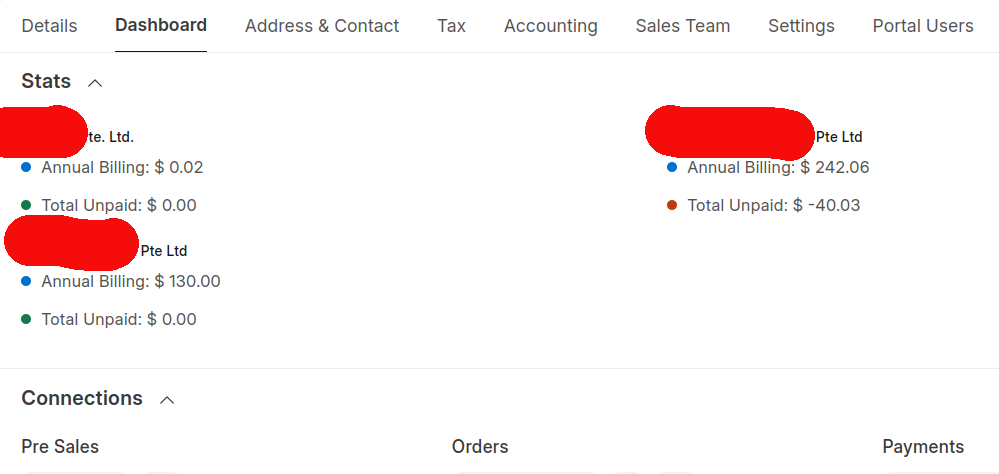
The code works great when there is only one company showing one Total Unpaid and Annual Billing.
If there are more than one company, it does not seem to work.
I have done refresh many times. Also did refresh holding the shift key down.
Can that be done?
Can you kindly share the screenshot of your dashboard with more than one company i can see how to tweak the code
I have tweaked code to match your description, hope this resolves what you desire
frappe.provide("erpnext.utils");

frappe.ui.form.on("Customer", {
    onload(frm) {
        if (erpnext.utils._patched_custom_dashboard) return;

        // 🎯 Role-based indicator rules
        const hideConfig = {
            "System Manager": [],                       // Hide ALL indicators
            "Sales User": ["Annual Billing"],           // Hide specific indicator
            "Accountant": ["Loyalty Points"]            // Example: hide specific
        };

        // 👉 Check if any role wants to block ALL indicators
        const blockAll = frappe.user_roles.some(role =>
            Array.isArray(hideConfig[role]) && hideConfig[role].length === 0
        );

        const restricted = blockAll ? [] : frappe.user_roles.flatMap(role =>
            hideConfig[role] || []
        ).map(text => text.toLowerCase());

        // --- PATCH SINGLE-COMPANY INDICATORS ---
        const originalAddIndicator = frm.dashboard.add_indicator;
        frm.dashboard.add_indicator = function (label, color) {
            if (blockAll) return;

            const labelText = (typeof label === "string" ? label : "").toLowerCase();
            const shouldBlock = restricted.some(r => labelText.includes(r));
            if (!shouldBlock) {
                originalAddIndicator.call(frm.dashboard, label, color);
            }
        };

        // --- PATCH MULTI-COMPANY INDICATORS ---
        const originalMultiCompany = erpnext.utils.add_indicator_for_multicompany;
        erpnext.utils.add_indicator_for_multicompany = function (frm, info) {
            if (blockAll) return;

            // Build indicator text for checking
            const text = Object.values(info).join(" ").toLowerCase();
            const shouldBlock = restricted.some(r => text.includes(r));
            if (!shouldBlock) {
                originalMultiCompany.call(erpnext.utils, frm, info);
            }
        };

        erpnext.utils._patched_custom_dashboard = true;
    }
});
Kindly click your profile picture and then choose Reload of there it clears cache instantly
Works beautifully!!!
Thank you very much for helping.
Thank you again.