Hi everyone,
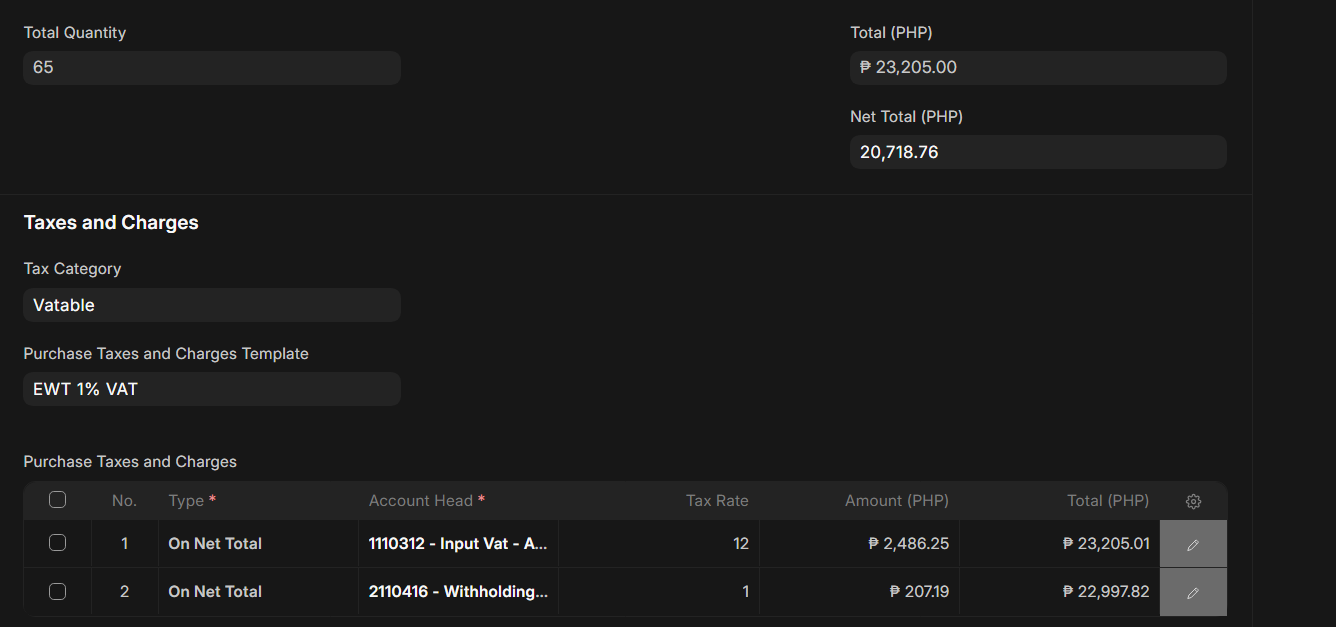
I’m encountering a recurring issue in Purchase Order → Purchase Receipt → Purchase Invoice where there’s always a small decimal difference (₱0.01 or ₱0.02) between the total item amount and the Input VAT total.
Here’s a recent example:
-
Total Items (Gross Amount): ₱23,205.00
-
Net Total: ₱20,718.76
-
Input VAT (12%): ₱2,486.25
- Computed Total: ₱23,205.01 (should be ₱23,205.00)
-
Withholding Tax (1%): ₱207.19
- Total after EWT: ₱22,997.82
As shown in the screenshot, the Input VAT total differs by ₱0.01 from the total items amount.
This happens quite often, especially when VAT and EWT are both applied.
Issue:
The decimal difference appears during rounding — either on the per-line item level or when ERPNext computes tax on net totals.
When multiple taxes are involved, these rounding discrepancies accumulate, causing mismatches between:
-
Purchase Order
-
Purchase Receipt
-
Purchase Invoice
Expected Behavior:
The Input VAT total should match the gross total of items exactly (no decimal difference).
Steps to Reproduce:
-
Create a Purchase Order with a total of ₱23,205.00 and apply 12% Input VAT and 1% EWT.
-
Save and check the computed tax totals.
-
You’ll see the Input VAT total becomes ₱23,205.01 instead of ₱23,205.00.
Environment:
-
ERPNext Version: (v15.45.4)
-
Frappe Version: (v15.81.0)
-
Currency Precision: 2
-
Global Defaults: Checked: Disable Rounded Total
Question:
Is there a way to synchronize rounding precision between the item total and computed tax total so that all documents (PO, PR, PI) remain consistent?
I’ve attached a screenshot showing the discrepancy.