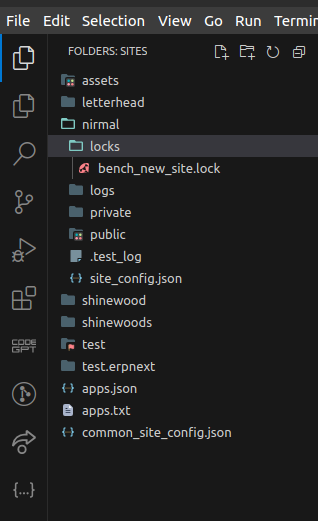
I have deployed my project on server and i have created a new role profile and saved it but when i’m trying to edit it for example adding more modules it is and trying to save it, it is showing this error :-
Traceback (most recent call last):
  File "apps/frappe/frappe/app.py", line 114, in application
    response = frappe.api.handle(request)
               ^^^^^^^^^^^^^^^^^^^^^^^^^^
  File "apps/frappe/frappe/api/__init__.py", line 49, in handle
    data = endpoint(**arguments)
           ^^^^^^^^^^^^^^^^^^^^^
  File "apps/frappe/frappe/api/v1.py", line 36, in handle_rpc_call
    return frappe.handler.handle()
           ^^^^^^^^^^^^^^^^^^^^^^^
  File "apps/frappe/frappe/handler.py", line 49, in handle
    data = execute_cmd(cmd)
           ^^^^^^^^^^^^^^^^
  File "apps/frappe/frappe/handler.py", line 85, in execute_cmd
    return frappe.call(method, **frappe.form_dict)
           ^^^^^^^^^^^^^^^^^^^^^^^^^^^^^^^^^^^^^^^
  File "apps/frappe/frappe/__init__.py", line 1778, in call
    return fn(*args, **newargs)
           ^^^^^^^^^^^^^^^^^^^^
  File "apps/frappe/frappe/utils/typing_validations.py", line 31, in wrapper
    return func(*args, **kwargs)
           ^^^^^^^^^^^^^^^^^^^^^
  File "apps/frappe/frappe/desk/form/save.py", line 39, in savedocs
    doc.save()
  File "apps/frappe/frappe/model/document.py", line 337, in save
    return self._save(*args, **kwargs)
           ^^^^^^^^^^^^^^^^^^^^^^^^^^^
  File "apps/frappe/frappe/model/document.py", line 361, in _save
    self.check_if_locked()
  File "apps/frappe/frappe/model/document.py", line 333, in check_if_locked
    raise frappe.DocumentLockedError
frappe.exceptions.DocumentLockedError
Anyone knows solution of it…???
Please navigate to the “Sites” folder, select your current site, and then open the “locks” folder. Remove all lock files and proceed with migrating your site.
I was able to work around this issue without modifying the standard Frappe app code.
In our case, the failure was caused by a Module Profile fixture during migrate. The flow was:
Removing lock files alone was not enough, because the same fixture import would recreate the same lock scenario during migrate.
What I did instead:
-
Removed the Module Profile fixture from the normal fixtures folder, so it would no longer be imported through the standard fixture sync during migrate.
-
Created a separate custom_fixtures folder in the custom app.
-
Added a patch that imports those fixtures manually after migrate logic, using a helper like this:
def import_custom_fixtures(app_name, files=None):
	"""
	Import custom fixtures from app's custom_fixtures directory.

	Args:
		app_name: Name of the app containing custom_fixtures folder
		files: Optional list of specific file names to import (e.g., ["file1.json", "file2.json"])
		       If None, imports all JSON files from the directory
	"""
	from frappe.core.doctype.data_import.data_import import import_doc
	fixtures_path = frappe.get_app_path(app_name, "custom_fixtures")
	if not os.path.exists(fixtures_path):
		return

	if files:
		fixture_files = files
	else:
		fixture_files = os.listdir(fixtures_path)

	for fname in fixture_files:
		if not fname.endswith(".json"):
			continue

		file_path = frappe.get_app_path(app_name, "custom_fixtures", fname)
		if not os.path.exists(file_path):
			print(f"Skipping fixture file {fname}. File not found.")
			continue

		try:
			import_doc(file_path)
		except (ImportError, frappe.DoesNotExistError) as e:
			print(f"Skipping fixture syncing from the file {fname}. Reason: {e}")


def check_if_installed(app):
    installed_apps = frappe.get_installed_apps()
    if isinstance(installed_apps, list):
        installed_apps = {app: 1 for app in installed_apps}

    return installed_apps.get(app)
Then the process was:
This allowed the upgrade to complete successfully in our case.
So, for anyone hitting the same issue during upgrade:
-
removing lock files by itself may not solve it permanently
-
if the root cause is a Module Profile fixture, moving it out of standard fixture sync and importing it through a controlled custom patch can be a practical workaround
This is a workaround, not a core fix, but it helped us complete the upgrade cleanly without patching the standard framework files.