Hello,
I am trying to set up our incoming and outgoing email account on ERPNext. I use Godaddy email account.
However, Godaddy is not listed in the options available.
How can i still use my domain to send incoming and outgoing emails?
Regards
Hello,
I am trying to set up our incoming and outgoing email account on ERPNext. I use Godaddy email account.
However, Godaddy is not listed in the options available.
How can i still use my domain to send incoming and outgoing emails?
Regards
Yes it should work. You will have to add server and port manually.
Thanks Anand,
I am having a great difficulty setting up the email. The configuration is not saving and i got some error.
Pls can you guide me on how to escalate to support?
Kind Regards,
Adekunle
Sent you a PM with the support email address
Pls can you clarify what you mean? I don’t understand.
Many thanks
Adekunle
Hello anand,
even I am facing the same issue. I tried my email account hosted on godaddy but when I click button the window just shows “Saving” forever. Please help
@Kumar_Akshay could be host/port issue
I tried to use my gmail, yahoo, hotmail email ids. But when I click on save it says invalid username or password. On Gmail I have turned off the feature to allow access to less secure apps.
Please tell me what to do
I am facing same issue with Godaddy email configuration. Do you have any solution?
I configured the Incoming & outgoing server & Port which was recommended by godaddy. the same setting working in outlook. but In ERPNext showing “Request Timed Out”
Thanks in advance
Email Domain
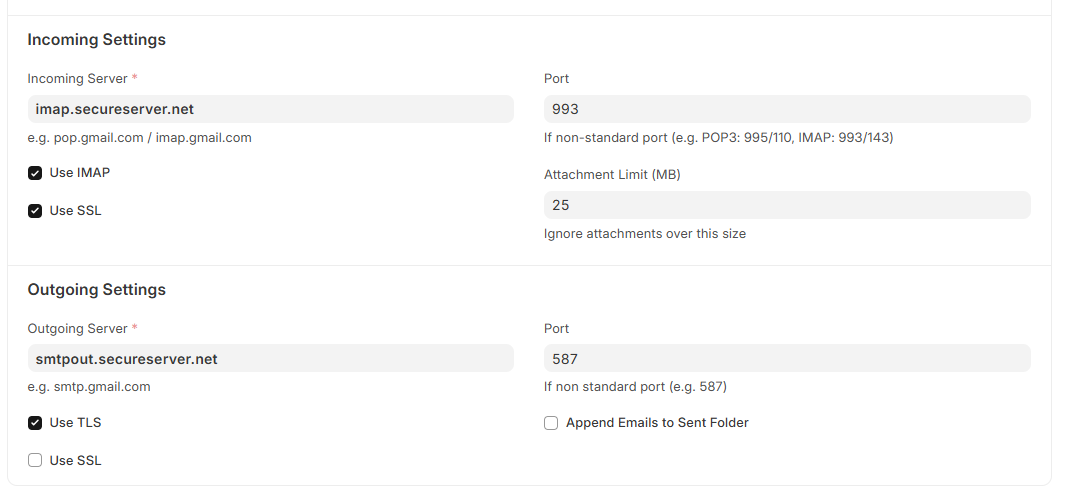
All you need to set is Email Domain with the below creds and you are good to go.
For Incoming Email Setting
Incoming Server : imap.secureserver.net
Use IMAP & SSL
Port : 993
Outgoing Server : smtpout.secureserver.net
Use TSL
Port : 587