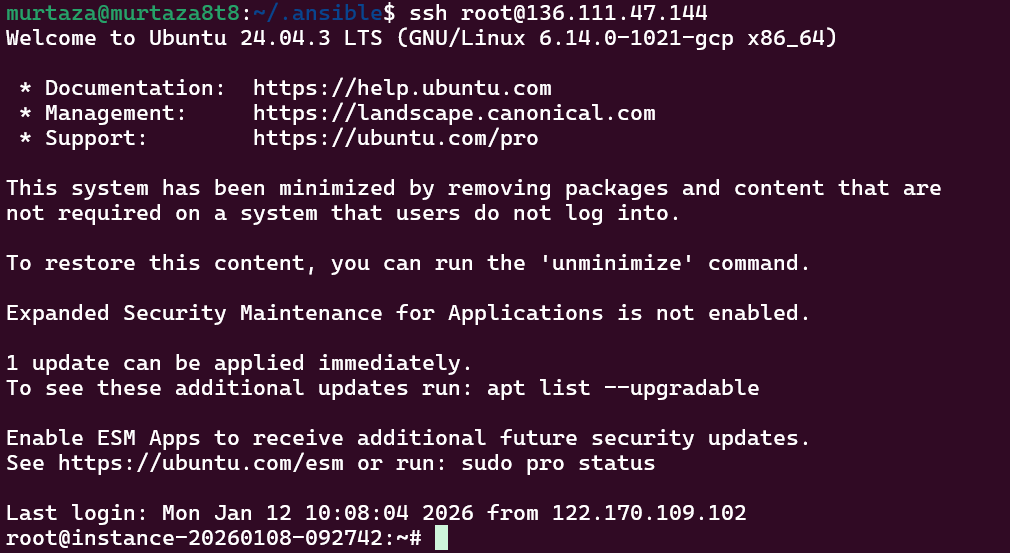
Hello, I am using Google Vm machine for proxy server and while running ANSIBLE ping command for it i am facing below error does anyone have idea of this?
15:09:16 web.1         | <136.111.47.144> ESTABLISH SSH CONNECTION FOR USER: root

15:09:16 web.1         | <136.111.47.144> SSH: EXEC ssh -vvv -C -o ControlMaster=auto -o ControlPersist=60s -o StrictHostKeyChecking=no -o Port=22 -o KbdInteractiveAuthentication=no -o PreferredAuthentications=gssapi-with-mic,gssapi-keyex,hostbased,publickey -o PasswordAuthentication=no -o 'User="root"' -o ConnectTimeout=0 -o ControlPath=/home/murtaza/.ansible/cp/9de41f982f -tt 136.111.47.144 '/bin/sh -c '"'"'/usr/bin/python3 /root/.ansible/tmp/ansible-tmp-1768210749.8726995-20298-237792245731350/AnsiballZ_setup.py && sleep 0'"'"''


15:09:16 web.1         | <136.111.47.144> (1, b'Traceback (most recent call last):\r\n  File "/root/.ansible/tmp/ansible-tmp-1768210749.8726995-20298-237792245731350/AnsiballZ_setup.py", line 102, in <module>\r\n    _ansiballz_main()\r\n  File "/root/.ansible/tmp/ansible-tmp-1768210749.8726995-20298-237792245731350/AnsiballZ_setup.py", line 94, in _ansiballz_main\r\n    invoke_module(zipped_mod, temp_path, ANSIBALLZ_PARAMS)\r\n  File "/root/.ansible/tmp/ansible-tmp-1768210749.8726995-20298-237792245731350/AnsiballZ_setup.py", line 37, in invoke_module\r\n    from ansible.module_utils import basic\r\n  File "/tmp/ansible_ansible.legacy.setup_payload_7f8dy6hg/ansible_ansible.legacy.setup_payload.zip/ansible/module_utils/basic.py", line 176, in <module>\r\nModuleNotFoundError: No module named \'ansible.module_utils.six.moves\'\r\n', b"OpenSSH_8.9p1 Ubuntu-3ubuntu0.13, OpenSSL 3.0.2 15 Mar 2022\r\ndebug1: Reading configuration data /home/murtaza/.ssh/config\r\ndebug1: /home/murtaza/.ssh/config line 1: Applying options for 136.111.47.144\r\ndebug1: Reading configuration data /etc/ssh/ssh_config\r\ndebug1: /etc/ssh/ssh_config line 19: include /etc/ssh/ssh_config.d/*.conf matched no files\r\ndebug1: /etc/ssh/ssh_config line 21: Applying options for *\r\ndebug2: resolve_canonicalize: hostname 136.111.47.144 is address\r\ndebug3: expanded UserKnownHostsFile '~/.ssh/known_hosts' -> '/home/murtaza/.ssh/known_hosts'\r\ndebug3: expanded UserKnownHostsFile '~/.ssh/known_hosts2' -> '/home/murtaza/.ssh/known_hosts2'\r\ndebug1: auto-mux: Trying existing master\r\ndebug2: fd 3 setting O_NONBLOCK\r\ndebug2: mux_client_hello_exchange: master version 4\r\ndebug3: mux_client_forwards: request forwardings: 0 local, 0 remote\r\ndebug3: mux_client_request_session: entering\r\ndebug3: mux_client_request_alive: entering\r\ndebug3: mux_client_request_alive: done pid = 20308\r\ndebug3: mux_client_request_session: session request sent\r\ndebug1: mux_client_request_session: master session id: 2\r\ndebug3: mux_client_read_packet: read header failed: Broken pipe\r\ndebug2: Received exit status from master 1\r\nShared connection to 136.111.47.144 closed.\r\n")
15:09:16 web.1         | <136.111.47.144> Failed to connect to the host via ssh: OpenSSH_8.9p1 Ubuntu-3ubuntu0.13, OpenSSL 3.0.2 15 Mar 2022
15:09:16 web.1         | debug1: Reading configuration data /home/murtaza/.ssh/config
15:09:16 web.1         | debug1: /home/murtaza/.ssh/config line 1: Applying options for 136.111.47.144
15:09:16 web.1         | debug1: Reading configuration data /etc/ssh/ssh_config
15:09:16 web.1         | debug1: /etc/ssh/ssh_config line 19: include /etc/ssh/ssh_config.d/*.conf matched no files
15:09:16 web.1         | debug1: /etc/ssh/ssh_config line 21: Applying options for *
15:09:16 web.1         | debug2: resolve_canonicalize: hostname 136.111.47.144 is address
15:09:16 web.1         | debug3: expanded UserKnownHostsFile '~/.ssh/known_hosts' -> '/home/murtaza/.ssh/known_hosts'
15:09:16 web.1         | debug3: expanded UserKnownHostsFile '~/.ssh/known_hosts2' -> '/home/murtaza/.ssh/known_hosts2'
15:09:16 web.1         | debug1: auto-mux: Trying existing master
15:09:16 web.1         | debug2: fd 3 setting O_NONBLOCK
15:09:16 web.1         | debug2: mux_client_hello_exchange: master version 4
15:09:16 web.1         | debug3: mux_client_forwards: request forwardings: 0 local, 0 remote
15:09:16 web.1         | debug3: mux_client_request_session: entering
15:09:16 web.1         | debug3: mux_client_request_alive: entering
15:09:16 web.1         | debug3: mux_client_request_alive: done pid = 20308
15:09:16 web.1         | debug3: mux_client_request_session: session request sent
15:09:16 web.1         | debug1: mux_client_request_session: master session id: 2
15:09:16 web.1         | debug3: mux_client_read_packet: read header failed: Broken pipe
15:09:16 web.1         | debug2: Received exit status from master 1
15:09:16 web.1         | Shared connection to 136.111.47.144 closed.
NOTE: SSH is working fine from terminal I already have setup the private and public key and root access to remote machine