Hi Team,
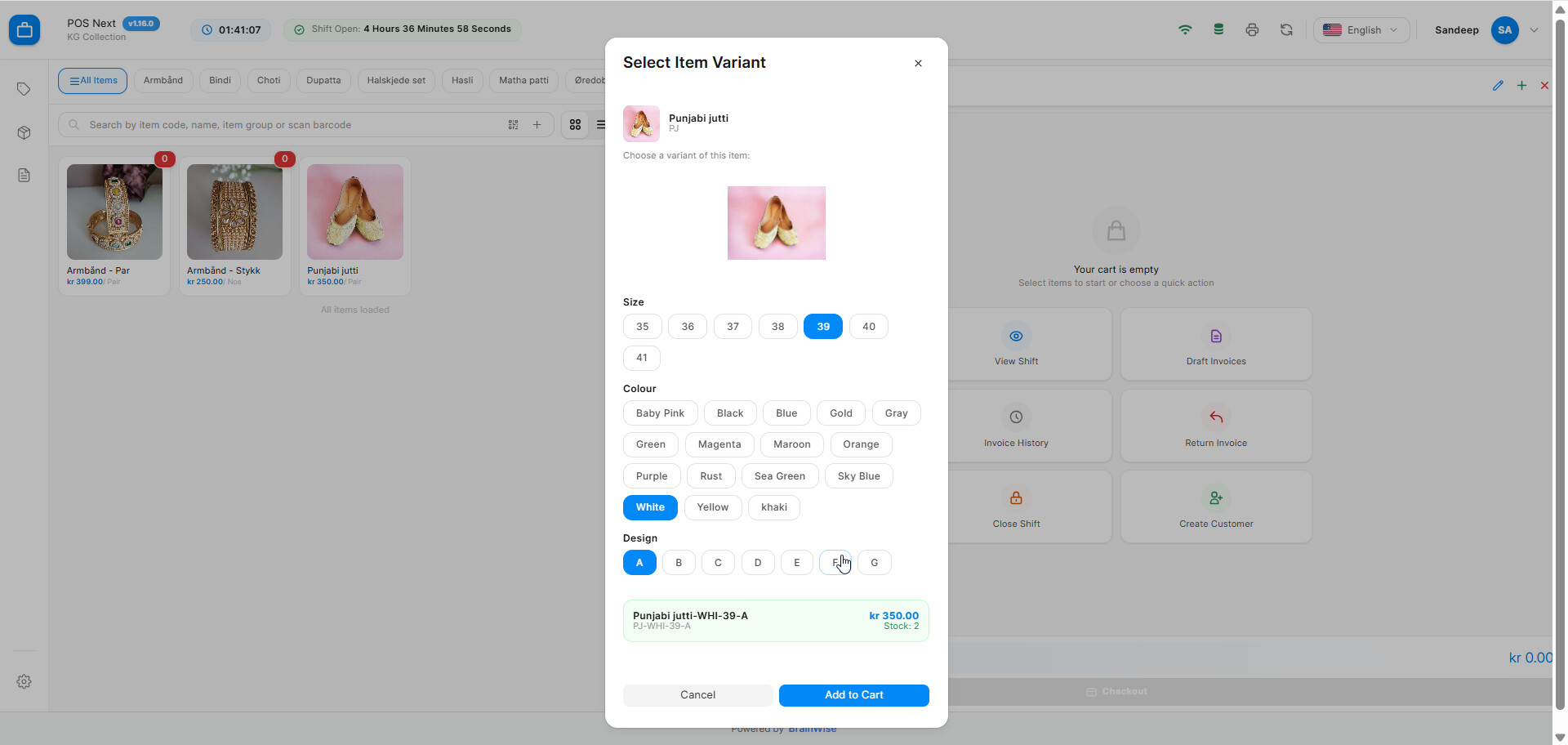
I am looking to improve the cashier user experience in my POS system (POS Next v1.16.0). Currently, when a user selects an item variant, all size and color combinations remain looking available, which slows down checkout when certain sizes are out of stock.
We would like to implement dynamic attribute cross-filtering on the Select Item Variant modal.
What i need:
-
Dynamic Disabling: When a specific Colour is selected (e.g., “White”), the system should immediately check the available inventory matrix for that item.
-
Visual Feedback: Any Size (or Design) buttons that have zero stock (
actual_qty <= 0) for that selected color should be visually faded out (e.g., set opacity to 0.3 or grayed out) and disabled from being clicked. -
Bidirectional Filtering: Similarly, if a user clicks a Size first, the colors that are out of stock for that size should also fade out.
I have attached a screenshot showing the current screen for reference. In this example, if “White” is selected, only the sizes that actually have a stock quantity greater than 0 should remain fully visible and selectable.
Could you please let me know if this can be added to my component’s frontend JavaScript logic, and provide an estimate for the implementation?
Thank you,