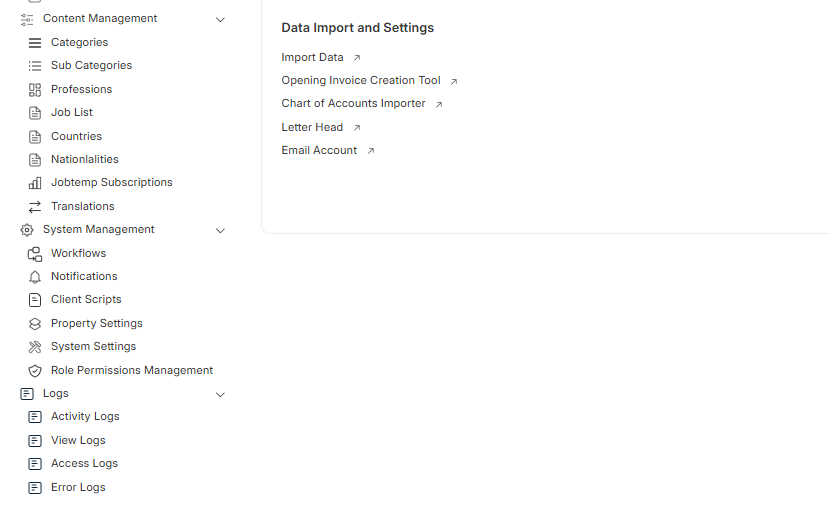
For this requirement, I implemented the following procedure in my custom application:
1. Add in hooks.py
app_include_js = [
    "/assets/custom_app/js/desk/sidebar.js",
    ]
2. Create sidebar.js with the below script:
frappe.provide('frappe.desk');

$(document).ready(function () {
    const createSidebarItem = (item) => `
        <div class="sidebar-item-container is-draggable" item-parent="${item.categoryName}" item-name="${item.label}" item-public="1" item-is-hidden="0">
            <div class="desk-sidebar-item standard-sidebar-item">
                <a href="${item.link}" class="item-anchor" title="${item.label}">
                    <span class="sidebar-item-icon" item-icon="${item.icon}">
                        <svg class="icon icon-md" aria-hidden="true">
                            <use href="#icon-${item.icon}"></use>
                        </svg>
                    </span>
                    <span class="sidebar-item-label">${item.label}</span>
                </a>
                <div class="sidebar-item-control">
                    <button class="btn btn-secondary btn-xs drag-handle" title="${__('Drag')}">
                        <svg class="es-icon es-line icon-xs" aria-hidden="true">
                            <use href="#es-line-drag"></use>
                        </svg>
                    </button>
                    <button class="btn-reset drop-icon hidden">
                        <svg class="es-icon es-line icon-sm" aria-hidden="true">
                            <use href="#es-line-down"></use>
                        </svg>
                    </button>
                    <div class="btn btn-xs setting-btn dropdown-btn" title="${__('Setting')}">
                        <svg class="es-icon es-line icon-xs" aria-hidden="true">
                            <use href="#es-line-dot-horizontal"></use>
                        </svg>
                    </div>
                </div>
            </div>
        </div>
    `;

    const waitForSidebar = (callback) => {
        const sidebarObserver = new MutationObserver((mutations, observer) => {
            const $publicSection = $("div.standard-sidebar-section.nested-container[data-title='Public']");
            if ($publicSection.length > 0) {
                observer.disconnect();
                callback($publicSection);
            }
        });

        sidebarObserver.observe(document.body, { childList: true, subtree: true });
    };

    const handleSidebarItems = (sidebarItems, $publicSection) => {
        const userRoles = frappe.user_roles || [];
        const userHasRole = (role) => userRoles.includes(role);
        const isSystemManager = () => userHasRole(__(''));

        Object.keys(sidebarItems).forEach((role) => {
            if (userHasRole(role) && !isSystemManager()) {
                const categories = sidebarItems[role];
                categories.forEach((category) => {
                    const categoryHTML = category.items.map(createSidebarItem).join('');
                    $publicSection.append(`
                        <div class="sidebar-item-container is-draggable" item-parent="" item-name="${category.categoryName}" item-public="1" item-is-hidden="0">
                            <div class="desk-sidebar-item standard-sidebar-item">
                                <a href="${category.link}" class="item-anchor" title="${category.categoryName}">
                                    <span class="sidebar-item-icon" item-icon="${category.icon}">
                                        <svg class="icon icon-md" aria-hidden="true">
                                            <use href="#icon-${category.icon}"></use>
                                        </svg>
                                    </span>
                                    <span class="sidebar-item-label">${category.categoryName}</span>
                                </a>
                                <div class="sidebar-item-control">
                                    ${category.items.length > 0 ? `
                                        <button class="btn-reset collapse-btn drop-icon" title="${__('Collapse/Expand')}">
                                            <svg class="es-icon es-line icon-sm" aria-hidden="true">
                                                <use class="collapse-icon" href="#es-line-down"></use>
                                            </svg>
                                        </button>
                                    ` : ''}
                                    <button class="btn btn-secondary btn-xs drag-handle" title="${__('Drag')}">
                                        <svg class="es-icon es-line icon-xs" aria-hidden="true">
                                            <use href="#es-line-drag"></use>
                                        </svg>
                                    </button>
                                    <div class="btn btn-xs setting-btn dropdown-btn" title="${__('Setting')}">
                                        <svg class="es-icon es-line icon-xs" aria-hidden="true">
                                            <use href="#es-line-dot-horizontal"></use>
                                        </svg>
                                    </div>
                                </div>
                            </div>
                            <div class="sidebar-child-item nested-container">
                                ${categoryHTML}
                            </div>
                        </div>
                    `);
                });
            }
        });

        $publicSection.on('click', '.collapse-btn', function () {
            const $nestedContainer = $(this).closest('.sidebar-item-container').find('.sidebar-child-item');
            $nestedContainer.toggle();
            const iconHref = $nestedContainer.is(':hidden') ? '#es-line-up' : '#es-line-down';
            $(this).find('svg use').attr('href', iconHref);
        });

        $publicSection.on('click', '.item-anchor', function (e) {
            e.preventDefault();

            const $clickedItem = $(this).closest('.sidebar-item-container');
            const categoryName = $clickedItem.attr('item-name');
            const categoryLink = $(this).attr('href');  // Get the link from anchor

            frappe.call({
                method: 'flora_hub.whitelist_methods.set_query_filter',
                args: { query_filter: categoryName },
                callback: function (response) {
                    if (response.message && response.message.status === 'success') {
                        console.log('Query filter set to:', categoryName);
                        console.log('categoryLink set to:', categoryLink);
                        if (categoryLink == '/'){
                             window.location.href = categoryLink;
                        }
                    } else {
                        frappe.msgprint(__('An error occurred while handling the request.'));
                    }
                },
                error: function () {
                    frappe.msgprint(__('An error occurred while handling the request.'));
                }
            });
        });
    };

    const updateSidebar = async () => {
        const userRoles = frappe.user_roles || [];
        const restrictedRoles = [""];

        // Check if the user has a restricted role
        if (userRoles.some(role => restrictedRoles.includes(role))) {
            return; // Stop execution if the user has a restricted role
        }

        try {
            const response = await frappe.call({
                method: 'flora_hub.sidebar_items.get_sidebar_items'
            });

            const sidebarItems = response.message;
            waitForSidebar($publicSection => {
                $publicSection.empty(); // Clear existing items
                handleSidebarItems(sidebarItems, $publicSection);
            });
        } catch (error) {
            console.error('Error fetching sidebar items:', error);
        }
    };

    // Call updateSidebar whenever the sidebar is displayed
    $(document).on('show.bs.sidebar', updateSidebar); // Assuming 'show.bs.sidebar' is the event triggered when the sidebar is shown

    updateSidebar(); // Initial call to populate the sidebar
});
3. Create sidebar_items.py with the below code:
import frappe
from frappe import _


@frappe.whitelist()
def get_sidebar_items():
    user_roles = set(frappe.get_roles(frappe.session.user))  # Use a set for faster lookups

    # Prepare sidebar items for user role "System Manager"
    def get_system_manager_items():
        return [
            {
                "categoryName": _("System Management"), "link": "", "icon": "setting-gear", "items": [
                    {"label": _("Workflows"), "link": f"/app/workflow", "icon": "workflow", "items": []},
                    {"label": _("Notifications"), "link": f"/app/notification", "icon": "notification", "items": []},
                    {"label": _("Client Scripts"), "link": f"/app/client-script", "icon": "small-file", "items": []},
                    {"label": _("Property Settings"), "link": f"/app/property-setter", "icon": "shortcut", "items": []},
                    {"label": _("System Settings"), "link": f"/app/system-settings", "icon": "tool", "items": []},
                    {"label": _("Role Permissions Management"), "link": f"/app/permission-manager", "icon": "permission", "items": []},
                ]
            },
            {
                "categoryName": _("Logs"), "link": "", "icon": "list-alt", "items": [
                    {"label": _("Activity Logs"), "link": f"/app/activity-log", "icon": "list-alt", "items": []},
                    {"label": _("View Logs"), "link": f"/app/view-log", "icon": "list-alt", "items": []},
                    {"label": _("Access Logs"), "link": f"/app/access-log", "icon": "list-alt", "items": []},
                    {"label": _("Error Logs"), "link": f"/app/error-log", "icon": "list-alt", "items": []},
                ]
            },
        ]

    # Map roles to function references directly
    sidebar_items = {
        "System Manager": get_system_manager_items,
    }

    # If the user has the role "System Manager", return the items for that role
    if "System Manager" in user_roles:
        return {"System Manager": sidebar_items["System Manager"]()}

    # Find the first matching role (assuming each user has only one role)
    for role in user_roles:
        if role in sidebar_items:
            function = sidebar_items[role]  # Get the function reference
            return {role: function()}  # Call the function directly

    return {}  # Return empty if no matching role is found
Feel free to contact in case of queries!
Best Regards,