Hi,
How to fetch values from child table(table inside Item doctype) and display it as select list in another doctype(eg. table Purchase Order Item)?
Is that possible with custom script(from frontend) or I will need to tweak something in backend?
Thanks!
Anyone?
Searching for same solution
@Pararera & @Bhargav_N
You can do something like:
// Replace "name" with the doctype entry name
frappe.db.get_doc('Item', 'name')
.then(function(doc) {
    let list = [];
    // Replace "child_table" with the fieldname of child table in Item doctype
    doc.child_table.forEarch(function(row) {
        // Replace "field_name" with the fieldname that you want to get value of
        list.push(row.field_name);
    });
    // If field not in child table
    // Replace "select_field" with fieldname of type Select
    let field = frm.get_field('select_field');

    // Else if field is in a child table
    // Replace "child_table_fieldname" with the fieldname of child table
    // Replace "select_field" with fieldname of type Select
    //let field = frm.get_field('child_table_fieldname').grid.get_field('select_field');

    field.df.options = list;
    field.set_options();
});
Thank you for the detailed explanation.
but I am unable get results. can i know what is ‘name’ here
// Replace “name” with the doctype entry name
frappe.db.get_doc(‘Item’, ‘name’)
and also I tried to fetch table field data into an array and tried to create dropdown selectable list, but not succeded.
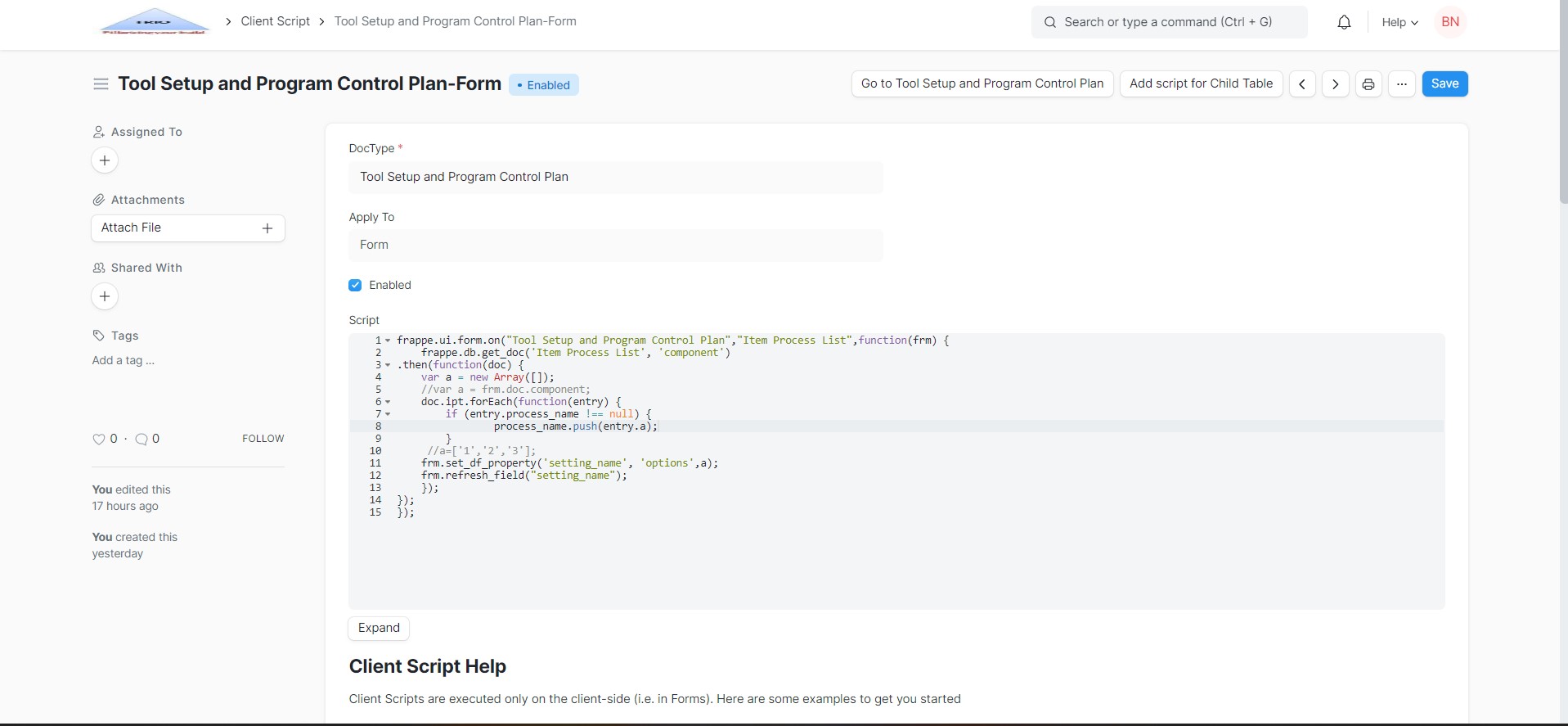
Code :
frappe.ui.form.on(“Tool Setup and Program Control Plan”,“component”,function(frm) {
//var a = new Array([]);
var a = frm.doc.ipt;
ipt.forEach(function(entry) {
if (entry.process_name != null) {
process_name.push(entry.a);
}
});
//a=[‘1’,‘2’,‘3’];
frm.set_df_property(‘setting_name’, ‘options’,a);
frm.refresh_field(“setting_name”);
});
here
DocType A name :Tool Setup and Program Control Plan
Trigger field : component (name of the docType B is linked with component field)
(component is field of DocType A)
Table name: ipt (table name of docType B)
Table’s field :process_name (field name of table ‘ipt’)
Field : “setting_name” (setting_name is field name of doctype A where selectable list are generated for)
is there anything that i am going wrong here?
@Bhargav_N I will post the code for you but before I do that please provide the missing info…
Doctype A
- Name:
Tool Setup and Program Control Plan - Trigger Field :
component - Select Field:
setting_name
Doctype B
- Name: ?
- Target Field:
process_name
Question
- Do you want to populate the select field in
Doctype Awith all the values ofprocess_namefromDoctype B? - Is the field
componentinDoctype Aa link toDoctype B?
It will be easier for me to help if you go to Customize Doctype, select Doctype A, scroll to the fields table and post a screenshot. Do the same for Doctype B and post a screenshot of the fields table.
Doctype A
- Name:
Tool Setup and Program Control Plan - Trigger Field :
component - Select Field:
setting_name
Doctype B
-
Name: Item Process List
-
Table field : ipt
-
Target Field:
process_name
Answers to the questions
- Do you want to populate the select field in
Doctype Awith all the values ofprocess_namefromDoctype B? - Yes. need to list the values and selected by user 'process_name ’ is one of the fields of table name ‘ipt’ (Item Process table) - Is the field
componentinDoctype Aa link toDoctype B? Yes, it is the name(Naming of type : filed) of the saved ‘docType A’.
@kid1194 Thank you for your Kind support
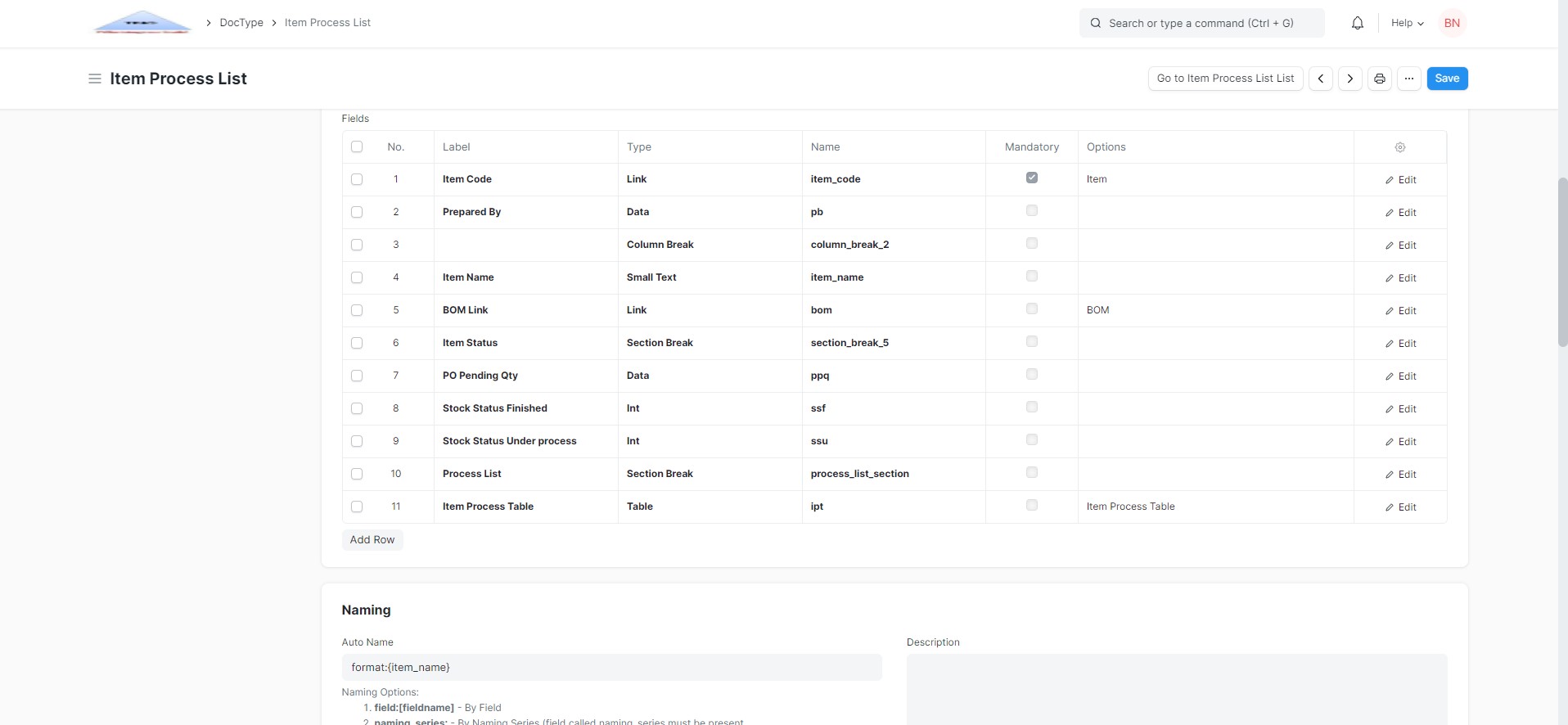
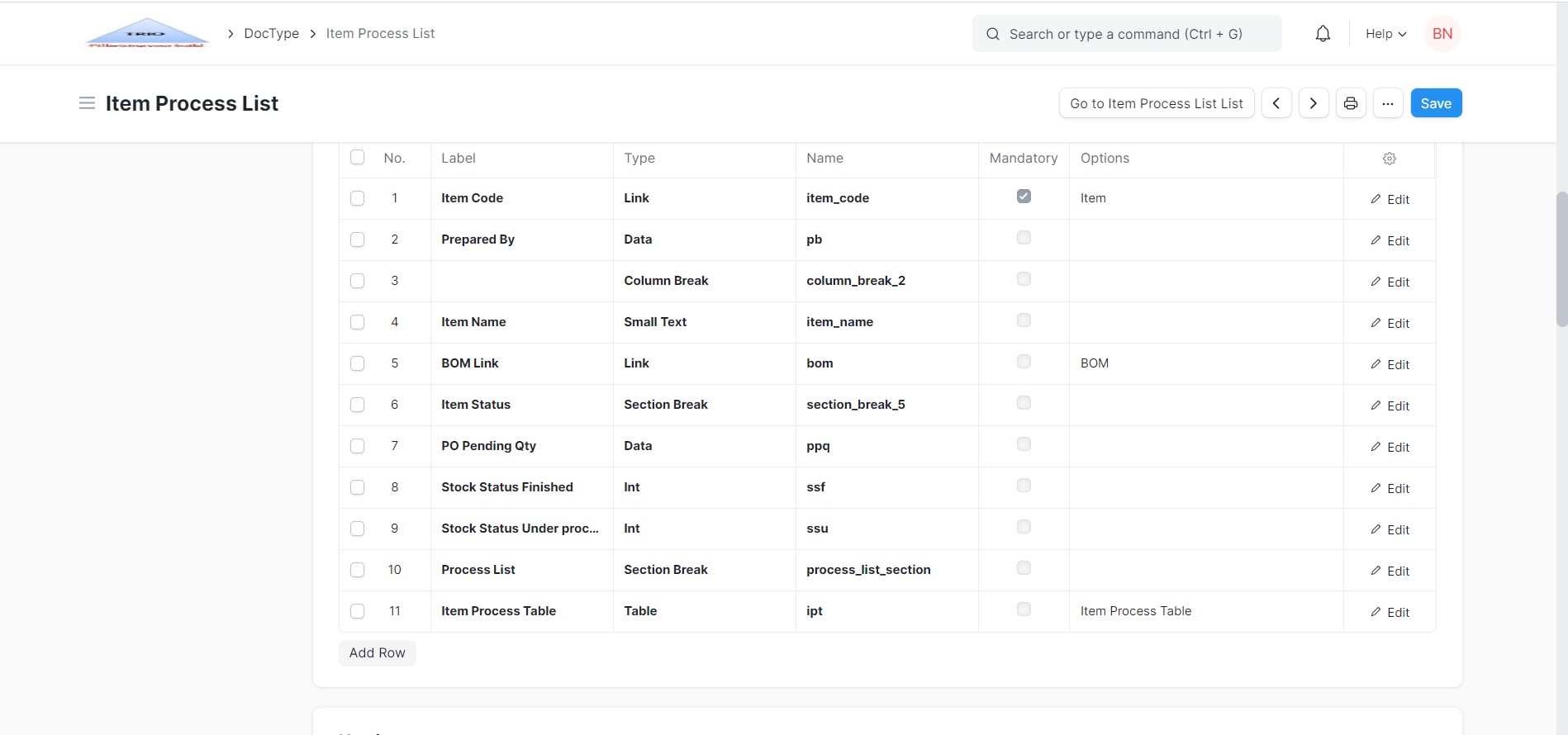
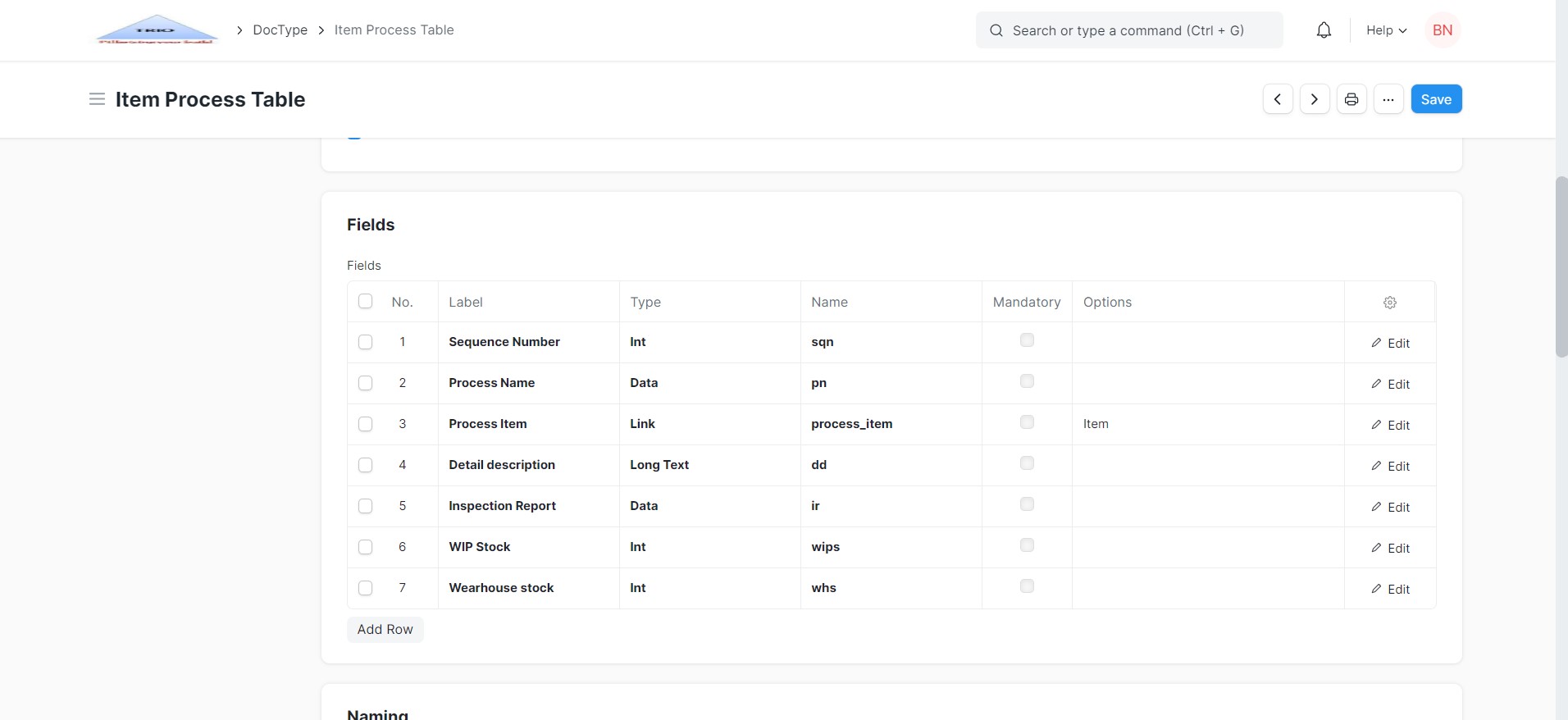
@Bhargav_N Since you didn’t post a screenshot of the fields of Tool Setup and Program Control Plan, I made some assumptions.
Doctypes & Fields
Tool Setup and Program Control Plan
componentfield is a link field toItem Process Listdoctype
Item Process List
iptfield is a child table calledItem Process Table
Item Process Table
pnfield holds the process name
Script
When the user select a value in the component field, what must happen is:
- Get the entry from
Item Process Listdoctype based on the value of thecomponentfield - Get the values of the
pnfield from the child tableiptthat belongs to the entry
If my assumption is right then the code that you need is this.
frappe.ui.form.on('Tool Setup and Program Control Plan', 'component', function(frm) {
    var select = frm.get_field('setting_name');

    // If the component field is empty, then empty the select list
    if (!frm.doc.component) {
        select.df.options = [];
        select.set_options();
        return;
    }

    // Getting the process name values
    frappe.db.get_list('Item Process Table', {
        fields: ['pn'],
        filters: {
            parent: frm.doc.component,
            parenttype: 'Item Process List',
            parentfield: 'ipt'
        }
    }).then(function(data) {
        // Sorting the process name from A-Z
        data = frappe.utils.sort(data, 'pn');
        // Making sure that the list of process name doesn't have duplicate values
        let list = [];
        data.forEach(function(v) {
            if (list.indexOf(v.pn) < 0) list.push(v.pn);
        });
        // Creating the select list of process names
        select.df.options = list;
        select.set_options();
    });
});
But if my assumption is wrong then please post a screenshot of the fields of Tool Setup and Program Control Plan doctype and I will modify the code for you.
Thank you very much for your Time and Solution .
It worked perfectly fine without any errors. Now I’m trying to understand code.
@Bhargav_N I’m glad that it did work 
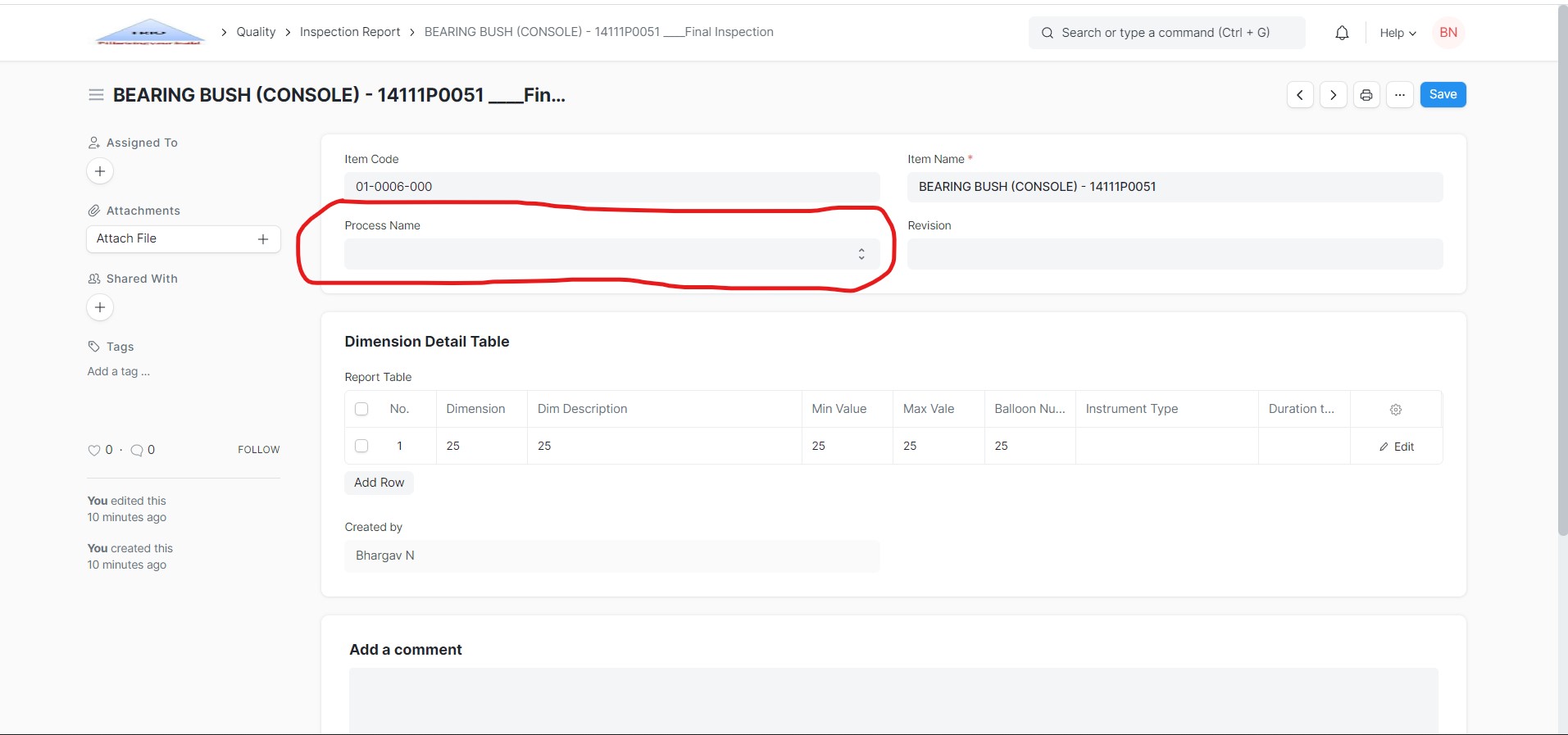
@Bhargav_N In that case use the following code…
I have added a default first option Select Process... and I have added caching method to reduce the number of requests so the process name list for the component is created only once…
frappe.ui.form.on('Tool Setup and Program Control Plan', {
    onload: function(frm) {
        // Cache for setting_name options
        frm._setting_names = {};
    },
    refresh: function(frm) {
        frm.trigger('load_process_names');
    },
    component: function(frm) {
        frm.trigger('load_process_names');
    },
    load_process_names: function(frm) {
        var select = frm.get_field('setting_name'),
        val = frm.doc.setting_name || null,
        // The select list options with the default first option
        list = [{label: 'Select Process...', value: ''}];
        // If the component field is empty, then empty the select list
        if (!frm.doc.component) {
            // Adding the old value of setting_name (if there is any) to the select list
            if (val) list.push({label: val, value: val});
            // Adding the list of options to the select field
            select.df.options = list;
            // Selecting the old value of setting_name if there is any
            select.set_options(val);
            return;
        }
        // A function to add the list of options to the select field
        var setOptions = function(optList) {
            // Adding the list of process names to the select field
            select.df.options = optList;
            // Selecting the old value of setting_name if there is any
            select.set_options(val);
        };
        // If cache exist, the get options from cache
        if (frm._setting_names[frm.doc.component]) {
            setOptions(frm._setting_names[frm.doc.component]);
            return;
        }
        // Getting the process name values
        frappe.db.get_list('Item Process Table', {
            fields: ['pn'],
            filters: {
                parent: frm.doc.component,
                parenttype: 'Item Process List',
                parentfield: 'ipt'
            }
        }).then(function(data) {
            // Sorting the process name from A-Z
            data = frappe.utils.sort(data, 'pn');
            // Making sure that the list of process name doesn't have duplicate values
            let check = [];
            data.forEach(function(v) {
                if (check.indexOf(v.pn) < 0) {
                    check.push(v.pn);
                    list.push({label: v.pn, value: v.pn});
                }
            });
            // Storing list in Cache
            frm._setting_names[frm.doc.component] = list;
            setOptions(list);
        });
    }
});
Thank you very much it’s working.
Now dropdown is displaying. But again it will ask to select if we reload. But data is saved in the doctype.
@Bhargav_N You are welcome buddy.
How about you try the following code…
I’m pretty sure that after refresh the value will remain…
frappe.ui.form.on('Tool Setup and Program Control Plan', {
    onload: function(frm) {
        // Cache for setting_name options
        frm._setting_names = {};
    },
    refresh: function(frm) {
        frm.trigger('load_process_names');
    },
    component: function(frm) {
        frm.trigger('load_process_names');
    },
    load_process_names: function(frm) {
        var select = frm.get_field('setting_name'),
        val = frm.doc.setting_name || null,
        // The select list options with the default first option
        list = [{label: 'Select Process...', value: ''}];
        // If the component field is empty, then empty the select list
        if (!frm.doc.component) {
            // Adding the old value of setting_name (if there is any) to the select list
            if (val) list.push({label: val, value: val});
            // Adding the list of options to the select field
            select.df.options = list;
            // Selecting the old value of setting_name if there is any
            if (val) frm.set_value('setting_name', val);
            return;
        }
        // A function to add the list of options to the select field
        var setOptions = function(optList) {
            // Adding the list of process names to the select field
            select.df.options = optList;
            // Selecting the old value of setting_name if there is any
            if (val) frm.set_value('setting_name', val);
        };
        // If cache exist, the get options from cache
        if (frm._setting_names[frm.doc.component]) {
            setOptions(frm._setting_names[frm.doc.component]);
            return;
        }
        // Getting the process name values
        frappe.db.get_list('Item Process Table', {
            fields: ['pn'],
            filters: {
                parent: frm.doc.component,
                parenttype: 'Item Process List',
                parentfield: 'ipt'
            }
        }).then(function(data) {
            // Sorting the process name from A-Z
            data = frappe.utils.sort(data, 'pn');
            // Making sure that the list of process name doesn't have duplicate values
            let check = [];
            data.forEach(function(v) {
                if (check.indexOf(v.pn) < 0) {
                    check.push(v.pn);
                    list.push({label: v.pn, value: v.pn});
                }
            });
            // Storing list in Cache
            frm._setting_names[frm.doc.component] = list;
            setOptions(list);
        });
    }
});
frappe.db.get_list(‘Child Table Name’, {
fields: [‘fieldname’],
filters: {
fieldname: ‘value’
}
}).then(records => {
var ar=[]
for(var i in records){
ar.push(records[i].fieldname)
}
frm.set_df_property(“select_field_name”,“options”,ar);
})
Sorry, not Working. In the beginning itself it is not letting to select.
Since the previous code is showing blank only after refresh it is not a big issue so I will use that code. Purpose are served (During printing & fetching value via script are showing exact values rather than blank)
And thanks a lot for your precious time. That means a lot.
Select field is holding only 20 values in this code!!
unable to find the reason, why so? can you please explain.
@Bhargav_N It shouldn’t hold only 20, it can hold mor but the code filters the list of options and remove duplicates. The list might have been more than 20 but the unique values are those displayed in the select field…