Frappe DocType: The Complete Story
What is a DocType?
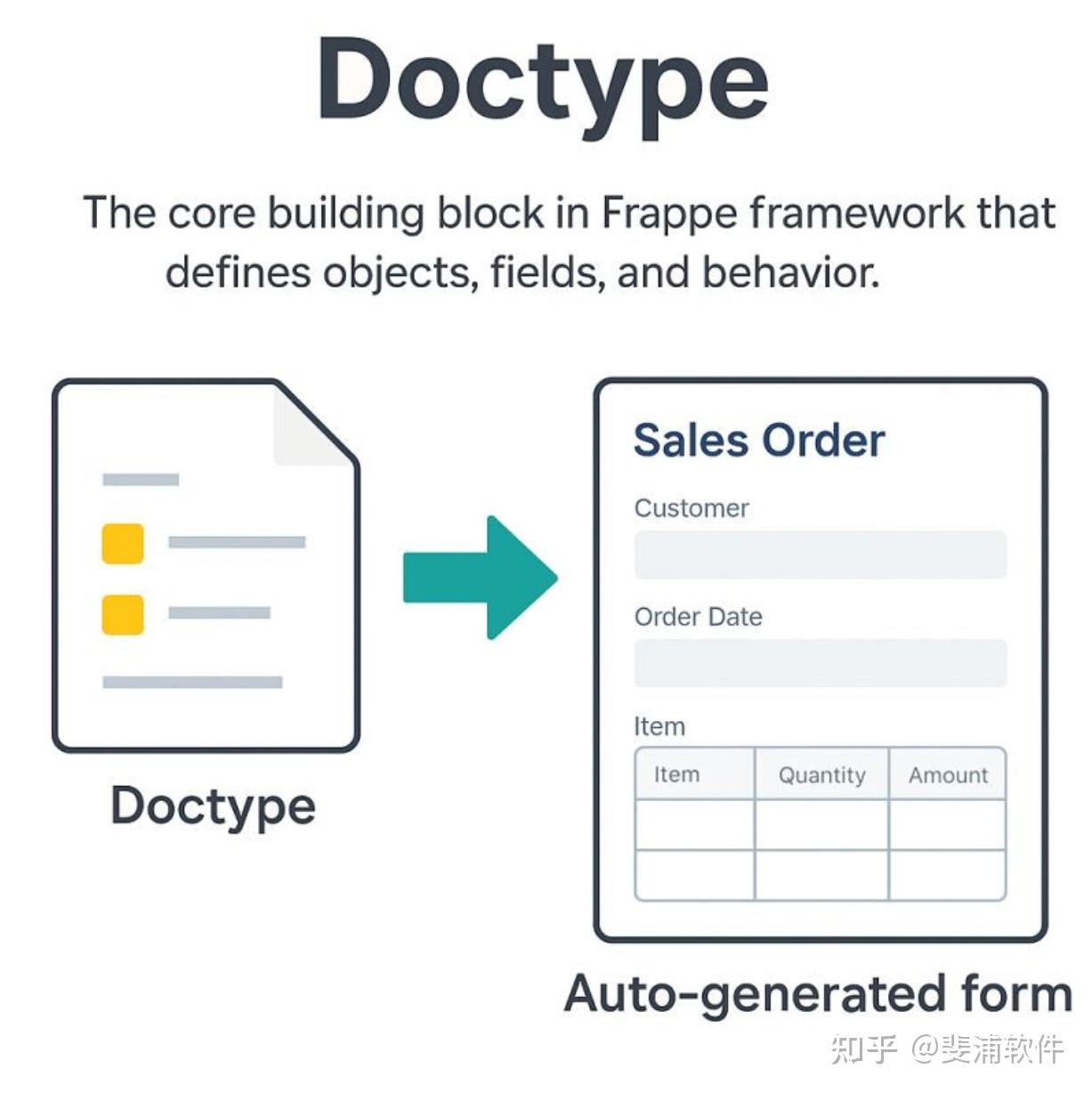
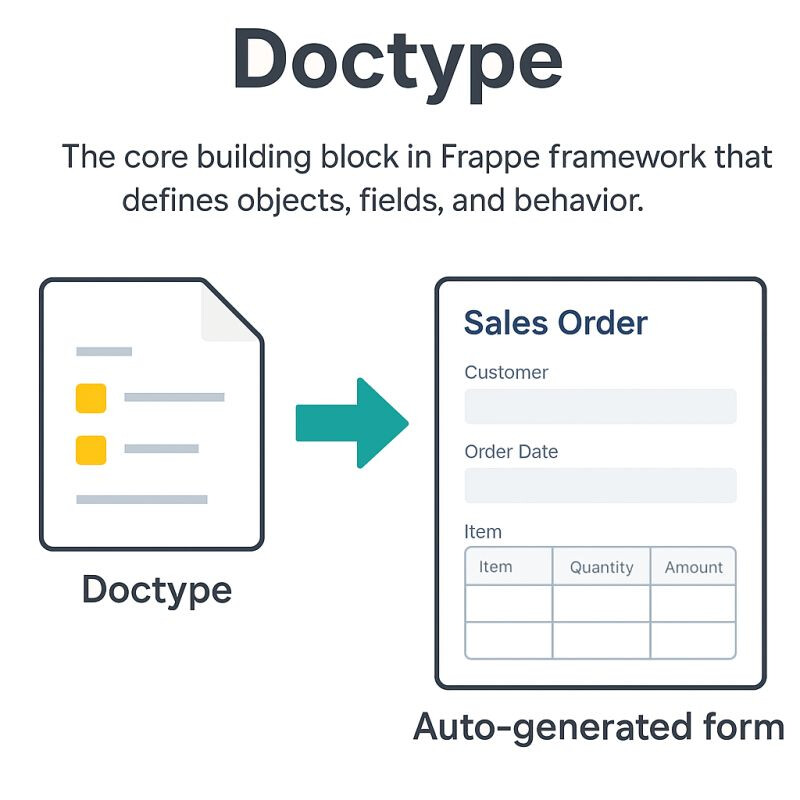
A DocType is the fundamental building block of the Frappe framework. Think of it as a “smart table” or “intelligent form” that represents any entity or concept in your application.
It is more than just a database table: it is a metadata-driven definition that tells Frappe how to handle a specific type of document (record).
Simple Definition
A DocType is a metadata definition that describes:
- What fields a document should have
- How data should be stored and retrieved
- What permissions control access to it
- How it behaves in different scenarios
- What relationships it has with other documents
Why the Name “DocType”?
The name “DocType” comes from the concept of a Document Type - it defines the type or category of documents that can exist in your system. Just like how you have different types of documents in real life (invoices, contracts, reports), Frappe has different types of documents (Sales Orders, Customers, Users, etc.).
What is Metadata-driven Definition?
- Metadata means “data about data.”
- In Frappe, metadata describes:
- How a document should behave
- How it should be stored
Example of Metadata in a DocType
| Field | Value |
|---|---|
| Field name | customer_name |
| Field type | Data |
| Is required? | Yes |
| Default value | None |
| Linked to | Customer Group |
This metadata is not the actual customer data (e.g., “Ahmed”).
It defines what kind of data is allowed and how it should be managed.
When You Create/Update a DocType in Frappe
-
Metadata is stored in tables like:
tabDocTypetabDocField
-
Frappe uses this metadata at runtime to:
- Generate the database schema
- Render forms in the UI
- Enforce validations and permissions
Why DocType is Called Metadata-driven
Because: The behavior of a DocType is not hardcoded but It’s dynamically determined by the metadata you define
What is “The Central Abstraction”?
An abstraction in software design is a simplified concept that hides complexity while exposing useful features.
In Frappe
- Instead of thinking in terms of raw SQL tables, joins, constraints, or low-level APIs…
- Developers and users just think in terms of DocTypes (documents of a certain type).
For Example
- Instead of writing SQL to create a
customertable, define foreign keys, and build forms => you just define aCustomerDocType. - Instead of manually handling permissions in every query => you configure role-based access in the DocType, and Frappe enforces it.
This makes the DocType the central abstraction:
- It is the primary building block that everything else (workflows, reports, print formats, APIs) builds upon.
- It hides the low-level database and UI details, letting you work with documents as high-level objects.
In Simple Terms
| Concept | Meaning |
|---|---|
| Metadata-driven | The behavior of a DocType is not hardcoded but It’s dynamically determined by the metadata you define |
| Central abstraction | DocTypes are the core concept you use to model and interact with any entity in Frappe, instead of dealing with raw SQL or UI code. |
Why Everything is a DocType?
Frappe is built on the philosophy of “Everything is a Document.”
This is not just a design choice, it is what makes the framework powerful, flexible, and consistent.
Instead of having separate systems for different types of data (settings, transactions, users, logs), Frappe treats everything as a document of a certain type (DocType).
This unification provides several key advantages:
1. Unified Data Model
Every record in the system — whether it’s a Customer, a Sales Order, or even System Settings — is represented as a document.
All documents share the same fundamental structure:
- name => a unique identifier
- creation / modified => timestamps
- owner / modified_by => audit info
- docstatus => workflow state (draft, submitted, cancelled)
Because of this uniformity:
- You don’t need to learn different APIs for different kinds of records.
- Features like versioning, comments, tags, and attachments automatically apply to all documents.
Example: Whether you add a note to a Customer, a Task, or a User, the commenting system works the same way — because they’re all documents.
2. Consistent Behavior
Since all data is a document, they all follow the same lifecycle and interaction model:
- CRUD => Create, Read, Update, Delete
- Workflows => Submit, Approve, Cancel, Archive
- Permissions => Role-based access and field-level control
- Universal features => Searching, filtering, reporting, exporting
Example:
A Leave Application and a Purchase Order might be very different in business meaning, but technically they both:
- Can be created via the Desk UI or REST API
- Have submission/cancellation states
- Respect permissions defined at the DocType level
This makes learning curve smoother: once you know how to use one DocType, you know how to use them all.
3. Extensibility
The “everything is a DocType” approach makes the system infinitely extensible without touching the core code.
You can:
- Add Custom Fields to standard (core/ app-level) DocTypes (e.g., adding “Preferred Language” to Customer).
- Create Custom (site-level) DocTypes to model entirely new concepts.
- Extend existing DocTypes with Client Scripts, Server Scripts, Workflows, and Automations.
Example:
Suppose you run a school. ERPNext (built on Frappe) doesn’t have a “Student Club” feature out of the box. Instead of hacking the code (the core), you simply create a new Student Club DocType, link it with the Student DocType, and it instantly behaves like any other part of the system — searchable, reportable, and permission-controlled.
4. No-Code / Low-Code Development
Because DocTypes are metadata-driven (The behavior of a DocType is not hardcoded but It’s dynamically determined by the metadata you define), most changes can be made without writing a single line of code:
- Business users can define new DocTypes directly from the web UI.
- Developers don’t need to manage database migrations — Frappe handles schema changes automatically.
The moment a new DocType is saved, it’s available in:
- The Desk interface (list view, form view)
- The REST API (
/api/resource/{DocType}) - Reports and search
Example:
An HR manager can create a new Employee Achievement DocType from the UI to track awards, without waiting for a developer. That DocType immediately has CRUD APIs, permissions, and list/report views — all generated automatically.
Why does this matter?
By treating everything as a DocType:
- Developers save time => no schema migrations, no boilerplate CRUD code.
- Admins gain control => they can configure the system without coding.
- Users get a consistent experience => whether interacting with a Sales Invoice or a Support Ticket, the interface and features feel familiar.
- The system stays future-proof => new features in Frappe (like Kanban boards, dashboards, or timeline view) work on all DocTypes automatically.
In other words:
DocType is the universal language of Frappe.
Once you understand DocTypes, you understand how to work with any part of the framework.
The DocType Architecture
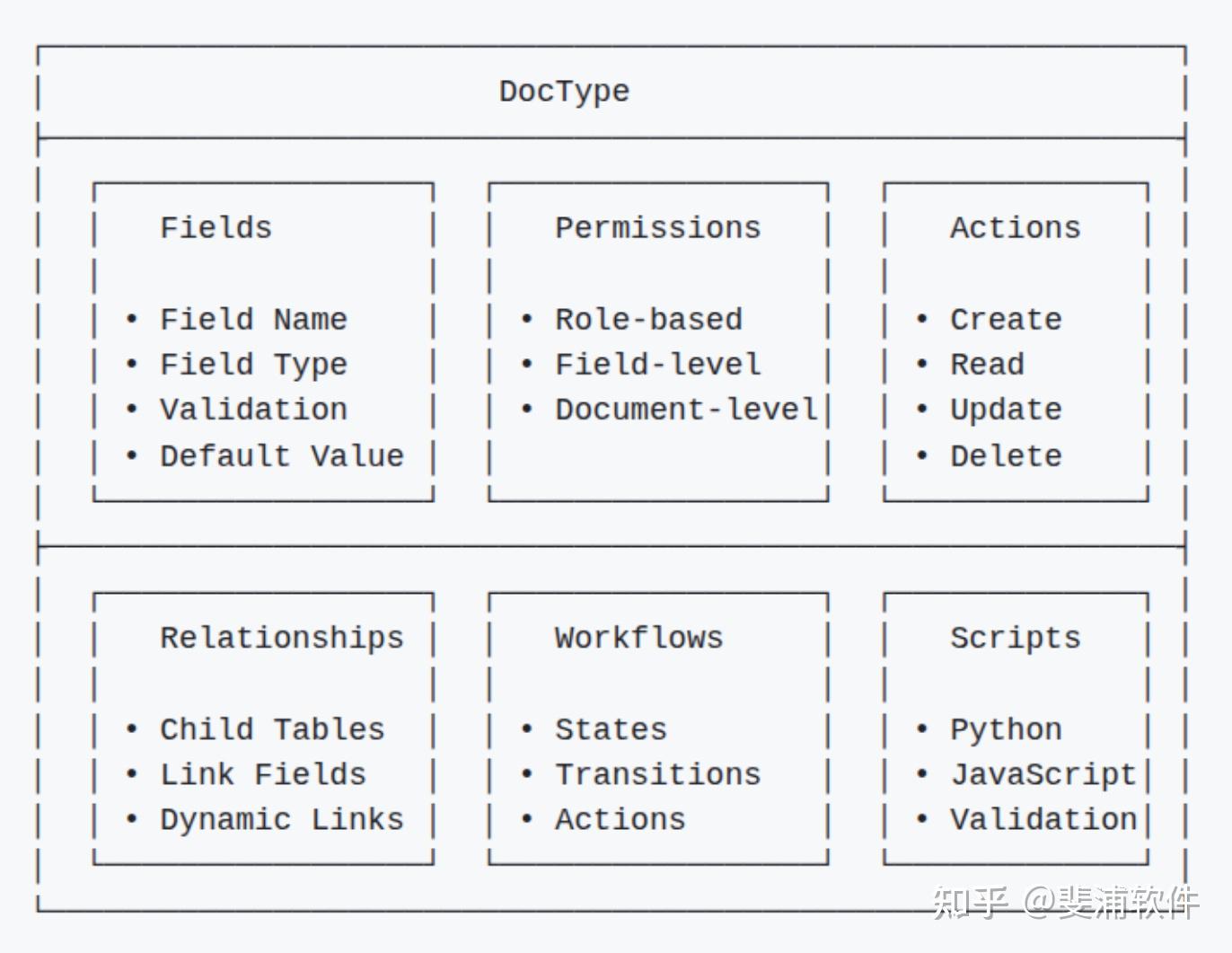
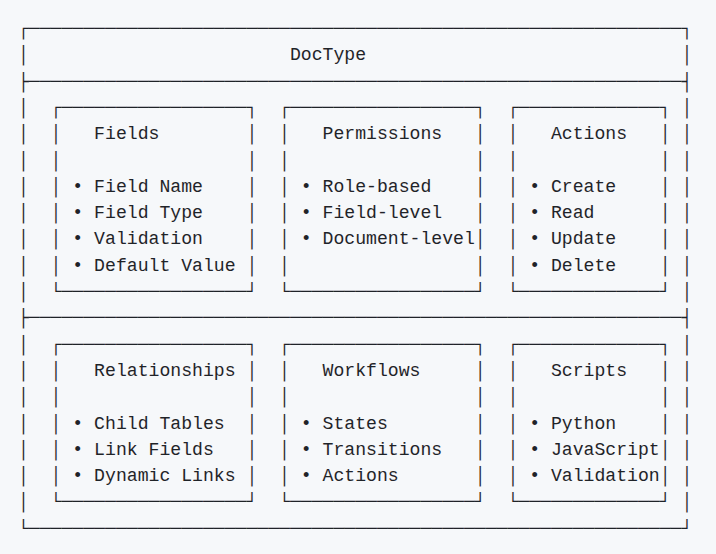
A DocType is not just a table definition. It is a collection of metadata objects that together define how data is stored, validated, displayed, secured, and extended in Frappe.
Core Components
Detailed Explanation of Each Component
1. Fields
Define the structure of the document.
Every field has:
- Fieldname (system name, e.g., customer_name)
- Label (display name, e.g., “Customer Name”)
- Type (Data, Currency, Date, Link, etc.)
- Validation (required, unique, length limits, etc.)
- Defaults (pre-filled values)
Together, fields are the schema of the DocType.
Example: In a Sales Invoice, fields like customer, posting_date, and grand_total are all defined in its metadata.
2. Permissions
Control who can do what with documents of this type.
Permissions can be set at:
- Role level (e.g., “Sales User” can create but not delete invoices).
- Field level (e.g., “grand_total” field is read-only for some roles).
- Document level (custom rules like “user can only see invoices they created”).
Example: A Sales Executive can create and submit a Sales Order, but only a Sales Manager can cancel it.
3. Actions
The built-in operations every DocType supports:
- Create => insert a new document
- Read => fetch a document
- Update => modify it
- Delete => remove it
These actions are automatically exposed in:
- The Desk UI
- The REST API (
/api/resource/DocTypeName)
Example: A mobile app can create a new Lead in Frappe just by calling the /api/resource/Lead endpoint with JSON data.
4. Relationships
Define how DocTypes connect with each other:
- Link Fields => Reference another DocType (e.g., customer in Sales Order links to Customer).
- Child Tables => A one-to-many relationship (e.g., Sales Order Item is a child table of Sales Order).
- Dynamic Links => Flexible linking where the target DocType is chosen at runtime.
Example: An Attachment can be linked to any document via a dynamic link, not just a fixed DocType.
5. Workflows
Enable state transitions on documents.
Define:
- States => e.g., “Draft”, “Submitted”, “Approved”
- Transitions => rules to move from one state to another
- Role-based actions => only certain roles can approve/reject
Example: A Leave Application goes from “Draft” => “Pending Approval” => “Approved/Rejected.”
6. Scripts
Extend DocTypes with custom logic:
- Python scripts => server-side validations, automation, integrations.
- JavaScript scripts => client-side form logic, field auto-fill, UI tweaks.
- Validation hooks => enforce business rules before saving/submitting.
Example: A Python script can automatically calculate late payment charges when an Invoice is submitted.
How It All Fits Together
Behind the scenes, these components are themselves stored as DocTypes (meta-inception!):
- DocType Definition => stored in tabDocType (the metadata record of the DocType).
- Field Definitions => stored in tabDocField.
- Permissions => stored in tabCustom DocPerm.
- Workflows => stored in tabWorkflow.
- Print Formats => stored in tabPrint Format.
- Reports => stored in tabReport.
This makes the framework self-describing — the system manages its own schema and behavior as data.
In short:
- The DocType architecture is a meta-system — not only does it define how your documents behave, but it does so using documents themselves.
- The DocType system is self-describing: the definitions of documents are themselves stored as documents.
- This makes Frappe a meta-system — you don’t hardcode rules, you store them as data, and Frappe interprets that data to control behavior.
“The DocType architecture is a meta-system”
What’s a meta-system?
“Meta” means self-referential => a system that describes or manages itself.
In Frappe, this means: the rules of the system are themselves stored in the same system.
Step 2: How does this apply to DocTypes?
Normally, in traditional software:
- You write database schemas in SQL.
- You write forms in HTML.
- You write validation rules in code.
But in Frappe:
- The definition of a DocType (its fields, permissions, workflows, etc.) is itself stored as a document inside Frappe. (Everything is a DocType in Frappe like Literally)
That’s why you see DocTypes like:
- DocType => stores definitions of all DocTypes
- DocField => stores field definitions
- Custom DocPerm => stores permissions
In other words: A DocType is defined using DocTypes.
That’s the meta part.
Why is this powerful?
Because the system can modify itself at runtime, without code changes:
- When you add a new field to “Customer” from the UI, Frappe is just inserting a new record in tabDocField.
- When you change permissions, it’s updating tabCustom DocPerm.
- When you create a brand-new DocType, you’re really just creating a new record in the DocType DocType.
Frappe then uses this metadata to automatically:
- Adjust the database schema
- Render new forms in the UI
- Enforce rules in the API
How DocTypes Work Behind the Scenes
Behind the friendly UI and APIs, Frappe performs a series of meta-driven operations to turn a DocType definition into a working database table, form, and API endpoint.
1. Metadata Storage
When you create a new DocType in the UI, Frappe doesn’t immediately just create a table.
It first stores the definition of the DocType itself as metadata inside the database.
- The
tabDocTypetable stores high-level information about the DocType (its name, module, whether it’s a child table, etc.). - The
tabDocFieldtable stores the field definitions (each field’s name, type, label, validation rules, defaults).
-- DocType definition stored in 'tabDocType' table
INSERT INTO tabDocType (name, module, custom, istable, ...)
VALUES ('Customer', 'Selling', 0, 0, ...);

-- Field definitions stored in 'tabDocField' table
INSERT INTO tabDocField (parent, fieldname, fieldtype, label, ...)
VALUES ('Customer', 'customer_name', 'Data', 'Customer Name', ...);
This is the meta-system at work:
Even DocTypes are stored as documents of type DocType.
2. Dynamic Table Creation
Based on the metadata, Frappe then synchronizes the database schema.
For each DocType, it creates a backing SQL table prefixed with tab.
For example, a Customer DocType creates a table tabCustomer.
So, Frappe automatically creates database tables based on DocType definitions.
3. Runtime Document Creation
When you interact with data, Frappe doesn’t treat it as just rows in a table.
It creates Document objects at runtime.
When you create a document, Frappe:
# 1. Loads the DocType definition (meta-data)
doctype_meta = frappe.get_meta("Customer")

# 2. Creates a Document instance
doc = frappe.get_doc({
    "doctype": "Customer",
    "customer_name": "Ameer",
    "customer_type": "Individual"
})

# 3. Validates against DocType rules
doc.validate()

# 4. Saves to the database
doc.insert()
Here’s what happens internally:
get_metaloads field definitions, permissions, and scripts for the DocType.get_docwraps raw data into a Document object with rich methods (save(), delete(), etc.).validateapplies field rules, Python hooks, and business logic.insertwrites the record into the corresponding SQL table (tabCustomer).
4. Dynamic Field Access
Because Frappe uses metadata, fields are not hardcoded as attributes.
Instead, they are dynamically accessible:
# You can access fields dynamically
doc.set("customer_name", "Ameer")
customer_name = doc.get("customer_name")

# You can add new fields at runtime
doc.set("new_field", "new_value")
This flexibility is what makes Frappe schema-less on the surface but structured under the hood:
- You can add a new field in the UI.
- Frappe updates metadata (
tabDocField). - On the next
schema sync, the field is added to the database table. - From that point, it behaves just like a native column.
Why this design matters
- Self-updating system => No manual SQL migrations needed.
- Consistent APIs => The same
get_docandinsertlogic works for any DocType. - Extensibility => Custom fields, validations, and scripts plug in seamlessly.
- Safety => System fields (like
docstatus) enforce lifecycle consistency across all DocTypes.
In short:
Frappe converts DocType metadata => SQL schema => runtime document objects, making it both dynamic (easy to extend) and structured (safe and reliable).
What does “schema sync” mean in Frappe?
Whenever you add or change fields in a DocType, Frappe needs to ensure that the database schema (your SQL tables) matches the metadata (DocType + DocField records).
This process is called schema synchronization (schema sync).
When does schema sync happen?
Automatically in the UI
- If you add a custom field or change a DocType via the Desk => Developer => DocType form,
- Frappe immediately updates the metadata (
tabDocType,tabDocField). - Then, it runs a schema sync in the background, altering the SQL table (e.g.,
ALTER TABLE tabCustomer ADD COLUMN ...).
This means the database is updated on the spot — no manual migrations needed.
During bench migrate
- When you pull code updates or install a new app,
- Running
bench migrateforces schema sync for all DocTypes. - This ensures the SQL tables are updated to reflect any new/changed fields from the code or fixtures.
Programmatically
- Developers can call
frappe.model.syncfunctions internally. - But most of the time, this is hidden and automatic.
Why is this needed?
The database doesn’t “know” about metadata in tabDocType.
Schema sync is the bridge that converts DocType definitions into actual SQL columns.
Example:
If you add a new field phone_number to Customer:
- A new row is added in
tabDocField. - Schema sync runs =>
ALTER TABLE tabCustomer ADD COLUMN phone_number varchar(255). - From now on, that field is part of the Customer DocType both in UI and SQL.
So when I said “on the next schema sync”, I meant:
- Either immediately (if you add the field via UI => automatic sync),
- Or the next time you run
bench migrate(if the field definition was changed in code).
Types of DocTypes
Not all DocTypes are the same. Depending on their purpose and behavior, DocTypes fall into different categories. Understanding these helps you design better models and avoid common pitfalls.
1. Document DocTypes (Most Common)
These are the main DocTypes you use for business data.
Each record is a document with a lifecycle:
- Draft => work in progress
- Submitted => finalized
- Cancelled => voided
They support features like: permissions, workflows, version history, emails, and comments.
Stored in their own database tables (e.g., tabCustomer, tabSales Order).
Examples:
- Customer => who you sell to
- Sales Order => a sales transaction
- Employee => staff record
In short: These are the everyday DocTypes you work with to run your business.
2. Table DocTypes (Child Tables)
Special DocTypes designed to act as line items or child records inside a parent DocType.
- Cannot exist independently — they always belong to a parent via a Table field.
- Stored in their own tables (e.g.,
tabSales Order Item), but always linked withparent,parentfield, andparenttypecolumns.
Examples:
- Sales Order Item => children of Sales Order
- Invoice Item => children of Sales Invoice
- Task Dependency => children of Task
These enable one-to-many relationships (e.g., a Sales Order with multiple items).
3. Single DocTypes
Store global settings or configuration.
- Only one record exists — no list view, only a form view.
- Instead of having their own SQL table, their fields are stored in
tabSingles(a key-value store). - Accessed via
frappe.db.get_single_value()andfrappe.get_single().
Examples:
- System Settings => stores date format, default currency, etc.
- Company => company-wide configuration
- HR Settings => HR-related preferences
Use these for system-wide configuration, not transactional data.
4. Setup DocTypes
Define system or app-level configuration that typically doesn’t change often.
- Often created during installation of an app.
- Used to bootstrap the system: roles, modules, DocType definitions themselves.
- Stored like normal DocTypes but usually protected against deletion.
Examples:
- Role => defines access roles in the system
- Module Def => groups DocTypes into modules
- DocType => yes, DocTypes themselves are defined by the DocType DocType
These are the foundation layer that makes the framework self-describing.
5. Page DocTypes
Define custom pages in the Frappe Desk.
- Used for dashboards, workspaces, or specialized UIs that go beyond a simple form/list.
- Stored as DocTypes but rendered differently (via JS + HTML templates).
Examples:
- Workspace => customizable landing pages for modules
- Dashboard => visual charts and KPIs
- Custom single-page apps (e.g., a “Leave Calendar” page)
Think of these as UI-level DocTypes — they don’t represent business data but how users interact with it.
Additional Note: Other Specialized DocTypes
While the above are the main categories, you’ll often see additional special-purpose DocTypes:
- Report => Defines reports (Query Report, Script Report).
- Print Format => Controls how documents are printed/exported.
- Web Page => Used in Frappe’s website module.
- Notification / Email Alert => Automation rules for sending messages.
These also follow the “everything is a DocType” philosophy — even system utilities are stored as documents.
In short:
- Document DocTypes = business records
- Table DocTypes = child/line items
- Single DocTypes = global settings
- Setup DocTypes = system definitions
- Page DocTypes = custom UI pages
A line item = a row in a child table, representing one part of a bigger document (like one product in an order, or one service in a bill).
DocType Lifecycle
Two kinds of DocType lifecycles
1. Non-submittable DocTypes (default)
These DocTypes don’t have the concept of “submission.”
- Documents are always editable unless permissions restrict them.
- Lifecycle is simple: Create => Update => Delete.
Examples: Customer, Employee, Item.
Used for master data (reference information that stays editable).
2. Submittable DocTypes
These have an extra field: is_submittable = 1.
Lifecycle includes states:
- Draft => can be edited.
- Submitted => becomes read-only (locked to preserve integrity).
- Cancelled => invalidated, but preserved for audit.
Additional states like Approved or Closed may come from workflows.
Examples: Sales Order, Purchase Invoice, Leave Application.
Used for transactions where you need strong control and audit trails.
A DocType lifecycle can be looked at in two levels:
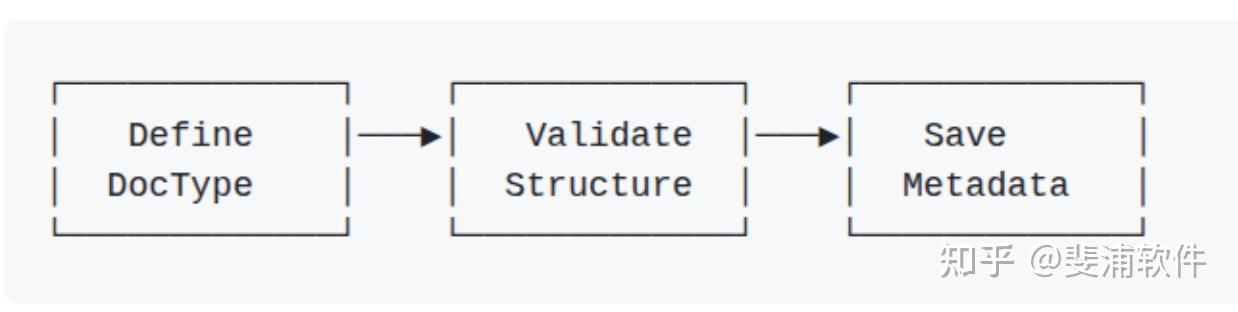
1. How the DocType itself is created (its definition).
This is about the metadata: fields, permissions, options, etc.
Steps: Define => Validate => Save (metadata).
Once saved, Frappe syncs the database schema.
This applies to all DocTypes, because every DocType is first defined as metadata.
2. How the documents inside that DocType move through states.
This is about the actual records created using that DocType.
Here we have two cases:
- Non-submittable DocTypes => Create => Update => Delete.
- Submittable DocTypes => Draft => Submitted => Cancelled (and optionally => Approved => Closed if workflows are added).
This lifecycle depends on whether the DocType is marked is_submittable.
1. Creation Phase
This is when you set up a new DocType in the system.
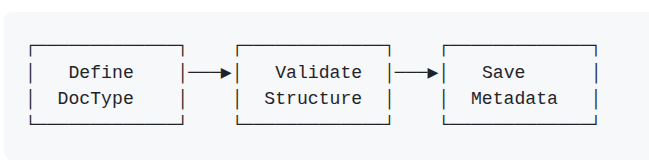
- Define => You specify fields, permissions, and behavior.
- Validate => Frappe checks if your design is valid (no duplicate fieldnames, correct types).
- Save Metadata => The definition is stored in tabDocType and tabDocField.
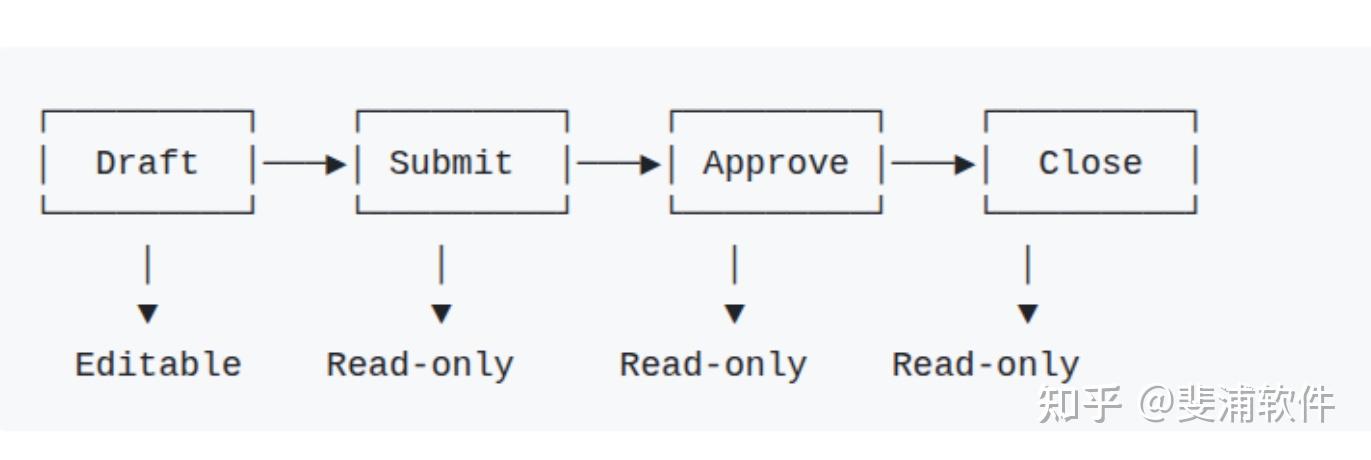
2. Document Lifecycle
Once a DocType is created, you can start creating documents of that type.
Each document usually moves through workflow states:
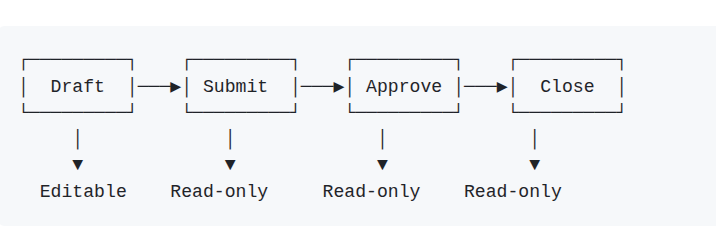
- Draft => Initial stage, still editable.
- Submitted => Finalized but not yet approved; becomes read-only.
- Approved => Officially confirmed; locked from edits.
- Closed => Archived or completed.
3. Version Control (Tracking Changes)
Every time a document changes, Frappe automatically keeps a history.
- Each update creates a new version entry in the Version DocType.
- You can see who changed what and when (audit trail).
- Old versions can be reviewed anytime.
- Some documents support amendments, allowing you to correct mistakes while keeping history intact.
Example: If a user changes the delivery date in a Sales Order, the old date is still visible in the document history.
Benefits of the DocType System
The DocType system is not just a data model — it’s the foundation of Frappe’s consistency, flexibility, and scalability. Here’s why it matters:
1. Consistency
- Every entity (Customer, Task, Invoice, Role) is a DocType.
- All documents share common system fields (
name,owner,creation,modified,docstatus). - Standard operations (CRUD, versioning, workflows, comments) apply everywhere.
This makes the framework predictable — once you learn one DocType, you can work with any other.
Example: Adding a comment to a Customer works exactly the same way as adding a comment to a Task because both are documents.
2. Flexibility
- Fields can be added or modified at any time without database migrations.
- Business logic can be extended via hooks, custom scripts, and workflows.
- Supports no-code customization (Custom Fields, Custom DocTypes, Workflows via UI) and low-code extensibility (Python/JS hooks).
Example: If you need to track “Customer Category” in the Customer DocType, you just add a Custom Field in the UI — no schema migration, no downtime.
3. Scalability
- Frappe’s DocType design can handle millions of records efficiently.
- Uses indexes, query optimization, and caching for performance.
- Since all DocTypes share the same design, horizontal scaling (multiple workers, caching layers, replicas) becomes easier.
Example: ERPNext installations with 10+ years of accounting data and millions of ledger entries remain performant because queries are optimized around the DocType model.
4. Security
- Role-based permissions ensure only the right people see/edit documents.
- Field-level security allows hiding or restricting sensitive fields.
- Audit trails (Version DocType + timeline) record every change for accountability.
- Integrated with DocStatus (Draft, Submitted, Cancelled) to prevent tampering with finalized records.
Example: A sales user might be able to create Sales Orders but not cancel them — that permission can be controlled at the DocType level.
5. Integration
- Every DocType automatically exposes a REST API endpoint (
/api/resource/{DocType}). - Supports webhooks for event-driven integrations.
- Can export data to Excel/CSV or connect via GraphQL (Why Frappe Framework Needs GraphQL at Its Core).
- Because everything is a DocType, integrations are uniform — no special handling needed for different data types.
Example: To sync Customers with an external CRM, you can directly call /api/resource/Customer — no extra API coding required.
In summary:
The DocType system provides:
- Uniformity (consistency)
- Adaptability (flexibility)
- Enterprise readiness (scalability + security)
- Openness (integration)
It’s what makes Frappe powerful as both a framework for developers and a no-code tool for business users.
Common Misconceptions About DocTypes
Because DocTypes are unique to Frappe, newcomers often misunderstand them. Here are the most frequent misconceptions:
“DocTypes are just database tables.”
Why people think this: Each DocType creates a corresponding SQL table (tabCustomer, tabSales Order), so it feels like a plain schema definition.
The truth: DocTypes are much more than tables — they encapsulate:
- Business logic (validations, triggers, scripts)
- Behavior (workflows, permissions, status changes)
- Relationships (links, child tables, dynamic references)
Think of a DocType as a smart schema: it’s not only structure, but also the rules and behavior attached to that structure.
“You need to write SQL to work with DocTypes.”
Why people think this: In traditional development, defining tables usually requires SQL, and queries must be written manually.
The truth: Frappe abstracts SQL away with a high-level ORM-style API:
frappe.get_doc()frappe.db.get_list()frappe.new_doc()
These handle data retrieval and creation. Query optimization and schema updates happen behind the scenes.
You rarely need SQL — unless for complex analytics, where Frappe even allows safe raw queries.
“DocTypes are slow because they’re dynamic.”
Why people think this: Dynamically generating schemas and forms can seem inefficient compared to hardcoded models.
The truth: Frappe employs multiple optimizations:
- Metadata caching (DocType definitions are cached in memory, not fetched repeatedly)
- Database indexing for common filters
- Efficient query building comparable to traditional ORMs
In practice, DocTypes perform well at scale — there are ERPNext installations running with millions of records smoothly (with proper tuning).
“DocTypes are only for simple applications.”
Why people think this: The no-code/low-code UI makes DocTypes seem like a tool for small apps.
The truth: DocTypes power ERPNext, a full enterprise ERP with accounting, HR, CRM, and supply chain modules.
They handle:
- Complex workflows (multi-level approvals, routing)
- Advanced security (role- and field-level permissions)
- Integration (REST APIs, webhooks, background jobs)
DocTypes are not limited to “toy apps” — they’re enterprise-grade building blocks.
In summary:
DocTypes aren’t “just tables” — they’re metadata-driven objects with behavior, rules, and integration hooks, making them far more powerful than traditional database schemas.