Hi Frappe Team,
I’m trying to integrate my Gmail account with Frappe Helpdesk using OAuth so that incoming emails are received in Helpdesk and outgoing replies are sent via Gmail. {This is for testing, in production I will add my support email}
Here’s what I’ve done so far:
- Created a Connected App: in Frappe with the correct Client ID, Client Secret, and OpenID Configuration URL (
https://accounts.google.com/.well-known/openid-configuration). - Set up OAuth credentials in Google Cloud Console and enabled the Gmail API.
- Authorized the Gmail account successfully through the Connected App — token cache was created.
- Configured the Email Account with:
- Incoming:
imap.gmail.com, port993, IMAP enabled, SSL checked - Outgoing:
smtp.gmail.com, port587, TLS enabled - OAuth selected, Connected App linked
- IMAP is enabled in Gmail settings. POP disabled
- HTTPS is configured on my domain and used, BUT THE redirect URI I get: https://helpdesk.pabbly.com/api/method/frappe.integrations.doctype.connected_app.connected_app.callback/mrn82acv88
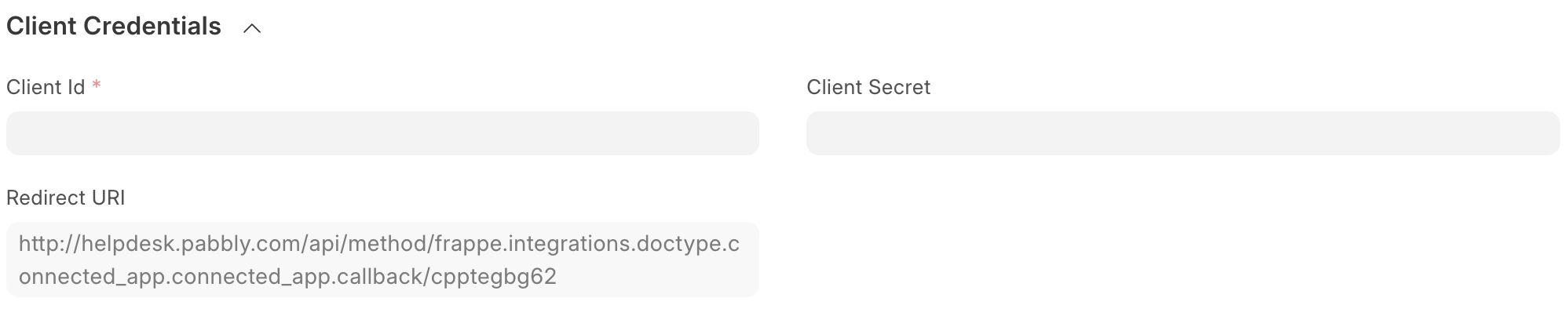
However, when I save the Email Account, I get the following error:
Please check your email login credentials. imaplib.IMAP4.error: [AUTHENTICATIONFAILED] Invalid credentials (Failure)
Looks like google doesnt accepts uri with http
I’ve currently set up my Frappe Helpdesk email integration using Basic authentication with an App Password for my Gmail account. The connection works initially, and I can send and receive emails without issue.
However, every 5 days, the connection breaks and email sync stops. When I manually reconnect using the same App Password, it starts working again — even though the password hasn’t expired or been revoked.
I’m trying to understand:
- Why does the connection break periodically?
- Is there a timeout or token refresh issue with Basic authentication?
- Is this expected behavior with Gmail App Passwords?
Would appreciate any insights or suggestions on how to make the connection more stable — or whether switching fully to OAuth is the only long-term solution.
Thanks! — Resham