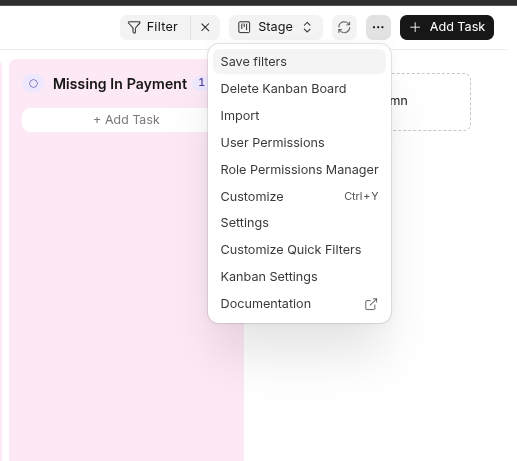
I have install 2 erpnext instance in my server, but when i try the kanban view on task theres a big difference. on one, theres is more option when i clik the … button and i can even change the board color like below
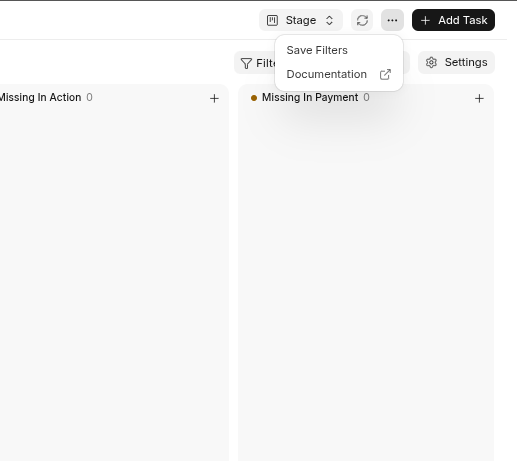
but on the other instance, there is fewer option on when i click … button, and i can’t even change the color of the kanban board. how do i fix the later one? Thank you
The two screenshots look like they come from different Frappe versions, and it could also be a permissions difference.
- Check the version on both sites. Run bench version on each one. The first screenshot (Save filters, Customize, Kanban Settings and so on) looks like the newer v16 UI. The second one looks like v15, where those options don’t exist. If that’s the case, you’d need to upgrade the second site to get them: take a backup, run bench switch-to-branch version-16 frappe erpnext --upgrade, then bench --site yoursite migrate.
- Check the user’s roles. Options like Import, User Permissions, Role Permissions Manager and Customize only show up for users with enough rights. Try logging in as Administrator, or give your user the System Manager role, and hard-refresh the page.
- Column colour. In recent versions you set it from the “…” menu next to the column title, not from the board’s top-right menu. If you don’t see it there either, it’s again a version or permission issue.
- Clear the cache. Run bench --site yoursite clear-cache, then bench build, then press Ctrl+Shift+R in the browser.