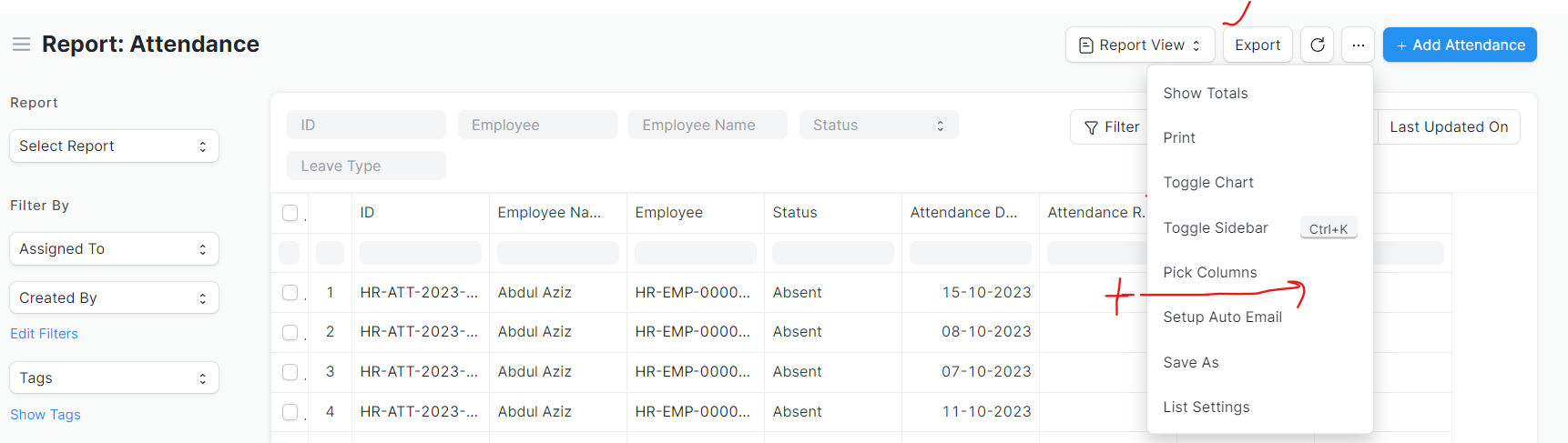
I have a script report. Just like any other report I can export its data (rows/columns) in excel or csv format.
Any help is appreciated.
# Copyright (c) 2015, Frappe Technologies Pvt. Ltd. and Contributors
# License: MIT. See LICENSE

"""build query for doclistview and return results"""

import json

import frappe
import frappe.permissions
from frappe import _
from frappe.core.doctype.access_log.access_log import make_access_log
from frappe.model import child_table_fields, default_fields, optional_fields
from frappe.model.base_document import get_controller
from frappe.model.db_query import DatabaseQuery
from frappe.model.utils import is_virtual_doctype
from frappe.utils import add_user_info, format_duration


@frappe.whitelist()
@frappe.read_only()
show original
Use Reference of Frappe Team Code to achieve your Customisation.def export_query(): and look the code
@pra17shant Thanks for your help.
Hello Prashant…
I added button “Export” using client script.
Now I am not able to add this function to that Button.
def export_query():
	"""export from report builder"""
	from frappe.desk.utils import get_csv_bytes, pop_csv_params, provide_binary_file

	form_params = get_form_params()
	form_params["limit_page_length"] = None
	form_params["as_list"] = True
	doctype = form_params.pop("doctype")
	file_format_type = form_params.pop("file_format_type")
	title = form_params.pop("title", doctype)
	csv_params = pop_csv_params(form_params)
	add_totals_row = 1 if form_params.pop("add_totals_row", None) == "1" else None

	frappe.permissions.can_export(doctype, raise_exception=True)

	if selection := form_params.pop("selected_items", None):
		form_params["filters"] = {"name": ("in", json.loads(selection))}

	make_access_log(
		doctype=doctype,
		file_type=file_format_type,
		report_name=form_params.report_name,
		filters=form_params.filters,
	)

	db_query = DatabaseQuery(doctype)
	ret = db_query.execute(**form_params)

	if add_totals_row:
		ret = append_totals_row(ret)

	data = [[_("Sr")] + get_labels(db_query.fields, doctype)]
	data.extend([i + 1] + list(row) for i, row in enumerate(ret))
	data = handle_duration_fieldtype_values(doctype, data, db_query.fields)

	if file_format_type == "CSV":
		from frappe.utils.xlsxutils import handle_html

		file_extension = "csv"
		content = get_csv_bytes(
			[[handle_html(frappe.as_unicode(v)) if isinstance(v, str) else v for v in r] for r in data],
			csv_params,
		)
	elif file_format_type == "Excel":
		from frappe.utils.xlsxutils import make_xlsx

		file_extension = "xlsx"
		content = make_xlsx(data, doctype).getvalue()

	provide_binary_file(title, file_extension, content)
Also, after adding button Export to ListView Actual Export Button in dropdown gets hide as below.
Sujay
November 14, 2024, 1:18pm
6
Hi, @umarless
Even I am trying to achieve the same. Did you find the solution?
@Sujay
export_report = function(file_format_type = "Excel") {
    // Works for both Report Builder (frappe.cur_list) and Query Reports (frappe.query_report)
    const route = frappe.get_route();
    const is_query_report = route[0] === "query-report";

    if (is_query_report && frappe.query_report) {
        const visible_idx = frappe.query_report.datatable?.bodyRenderer.visibleRowIndices || [];

        if (visible_idx.length + 1 === frappe.query_report.data?.length) {
            visible_idx.push(visible_idx.length);
        }

        open_url_post(frappe.request.url, {
            cmd: "frappe.desk.query_report.export_query",
            report_name: frappe.query_report.report_name,
            file_format_type: file_format_type,
            filters: frappe.query_report.get_filter_values(true),
            custom_columns: frappe.query_report.custom_columns?.length
                ? frappe.query_report.custom_columns : [],
            visible_idx: visible_idx,
        });

    } else if (cur_list) {
        // Report Builder
        const args = cur_list.get_args();
        args.cmd = "frappe.desk.reportview.export_query";
        args.file_format_type = file_format_type;
        args.title = cur_list.report_name || cur_list.doctype;
        args.start = 0;
        args.page_length = cur_list.data.length;

        open_url_post(frappe.request.url, args);

    } else {
        frappe.msgprint(__("No active report found to export."));
    }
};

create_export_button = function(report) {
    // Pass the current list when using Report Builder
    report.page.add_inner_button(__('Export to Excel'), function() {
        export_report("Excel");
    });
};
Use create_export_button to create the button.
For Report Builder reports, pass the ListView. For Query Reports pass report as arugument
doctype_name_list.js
frappe.listview_settings['DocType'] = {
    onload: function(listview) {
            create_export_button(listview);
    }
};
report_name.js
frappe.query_reports["Report Name"] = {
    onload(report) {
        create_export_button(report);
    },

}
Using version-15 of frappe