I run an ERPNext implementation agency, and on every project we face the same problem: client communication is scattered everywhere. Requirements come on WhatsApp, approvals on email, meetings on Zoom links, and change requests get lost in chat history — which later turns into scope arguments (“you never told us that” / “we sent it on WhatsApp”).
Looking at the ecosystem: Raven is excellent for internal team chat, Helpdesk is for support tickets, Gameplan is async discussions — but there is nothing client-facing for implementation projects. Something like Slack Connect, but native to Frappe.
So we are considering building this:
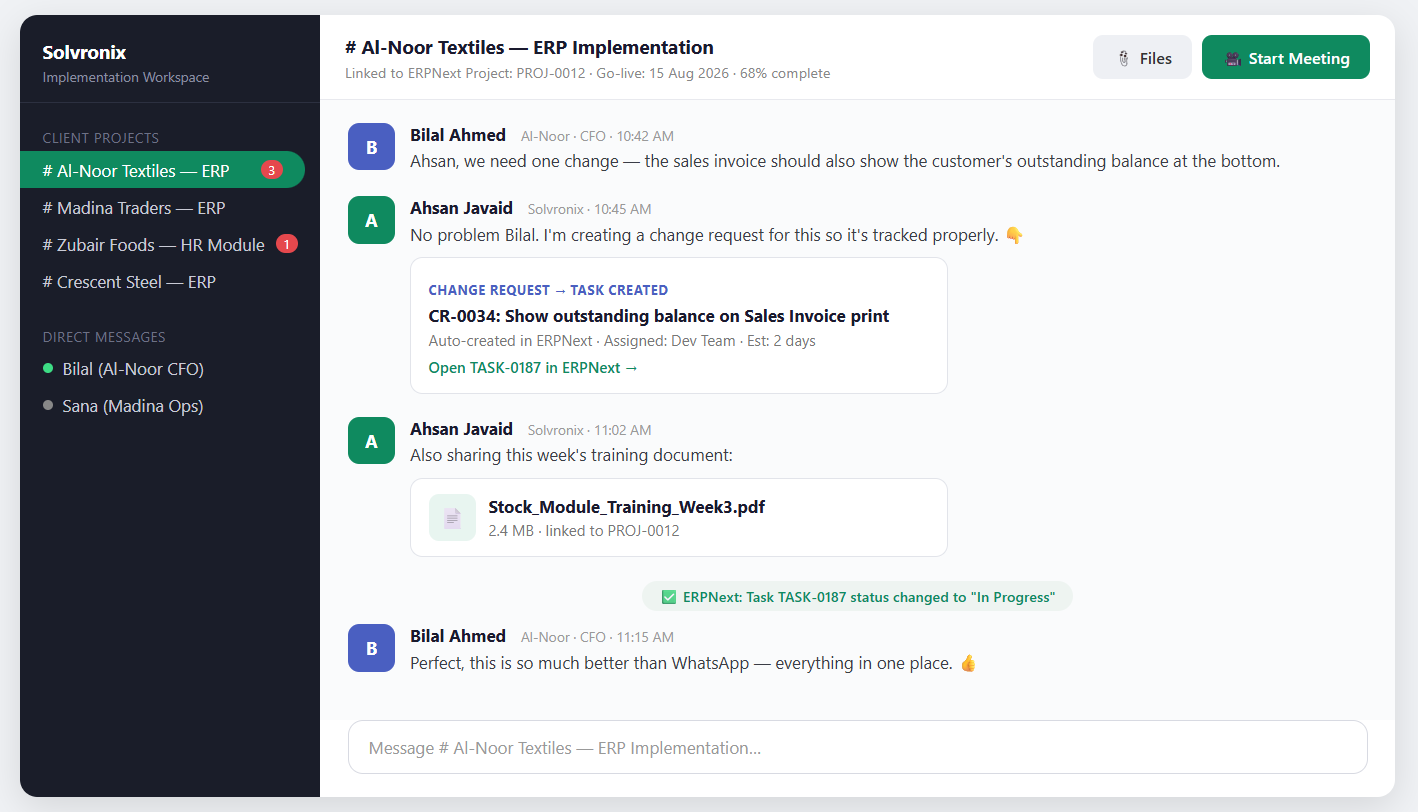
Implementer creates a project workspace, invites the client by email — client clicks, sets a password, and is in. No Frappe knowledge needed, they only see their project.
Real-time chat per project, linked to the ERPNext Project doctype
Files shared in chat, linked to ERPNext records
Client raises a change request in chat → it auto-creates a Task in ERPNext
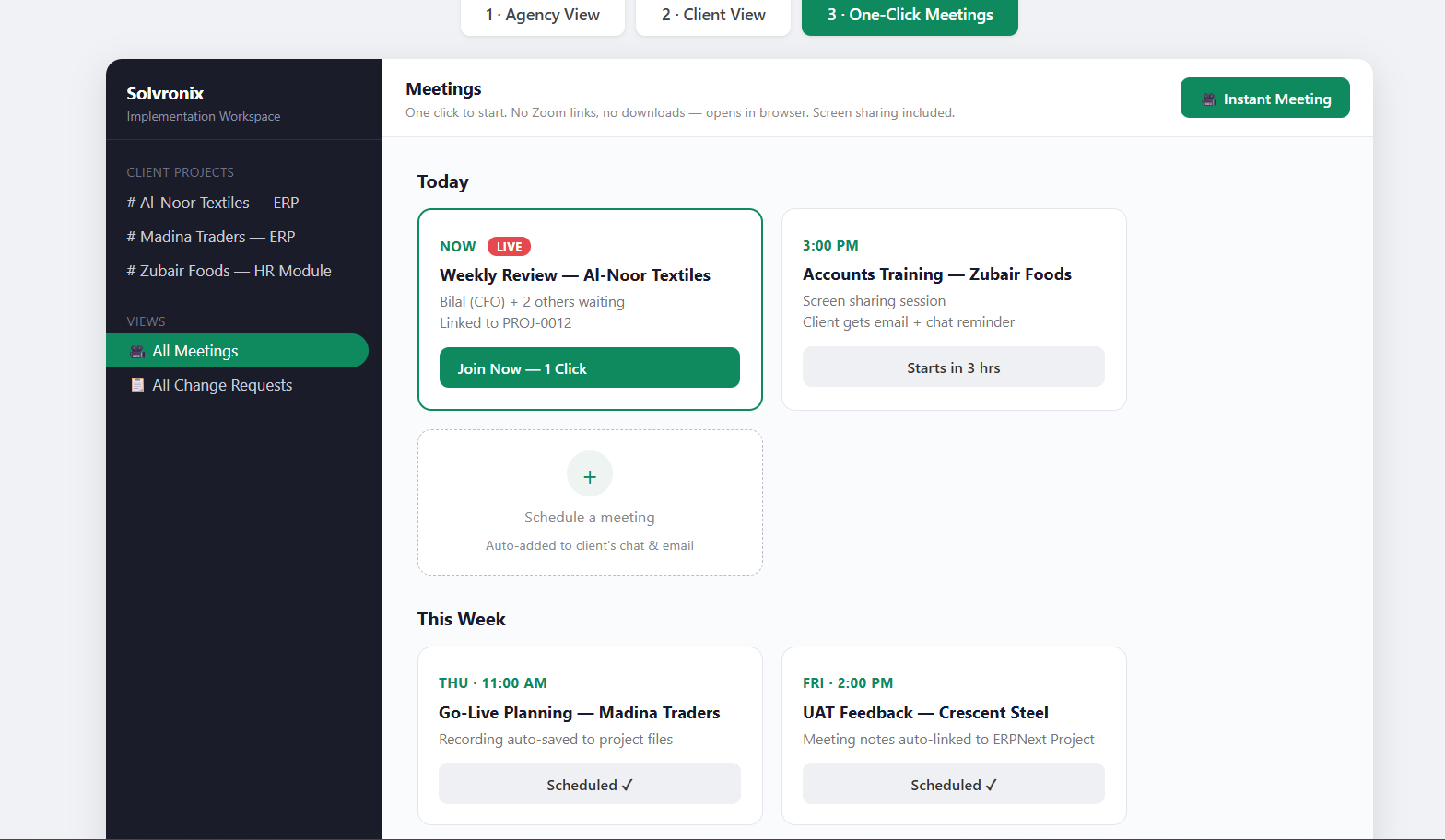
One-click meetings in the browser (Jitsi) with screen sharing — no Zoom links to send
Before we invest months into this, I want brutal honesty from fellow implementers:
Is this a real pain in your projects, or does WhatsApp + email work fine for you?
The biggest risk I see: clients live on WhatsApp. Do you believe your clients would actually log into a portal like this? What would make them stay?
What would this need to have for your agency to pay for a hosted version?
Has anyone already tried solving this and dropped it? What went wrong?
If you think it’s a bad idea, please say so directly — a real “no” today saves us six months. And if it resonates, we’re planning an early beta with a few agencies.
I think Frappe themselves best suited to answer this question as they believe in dog food concept (not really sure where that came from) - probably they use partners portal to manager these communications but best you ask them
good pointer! I looked at the PRM blog — it’s a great example of dogfooding, but it solves a different problem: it manages the Frappe ↔ partner relationship (credits, leads, tickets, resources).
What I’m talking about is the implementer ↔ end client relationship during a project: real-time chat, screen-share meetings, and change requests — the daily back-and-forth that currently lives on WhatsApp and gets lost. More like Slack Connect than a portal.
Curious though — how does your team handle that day-to-day client communication during implementations? WhatsApp like everyone else?
Haha exactly — WhatsApp, Telegram, email… the project history ends up in 5 places That’s the exact problem we’re exploring a solution for — client communication built into ERPNext itself. Happy to share when the beta is ready if you’re curious.
Really appreciate the honest take @asieftejani — this is exactly what I asked for
Your split is fair, but here’s my thinking: the record isn’t for winning arguments — you’re right, customer is king, and waving a chat log at them rarely ends well. It’s for preventing them: when a request instantly becomes a visible task with a status both sides can see, the “you never told us that” conversation mostly never starts. Prevention rather than evidence.
But your point stands — if implementers read this as a “dispute tool,” appeal will be limited. Good input for how we position it.
Curious — how do you handle scope creep today? Absorb it silently, or document it somewhere?
I am a solo freelancer so its undocumented/verbal/informal - mostly on telegram/zoom. If there is any misunderstanding I just absorb it as I want to maintain long term relationships
agreed, and you’ve named the core issue: Helpdesk can do it, but tickets feel too formal and heavy for the daily back-and-forth of an implementation. Clients simply won’t write tickets. That friction is exactly the gap.
appreciate the honesty. “Absorb it silently” is probably what most solo consultants do, and for long-term relationships it’s rational. Sounds like this pain gets expensive mainly when you’re a team running multiple projects at once.
@ahassoun Rocket.Chat is a solid suggestion, and honestly a fair interim answer. The question we’re exploring: does the deep ERPNext link change the game , chat messages becoming Tasks, files attached to project records, change requests tracked in the same system where the work happens? Would that be enough reason for you to choose a Frappe-native tool over Rocket.Chat, or is plain chat good enough?
I think that’s too much to ask even for a frappe-native tool, don’t you think so? At least for what is currently available, but seems very feasible to build, though, if someone is willing
That’s the plan — we’re willing to build it, The core features (guest channels linked to ERPNext Projects, change requests auto-becoming Tasks, one-click meetings) are exactly what we’re scoping for an early beta.
Since you suggested Rocket.Chat, one honest question: if this existed today, would you actually use it for your client communication? And would you pay for a hosted version, or use it only if free? No wrong answer — “only if free” is also useful data for us at this stage.
Great question @DoGa — Raven is excellent, and we use it as inspiration. But Raven is built for internal team chat: every participant is a full user on your Frappe site, sees the workspace, channels, the works.
What’s missing for implementation projects is the external client side — what Slack Connect does:
Client joins by email invite, sets a password, and sees ONLY their project — chat, files, meetings. No Frappe knowledge, no workspace access, no other clients visible.
Change requests raised in chat auto-create Tasks in ERPNext.
One-click browser meetings with screen sharing — no Zoom links.
For a non-technical client (a factory owner, a trader), even Raven’s normal UI is too much — they need a stripped, safe, guest-only view. That guest layer + deep Project/Task linking is the actual product; the chat engine is the easy part.
Honest question back: if Raven added proper external guest access tomorrow, would that solve it for you? Or is the ERPNext project linking (CRs → Tasks) the part that matters?


 That’s the exact problem we’re exploring a solution for — client communication built into ERPNext itself. Happy to share when the beta is ready if you’re curious.