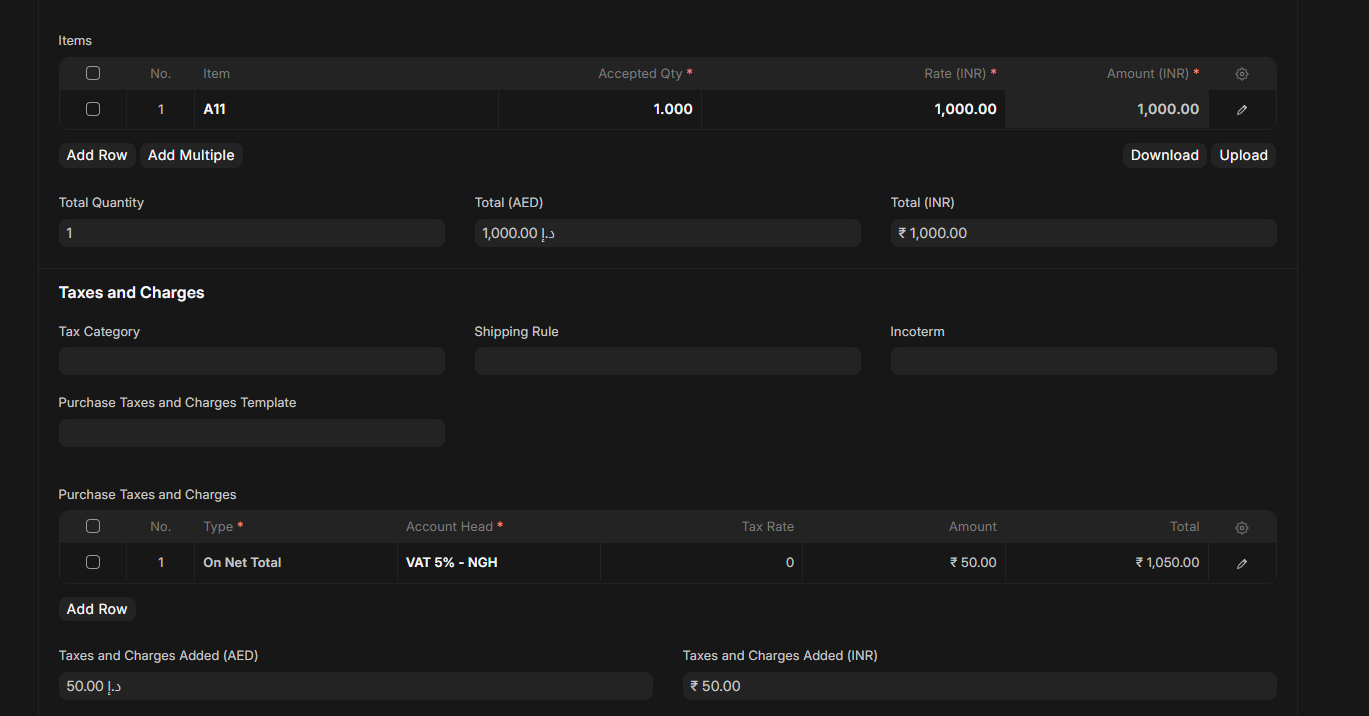
I have one issue with erpenext
I create one product with 5% tax and i link with Item tax 5% my duties and tax account only single ledger there select
is it fine for my tax calculation or need extra purchase and sales tax template required for tax posting ? so now my issue is i have 2 different tax % item with same invoice like 5% and 15% so item tax template i created 2 template with both linked with duties and tax ledger so how create purchase with this and how erpnext post my input and put put tax correctly both item in one invoices ?
If you have India Compliance installed, then the purchase taxes and charges templates should be auto populated with the instar and out state tax templates.
Once you select two line items for 5% tax (Amount 100) and 15% tax (Amount 100) “item tax templates”, then the total tax will be calculated as 100x5% + 100x15% = 20.
So total amount will be 200 + 20 (Tax).
If it is instate, this tax amount will be split as 10+10 for Central and State GST.
If it is outstate, tax will be 20 IGST.
No that all based on purchase tax template wise right ? my question why then item tax template in demo i saw item tax template choosing account type Tax but in tax side it should be post based on input or out put ledger that manage from purchase and sales tax template thne why required separate item taxt template thing and there only choose one account duties and tax only
If you want item wise taxes (Single invoice having multiple items of different tax rates) then you need item tax templates.
that understood but that how post input and out put side its posting directly duty’s and tax account only bcz item tax template for select one ledger with tax account if i chose pruchase tax template then ok i can post input side or out put side but that time why item tax template using so ones item tax template also need to define input or out put account but one item only choose single item tax not liek sale sand purchase wise so this area more confuse
Input or output tax is defined by the purchase and sales tax templates mapped in the purchase and sales invoice.
Item tax template is used to ultimately define only the percentage rate of tax.
So if entry create like this then it will go wrong bcz here item side tax took to purchase tax side but here should be select purchase tax template with asset side tax account right ?
 Each Item can have ONLY ONE Item Tax Template.
Not two (purchase + sales).
Not dynamic.
Only ONE.
Because of this, you cannot use Item Tax Template for both purchase and sales.
That’s why your confusion is happening.
 What ERPNext expects (REAL RULE)
ERPNext expects you to handle this like:
PURCHASE SIDE
- Use Item Tax Template
→ Ledger = Input VAT (Input Tax)
SALES SIDE
- Use Sales Taxes and Charges Template
→ Ledger = Output VAT (Output Tax)
→ MULTIPLE items can use same sales template
 Why ERPNext does this?
Because:
-
Purchases need Input VAT ledger
-
Sales need Output VAT ledger
-
If item had 2 templates → system will not know which one to apply
So ERPNext forces:
 Your exact problem now
Since your item has only ONE Item Tax Template, you linked Input VAT ledger.
So on Sales Invoice without Sales Tax Template, system will post:
 Sales VAT → Input VAT ledger (wrong)
 Correct Working Setup for VAT (Final Clear Workflow)
 PURCHASES
Use:
- Item Tax Template
Ledger: Input VAT (5% / 15%)
No Purchase Tax Template is required.
This is perfect for purchase.
SALES
Use:
- Sales Taxes and Charges Template
Ledger: Output VAT (5% / 15%)
DO NOT rely on Item Tax Template for sales.
FINAL RULE (IMPORTANT)
Item Tax Template = only for purchase side
because only one template is allowed.
Sales must ALWAYS use Sales Tax Template
otherwise VAT goes to wrong ledger.
 Required Change in Your ERP
To follow ERPNext logic perfectly:
-
Keep Item Tax Template connected to Input VAT
-
Always apply Sales Tax Template for sales invoices (5% or 15%)
-
Do NOT depend on item template for sales
so now i am stuck with this area if i have 2 item have 15% and 5% tax then how i post correctly input and out put ledger i should create 2 tax template for purchase and sales then post is fine so that time item tax template i should create with 2 ledger there only select duty and tax so then ones i select product item tam template is coming to purchase tax template table with duty’s and tax account then i remove that then again i add purchase tax template all are complected only so where i wrong ?