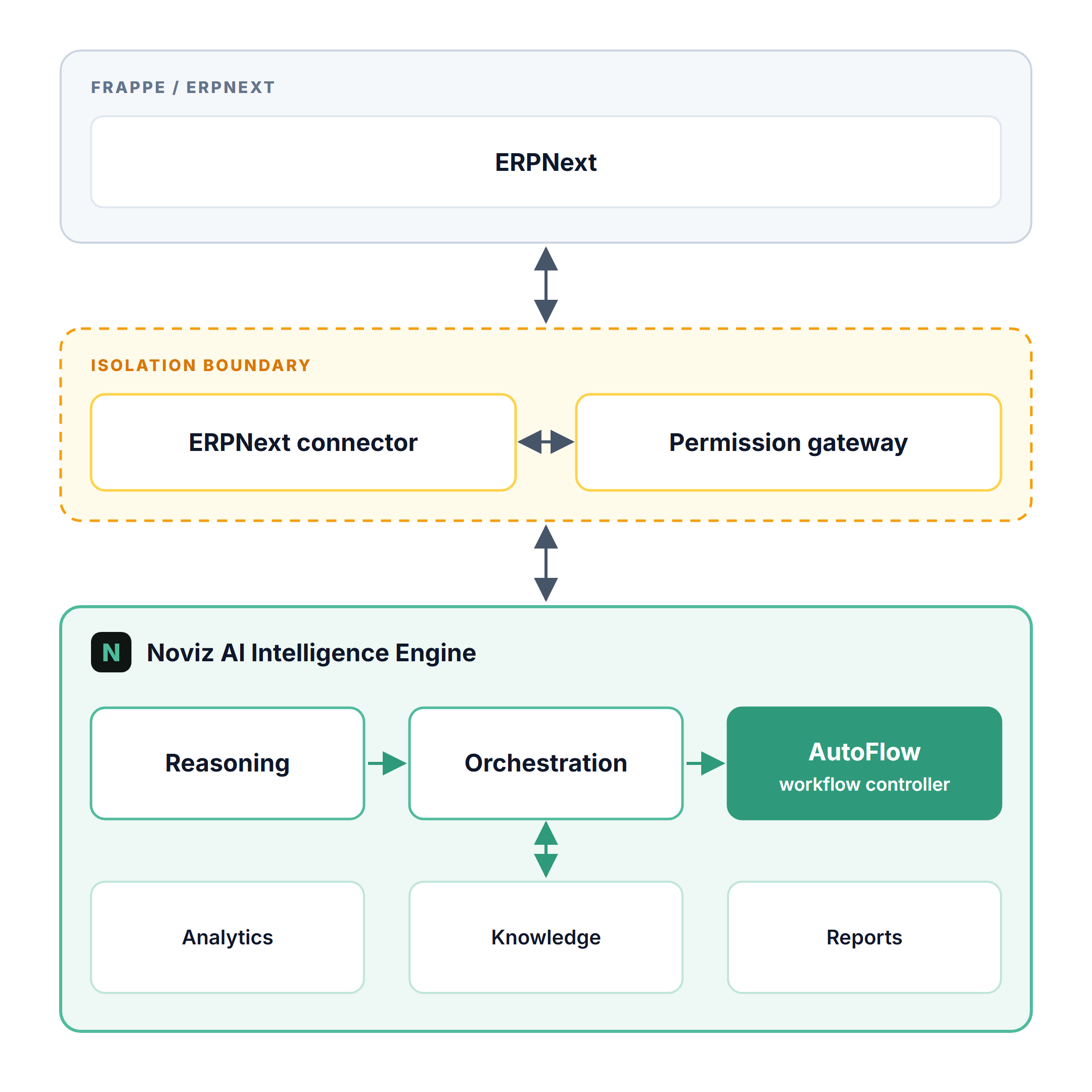
We’ve been working on Noviz AI, an AI integration for ERPNext, to explore how AI reasoning and workflow automation can work together with existing business data and processes.
One of the challenges we wanted to address is the effort involved in designing and maintaining AI-powered workflows for different business requirements. Instead of building every workflow as a separate solution, Noviz AI uses an intelligence and orchestration layer that can work with ERPNext through its existing permissions and data access mechanisms.
The architecture brings together AI reasoning, orchestration, workflow control, analytics, knowledge, and reporting. The idea is to make it easier to translate business requirements into useful, domain-specific workflows without unnecessarily complicating the underlying ERP system.
We’re sharing the architecture to explain our approach and would be interested in hearing how others in the Frappe community are approaching AI integration, workflow automation, and permission-aware execution in ERPNext.
Permission-aware execution needs to be enforced at each tool call, not just in the orchestration layer’s initial context. I’d route actions through whitelisted methods that use the current user’s permissions, and require human confirmation for writes such as submitting invoices or changing payroll. Logging the user, inputs, and resulting document would also make failures auditable.
Agree on checking permissions at every tool call. One more line worth drawing: let the agent create drafts only. It can prepare a Purchase Invoice or a Material Request, but a person presses Submit. ERPNext’s docstatus already gives you that boundary, and the version log shows who approved what. Has anyone set limits per agent role rather than per user? An agent acting as a full Accounts User feels like too much.
The thing is, each DocType already has its own enforced permissions, validations, and error handling. Why should we waste time recreating repetitive logic that is already part of the system and properly recorded?
It is about how ERPNext workflows are customized or standardized. The real question is how effectively you can maximize the capabilities of your customized workflows.
Most AI engineers try to build their own workflows and their own logic in the orchestration layer. This can destroy the entire ecosystem and years of hard work that ERP systems like ERPNext have maintained.
The best approach is to work within the existing workflows and make them more efficient through better control of prompts and instructions at the module and submodule levels, fully utilizing the capabilities of the existing customized workflows.