Need Help with ERPNext Script Report – AI Suggestions Didn’t Fix It

Hello Frappe Community,

I’ve been attempting to create a Script Report in ERPNext to display some basic metrics (e.g., attendance details, salary info, etc.). I received a detailed solution from an AI assistant (see code snippet below), but my script still isn’t working—it always shows “Nothing to show” or yields no data. Here’s a summary of what I’ve tried:

  1. Used the AI-generated script: I pasted it exactly in the “Query/Script” box for a new Script Report (Report Type = “Script Report,” “Disable Prepared Report” checked).
  2. Verified Data & Permissions:
  • Linked my user to an Employee record.
  • Gave “Read” permission on relevant doctypes (Employee, Attendance, etc.).
  • Added or tested sample data in “Attendance” or “Employee Checkin” (in case the script needs real records).
  1. Rebuilt Assets (if self‐hosted) and reloaded the page.
  2. Embedded the report in my “Employee Dashboard” workspace.

Despite all this, the report still shows no rows or “Nothing to show.” I’ve combed through the AI’s troubleshooting steps (like checking for a forced row of data, verifying code syntax, etc.), but I’m stuck.


AI-Generated Script Snippet (Sample)

python

Copy

def execute(filters=None):
    columns = [
        {"fieldname": "invalid_count", "label": "Invalid Punches", "fieldtype": "Int"},
        {"fieldname": "late_count", "label": "Late Marks", "fieldtype": "Int"},
        {"fieldname": "unpunched", "label": "Unpunched Days", "fieldtype": "Int"},
        {"fieldname": "today_checkins", "label": "Today's Checkins", "fieldtype": "Int"}
    ]

    user = frappe.session.user
    employee = frappe.db.get_value("Employee", {"user_id": user}, "name")

    if not employee:
        frappe.msgprint("No Employee Found for user: {}".format(user))
        data = [{"invalid_count": 0, "late_count": 0, "unpunched": 0, "today_checkins": 0}]
        return columns, data

    # Some date logic (last 30 days, etc.)
    # Some counts on Attendance or Employee Checkin
    # Return a single row with the counts
    data = [{"invalid_count": 2, "late_count": 1, "unpunched": 3, "today_checkins": 0}]
    return columns, data
It looks like you’ve defined a function but don’t ever call it?

Bro, please explain the entire process of creating a report script in ERPNext

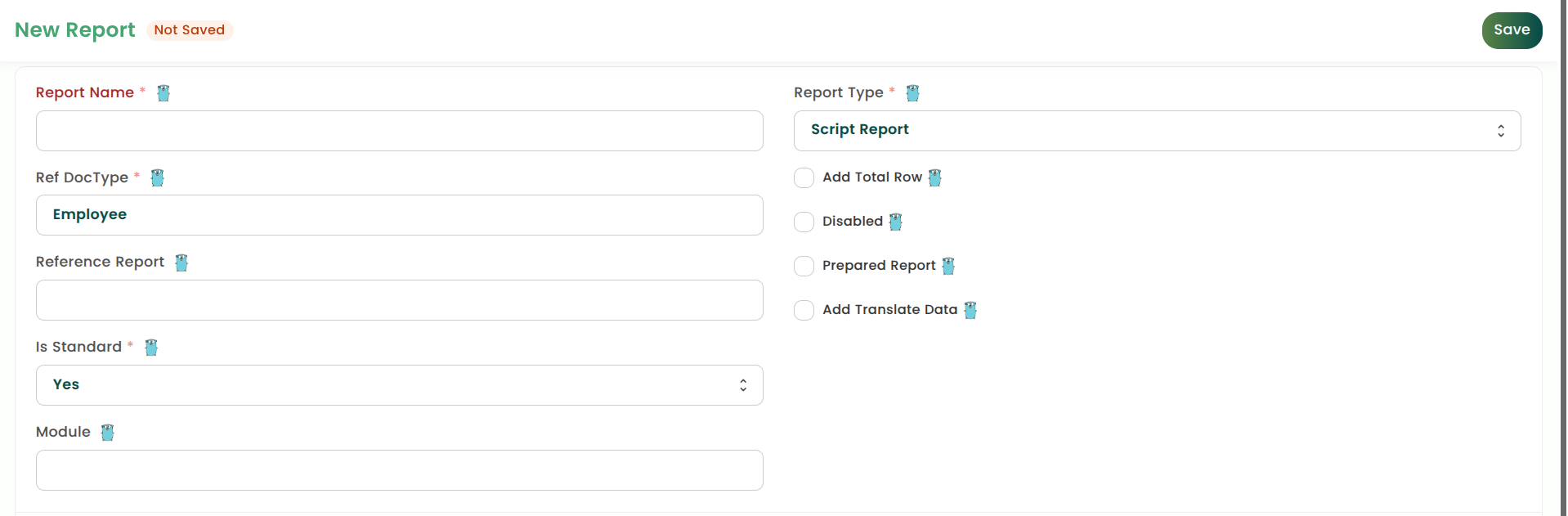
I’m trying to create a new report, and here’s what I’ve been doing:

  • I created a new report.
  • I selected Script Report as the report type.
  • I wrote the report logic inside the script.

But nothing is working—I’m not getting any output.

Can you please guide me through the actual, correct process step by step? What am I missing? I just want this report script to work properly.

Here’s a guide I wrote a few years back. It should all still work.

This could be related to an issue that I have as well where frappe is editing/referring to the code in your /env/lib/python/site-packages folder. I described the issue here Script Report not creating Boilerplate in correct directory

Basically ensure that your module is installed as an editable package. Easiest way to do this is define a pyproject.toml with the same build-system content as the one in frappe/erpnext repository

Follow the below approch to create Script report . @prince1

Go to Report scren anf fill details and save . In code editor it will generate .js, .py, .json file for this report

Js file

frappe.query_reports["Report name"] = {
	filters: [
		{
			fieldname: "from_date",
			label: __("From Date"),
			fieldtype: "Date",
			default: frappe.datetime.get_today(),
			reqd: 1
		},
		{
			fieldname: "to_date",
			label: __("To Date"),
			fieldtype: "Date",
			default: frappe.datetime.get_today(),
			reqd: 1
		},
		{
			fieldname: "employee",
			label: __("Employee"),
			fieldtype: "Link",
			options: "Employee"
		}
	]
};


Python file code

import frappe
from frappe import _
from frappe.utils import date_diff


def execute(filters=None):
    filters = frappe._dict(filters or {})
    validate_filters(filters)

    columns = get_columns()
    data = get_data(filters)

    return columns, data


def get_columns():
    return [
        {
            "label": _("Employee"),
            "fieldname": "employee",
            "fieldtype": "Link",
            "options": "Employee",
            "width": 200,
        },
    ]


def get_data(filters):
    conditions = []
    values = {}

    if filters.get("employee"):
        conditions.append("employee = %(employee)s")
        values["employee"] = filters.employee

    conditions.append("date_of_joining BETWEEN %(from_date)s AND %(to_date)s")
    values.update({
        "from_date": filters.from_date,
        "to_date": filters.to_date,
    })

    where_clause = " AND ".join(conditions) if conditions else "1=1"

    return frappe.db.sql(
        f"""
        SELECT
            employee
        FROM `tabEmployee`
        WHERE {where_clause}
        """,
        values,
        as_dict=True,
    )


def validate_filters(filters):
    from_date = filters.get("from_date")
    to_date = filters.get("to_date")

    if not from_date or not to_date:
        frappe.throw(
            _("Both From Date and To Date are required."),
            title=_("Missing Date Filters"),
        )

    if date_diff(to_date, from_date) < 0:
        frappe.throw(
            _("To Date cannot be before From Date."),
            title=_("Invalid Date Range"),
        )

    if date_diff(to_date, from_date) > 180:
        frappe.throw(
            _("Date range cannot exceed 180 days."),
            title=_("Date Range Limit Exceeded"),
        )


Now refresh the report and check