Hi,
I’ve seen some similar problems but without a solution.
My Situation:
I need a DocType where I can add multilple items (AssetDefinition) that have a Parent-Child structure (Category-SubCategory).
To simplify, imagine that I need to add a listo of assets with a Name, a Brand and a Model, if I select a Brand, the dropdown shows me just Model associated to that brand.
DocType “SubCategory” (is Child Table = True)
- Field 1: Name (Data)
DocType “Category” (is Child Table = False)
- Field 1: Name (Data)
- Field 2: SubCategories (Child Table of “SubCategory” DocType)
DocType “AssetDefinition” (is Child Table = True)
- Field 1: Name (Data)
- Field 2: Category (Link of “Category” DocType)
- Field 3: SubCategory (Link of “SubCategory” DocType)
DocType “ItemList” (is ChildTable = False)
- Field 1: Name (Data)
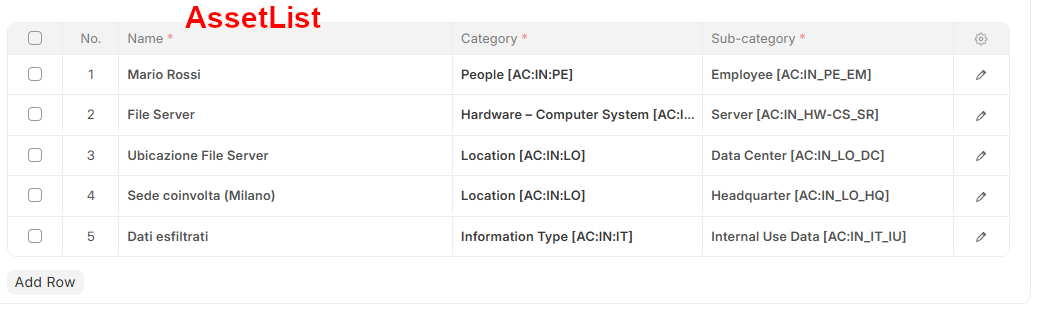
- Field 2: AssetList (Child Table of “AssetDefinition” DocType
The ItemList form appear like this:
When I add a new row it appears like this:
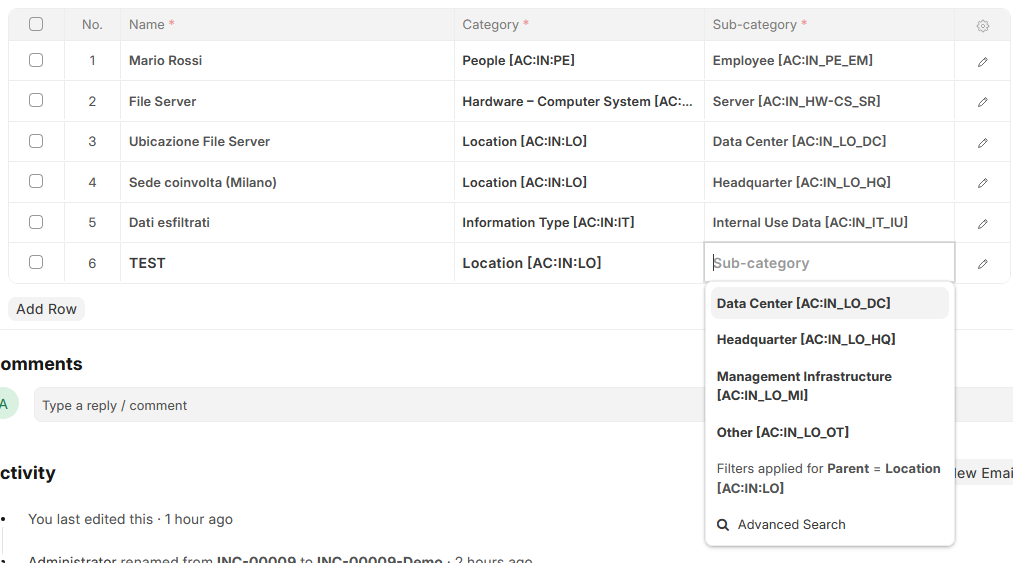
Using Administrator all is working fine, I can select Category, then SubCategory is filtered with a Client Script based on the selected Category, but when I try to add a row from a User (that has permissions on the ItemList (the main DocType) and on the Category), I receive this error when trying to select the SubCategory:
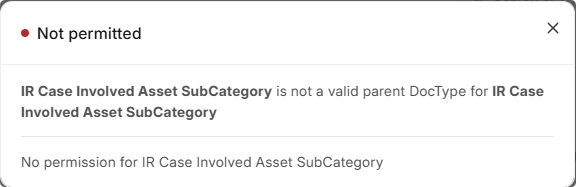
I can’t provide direct permission on “SubCategory”, because it’s a Child Table.
How can I solve this?
Thanks