Print Designer from Mararshi Patel

Watched the Video on Youtube: https://www.youtube.com/watch?v=XpmrLzbianE

Starting to make new documents, in the video I see the two created fields with name and date filled on the bottom from the form right after the name and date are selected, In my case those fields are not with the data as seen in the video but only see
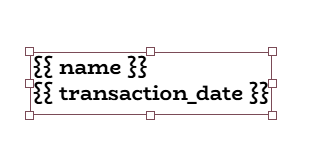
What steps I miss to make the form as seen in the video?

It should be:

{{ doc.name }} or {{ doc.field_name }}

I am starter using NextErp just finished the installation and could make some items in the factory module

There is a form called Reguest for Quotation, this form I used in Print Designer to make an new design while watching the video and stumbled over the not filled-in fields

No idea how to handle it