I want to try out ERPNext / Frappe for use in my company.
The problem I’m currently facing is that there are seemingly 20 different ways of installing ERPNext with frappe bench, bench itself is straight forward but installing it in an updatable manner not really (at least not to me).
What I thought is the go-to way was the easy install script as it also had an option to update, yet I did not really find the docs on its usage.
So I went and exec into the bench after using the easy install script and installed my needed apps, so far so good but then after doing that I can no longer use the easy installation script’s update function as that fails because the apps were not installed through it?!
So can someone please tell me what the best way to set this up reliably for production use with an easy way to update it is?
Docker can definitely be used. Most of the projects I’ve worked on required customisation to certain degree. What that means is pulling code from different branches from a Git repo. The setup I’ve suggested was taking that into consideration. If you’re mostly doing vanilla installation – go for Docker no issues.
Best way, reliably, easy;
Keywords for using frappe.cloud which is cloud hosting provider specifically for frappe framework and its apps. Since you are still experimenting go for the 5$ plan
For production, Docker seems to be the best approach in my opinion. Build your custom image and start. If you need to add an app, edit the apps.json, rebuild your image, then get inside the container and run: bench --site your_site install-app your_app Migrate, clear the caches and you’re good.
Since you handle critical data I would recommend having some devops on your team to handle the local instance since managing frappe might not be the most straightforward specially when updating major versions.
The official docs recommend Docker, because no one wanted to maintain + document the other alternatives. Including the “easy install” script.
So although bare metal is not “recommended”, there’s absolutely nothing wrong with it. I’ve been installing ERPNext that way for 8 years. Fundamentally, all you need to install Frappe/ERPNext are these components. They can coexist on 1 virtual machine, or dozens. Doesn’t matter so long as they can communicate with each other.
What’s tricky is the details. Some people host on Ubuntu 20, or 22, or 24. Some people host on Debian, or Arch, or even MacOS. And even if you and I are both using the same Ubuntu? Different cloud-providers have made their own alterations. So there’s no guarantee we’re 100% identical.
The details and differences are what cause headaches during a manual installation. You can find dozens of guides here on the forums. But they still may not work perfectly. Troubleshooting requires a good working knowledge of every component … plus Frappe/ERPNext themselves. Which people installing for the first time will not have.
Docker simplifies a lot of this, and avoids many of the dependency conflicts. (although sometimes introduces new, Docker-based problems and headaches)
@imbra The last thing you want to do in a production environment is installing anything directly on the host and dealing with the unpredictable Linux dependency hell.
We are using LXD containers in production for several years now - our install is vanilla - we had one custom app on one of our websites - for a while. Mariadb is hosted in a separate container which is shared with wordpress container. Haproxy / Nginx container can be used as frontend for reverse proxy to direct traffic to different containers. For a small company like ours - I find that Docker takes up unnecessary overhead and requires you to learn so many commands. LXD containers are not application based - so take up more storage space than docker as OS has to be installed for each container - but as I understand the LXD hypervisor is more efficient. You can create clusters, replication, schedule automatic snapshots, remote backup, etc. quite easily… All depends on your requirements…
Interesting, I have considered LXD too, but later found that its containers aren’t minimal. They typically include a full init system and other OS components, which means they use more memory than Docker containers.
Also found LXD less intuitive for container networking and configuration; you often need to set up bridges, profiles, and other details manually, with no simple default like Docker’s bridge network.
For me, the best middle ground is Podman it offers the same OCI-compatible containers and performance as Docker, but without the daemon and rootless. Better security and better performance.
Docker is indeed the recommended method, however, the setup is not necessarily straightforward since there are many possibilities for configuration and environment scenarios (I.e. SSL, proxy, local network access, custom domain, etc).
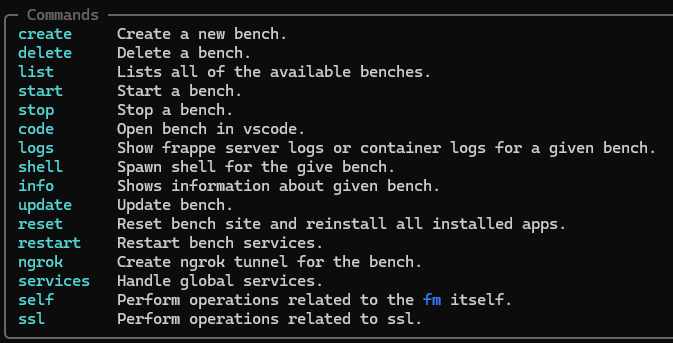
There is, however, a much easier way to use the docker images, which I’m surprised has not been mentioned yet in this thread. I’ve been using Frappe Manager for a few months now, and it has really simplified everything for me when it comes to development and production setups.
There are a few ways to install Frape Manager, however, I find the install script to be the easiest, especially when running on Linux.
The fm command then gives you all the goodies like:
Ok, lets say I create a new site test.example.com on my office server. Now I want to use coolify, pangolin or cloudflare tunnel to point my domain. How would I do that with fm.