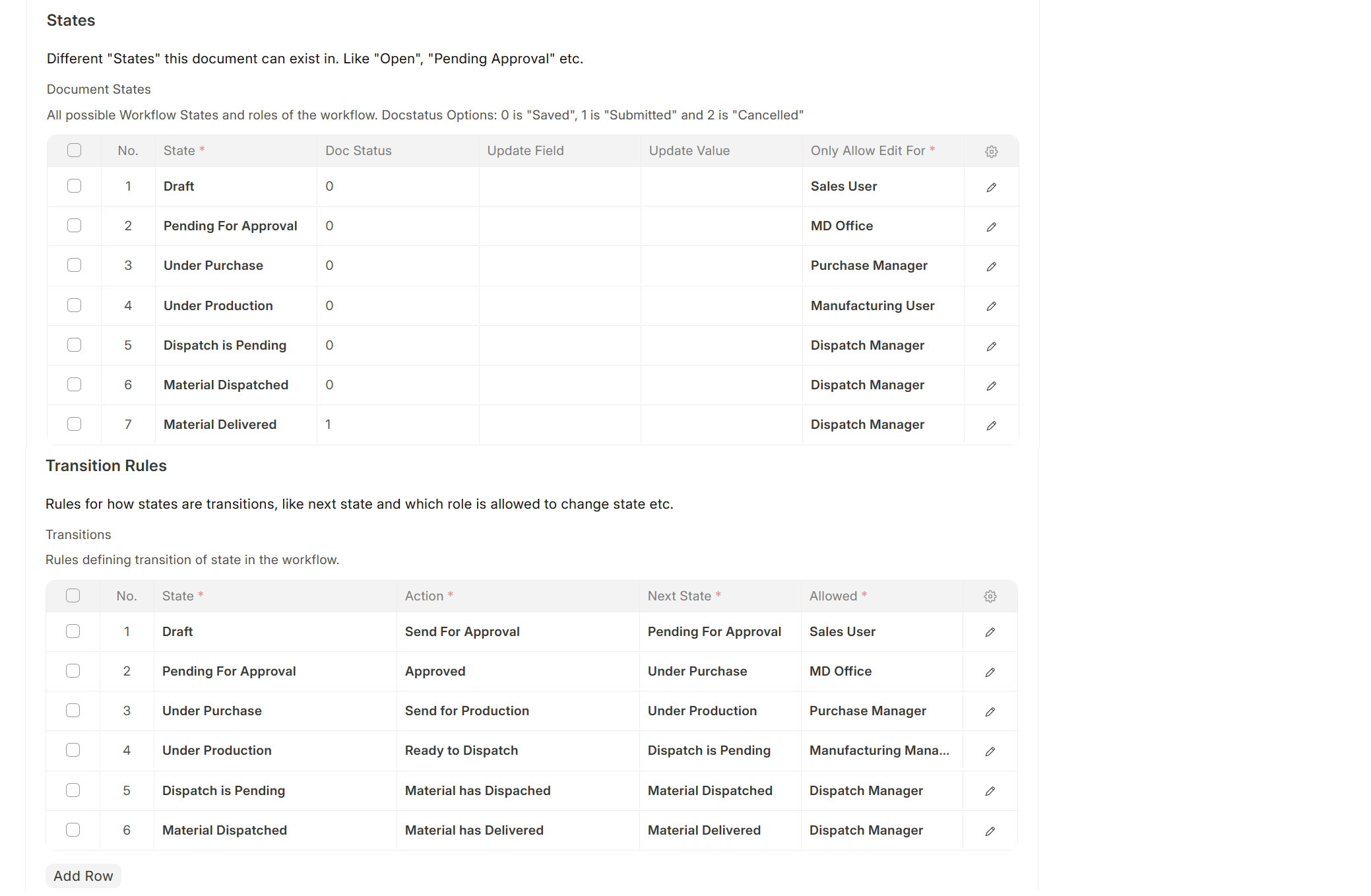
I am trying to design a detailed Sales Order Workflow in ERPNext v15, but I am facing challenges in getting the transitions and role-based buttons to work properly.
Here is my scenario:
Sales User creates the order in Draft and sends it for approval.
MD Office reviews in Pending for Approval and approves the order.
Purchase Manager handles purchase and then sends it to production.
Production User moves it to Inspection Required (or directly to Inspection Not Required if not applicable).
Inspection User reviews and either marks Inspection Done or Inspection Not Required, then sends to MD Office for payment check.
MD Office checks payment and then moves it to Ready for Dispatch.
Dispatch Manager handles dispatch steps:
Can mark Material Partially Dispatched → Material Partially Delivered (looping until complete).
Or fully dispatch → fully deliver.
Final state is Material Delivered with docstatus = 1 (submitted).
I also want to ensure that partial dispatch/delivery keeps the Sales Order open until all items are delivered.
Can someone please guide me on the best way to model this workflow in ERPNext v15? Am I missing anything in my state/transition setup that would prevent the workflow buttons (like Send For Approval) from showing up correctly for the assigned roles?
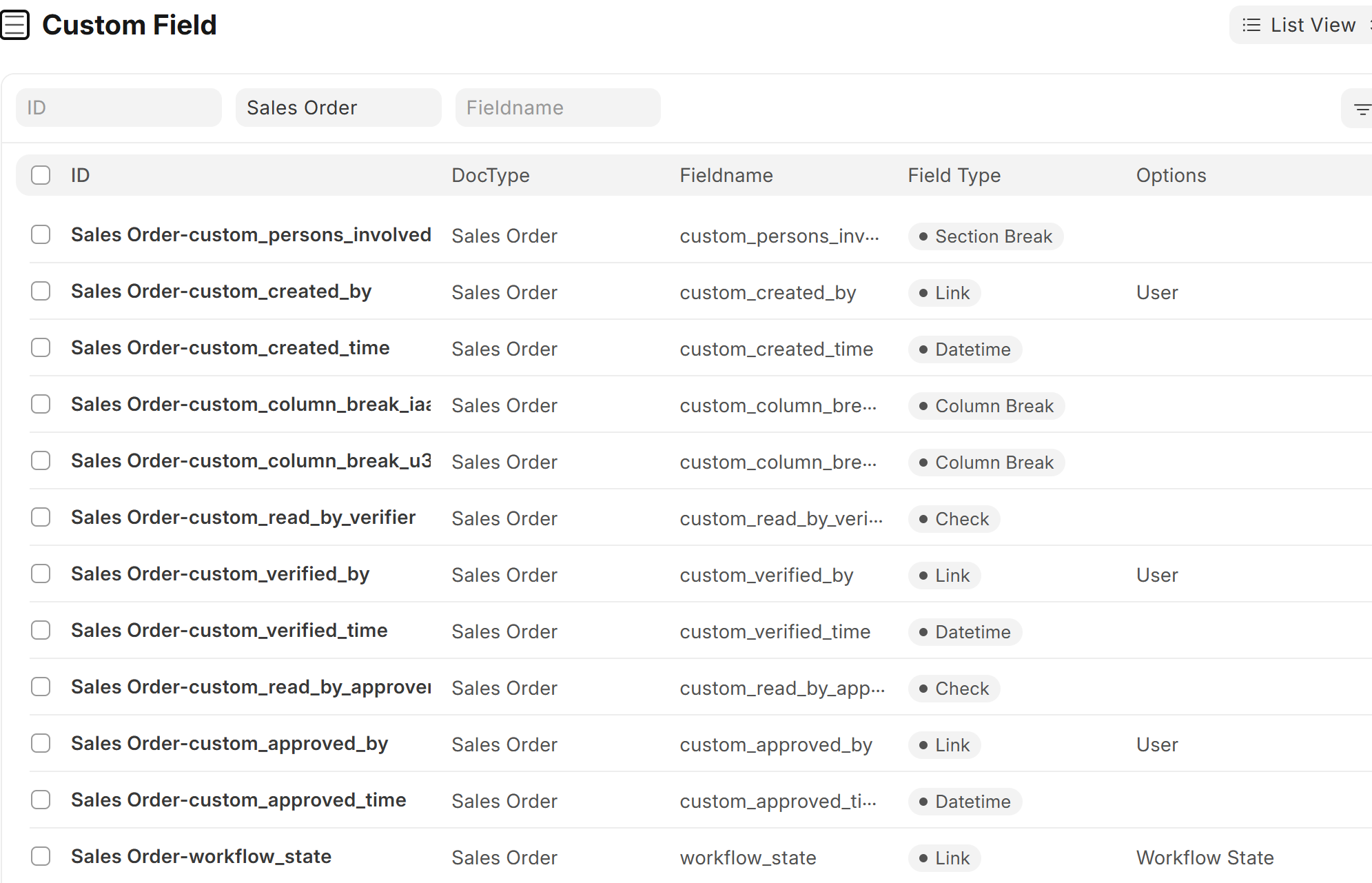
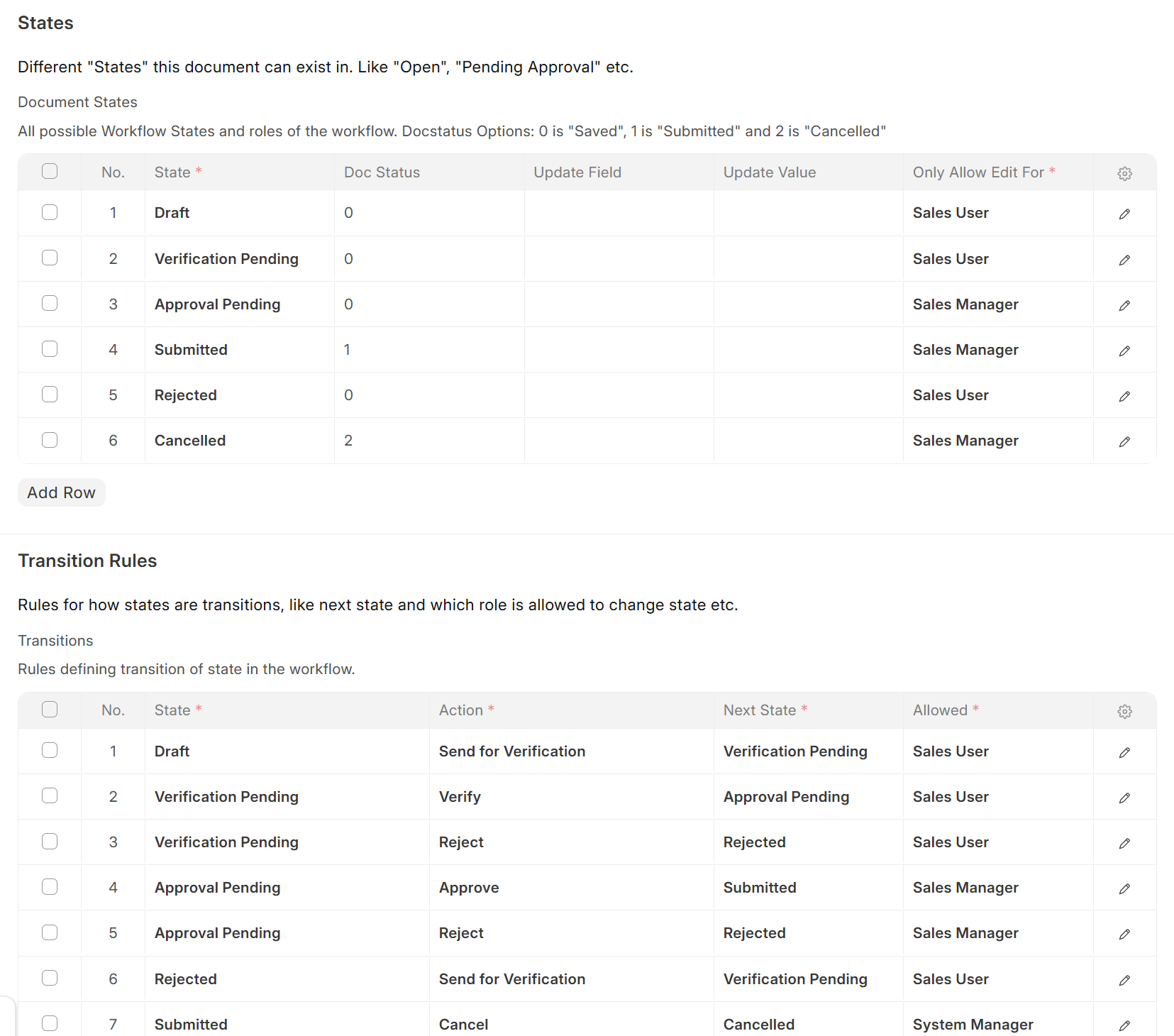
I have implemented an ISO 9001:2015 compliant ERP in our Company. To accomplish that we have to track the Creator, Verifier and Approver of every document. So for every Sales Order, Work Order, Delivery Note, Sales Invoice, etc these fields have been created, Workflow has been made as per user role profiles, client script has been made to capture which user is the creator/verifier/approver. I am attaching screenshots and code for the same. You can modify it according to your use easily.
frappe.ui.form.on('Sales Order', {
    validate: (frm) => {
        // When Document is initially created:
        if (frm.doc.workflow_state === 'Draft') {
            // Only when doc created for the first time:
            if (!frm.doc.custom_created_by){
                frm.doc.custom_created_by = frappe.session.user;
            }
            // Enter time if user has not selected it:
            //if (!frm.doc.custom_created_time){
                frm.doc.custom_created_time = frappe.datetime.now_datetime();
            //}
        }
        // When Document is in 'Verification' & 'Read by Verifier' checkbox is selected:
        else if ((frm.doc.custom_read_by_verifier == 1) && (frm.doc.workflow_state === 'Verification Pending')){
            frm.doc.custom_verified_by = frappe.session.user;
            // Only enter date & time if user has not manually entered it:
            //if (!frm.doc.custom_verified_time){
                frm.doc.custom_verified_time = frappe.datetime.now_datetime();
            //}
        }
        // When Document is in 'Verification' & 'Read by Verifier' checkbox is NOT selected:
        else if ((frm.doc.custom_read_by_verifier != 1) && (frm.doc.workflow_state === 'Verification Pending')){
            frm.doc.custom_verified_by = null,
            frm.doc.custom_verified_time = null;
        }

        // When Document is in 'Approval' & 'Read by Approver' checkbox is selected:
        else if ((frm.doc.custom_read_by_approver == 1) && (frm.doc.workflow_state === 'Approval Pending')){
            frm.doc.custom_approved_by = frappe.session.user;
            // Only enter date & time if user has not manually entered it:
            //if (!frm.doc.custom_approved_time){
                frm.doc.custom_approved_time = frappe.datetime.now_datetime();
            //}
        }
        // When Document is in 'Approval' & 'Read by Approver' checkbox is NOT selected:
        else if ((frm.doc.custom_read_by_approver != 1) && (frm.doc.workflow_state === 'Approval Pending')){
            frm.doc.custom_approved_by = null,
            frm.doc.custom_approved_time = null;
        }
    },

    before_workflow_action: (frm) => {
            //console.log(frm.selected_workflow_action);
            if ((frm.selected_workflow_action === 'Verify') && (frm.doc.custom_read_by_verifier != 1))
            {
                frappe.throw("Please tick the 'Read by Verifier' checkbox at the bottom of the page !");
            }
            else if ((frm.selected_workflow_action === 'Approve') && (frm.doc.custom_read_by_approver != 1))
            {
                frappe.throw("Please tick the 'Read by Approver' checkbox at the bottom of the page !");
            }
    }
});

Hope this solves your requirement.