Hi everyone,
I’m facing a strange issue in Frappe Studio related to a search input filter.
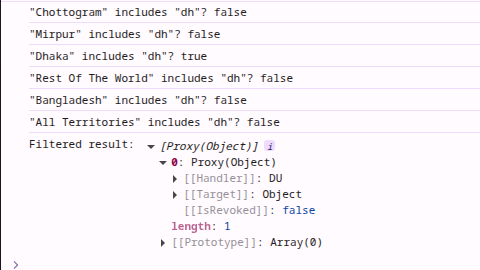
When I type something (for example “dh”), the console log shows the correct filtered result — only matching territories are displayed correctly in the log.
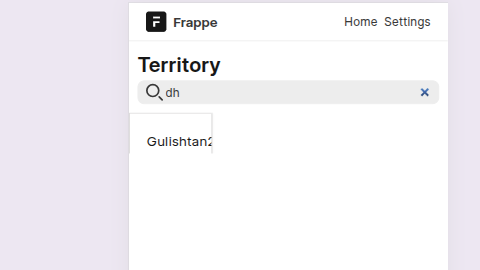
However, the UI list (the displayed result under the search box) shows a completely wrong item that doesn’t match the filter.
Here’s my code:
if (territory_search_input.value == "") {
  territoryList.value = Territory.data
  console.log('Empty search - showing all:', Territory.data)
} else {
  console.log('Search input:', territory_search_input.value)
  console.log('All territories:', Territory.data.map(t => t.territory))

  const filtered = Territory.data.filter(ter => {
    const match = ter.territory.toLowerCase().includes(
      territory_search_input.value.toLowerCase()
    )
    console.log(`"${ter.territory}" includes "${territory_search_input.value}"? ${match}`)
    return match
  })

  console.log('Filtered result:', filtered)
  territoryList.value = filtered
}
 Console Output (Correct)
Only Dhaka matches dh.
UI Output (Wrong)
It shows another item (e.g., “Gulistan”) that doesn’t match the search term.
Screenshots:
 Question:
Why is the UI showing incorrect results even though the filtered array is correct in the console?
Is this a reactivity or Proxy issue in Frappe Studio?
Any help or suggestions would be appreciated