I have a BOM with a series of operations, each with their own sequence ID. The second operation cannot take place before the first, the third cannot before the second, etc.
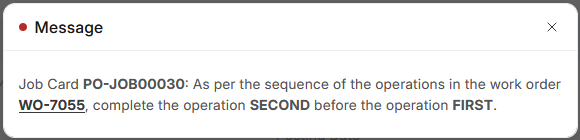
During manufacturing, after the first operation is done, the second one will be done immediately after, for each item produced. The operations be done simultaneously, so I would like to start the job cards for them simultaneously also. Upon trying to start the second job card (with the Start Job button) however, I get this error popup:
It is no problem to complete the first job card before completing the second, but I need to start the second before completing the first. How do I do this?
I am using ERPNext 16
You can set both the operations with the same sequence ID. Then you can start either one first.
I would still like to make sure the operations are started in order. If a later operation is started first, it will appear to have taken longer than it really has, given the operation’s manufacturing process for each individual item can’t happen until the operations before it have.
Ideally I could…
- Start Operation 1
- Start Operation 2
- Start Operation 3
- Finish Operation 1
- Finish Operation 2
- Start Operation 4
- Finish Operation 3
- Finish Operation 4
This reflects the manufacturing process:
- the first item has its first operation
- the second item has its first operation, the first item has its second operation
- the third item has its first operation, the second item has its second operation, the first item has its third operation
- etc.
Sometimes the operations won’t be simultaneous, if a machine is busy for example, so my other option of summarising all the operations as one isn’t perfect either.