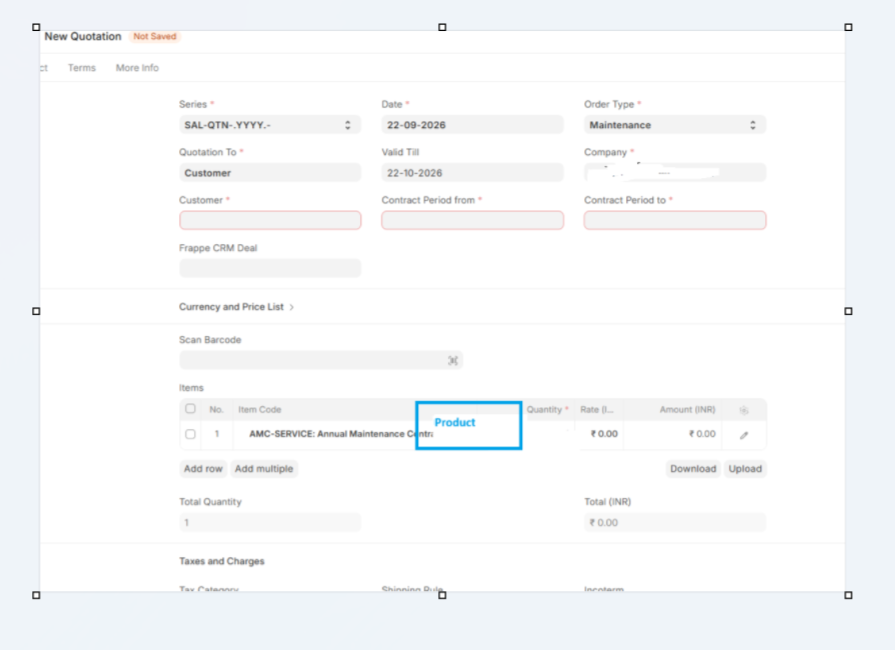
Hello Developers
there is one case in Quotation
if order type =maintanance
there is one field (Product,datatype-text) it should visible in item grid after item code
if not order type =maintanance
then field(product) should not visible
Grid view based on the header level field is possible but based on item code is something the framework lacks.
To toggle grid view property properly, remove all in liste view or grid view property from the child fields and on selection of order type re render the child table with custom grid views.
try using
depends_on => eval:parent.order_type [ Fields-name ] = maintanance
syntax : eval:parent.
1 · hooks.py — one line inside the existing doctype_js dict:
"Quotation": "public/js/quotation.js"
2 · /public/js/quotation.js — new file:
frappe.ui.form.on("Quotation", {
refresh(frm) {
pms_quotation_product_column(frm);
},
order_type(frm) {
pms_quotation_product_column(frm);
},
});

function pms_quotation_product_column(frm) {
const gf = frm.fields_dict && frm.fields_dict.items;
if (!gf || !gf.grid) return;
const grid = gf.grid;

const show = frm.doc.order_type === "Maintenance";

try {
	grid.update_docfield_property("custom_product", "in_list_view", show ? 1 : 0);
	grid.update_docfield_property("custom_product", "hidden", show ? 0 : 1);
} catch (e) {
	return;
}
grid.visible_columns = [];
if (typeof grid.reset_grid === "function") grid.reset_grid();
else grid.refresh();

}