BUG : Reconciliation entries against Opening Entries shows in Opening Cr/Dr Column.
An entry-handling issue exists in ERPNext where the system-generated GL entries created during Payment Reconciliation inherit the Is Opening = Yes flag from the parent Payment Entry. Consequently, instead of treating the allocation adjustment as a current-period transaction under the Debit/Credit columns, the Trial Balance alters the historical Opening Balance columns. This behavior changes the financial opening snapshot simply because an opening advance was later reconciled against a current invoice.
Issue Detailed Description:
To migrate the open advances received from the customer as a closing balance for 31/3/26, I created a
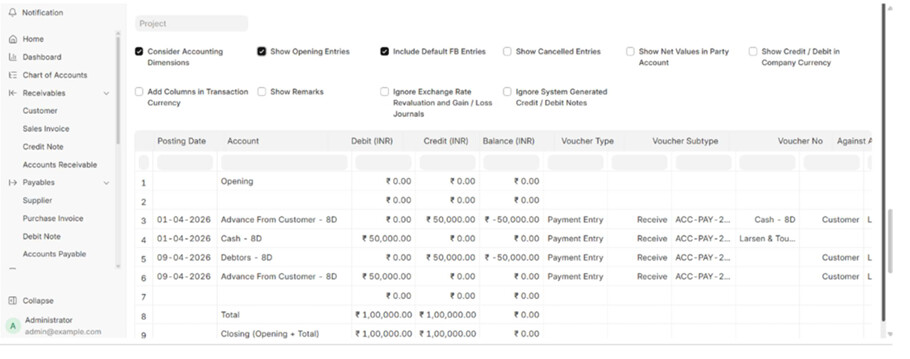
payment entry of the date 1/4/26 keeping the Is Opening “Yes”, I used the account “Advance from customer” account as my balance as on 31st march was in that account. the accounting entry as on 1/4/26 as an opening was generated as Cash account debit and Advance received from customer got credited, and on 9th April I generated a sales invoice that Debtor Account debited and Sales account credited. Still kept Unreconciled. This was absolutely correct, and at this stage the trial balance was also showing correct.
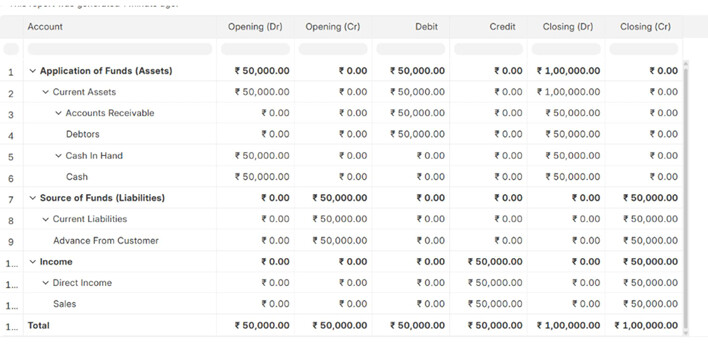
Once I did payment reconciliation on on 9th april itself, my opening for debtor account which was 0 is now
showing 50,000. This creates a wrong image of the same report in the different time. Opening balance cannot get changed for the current transactions. Below is the trial balance after reconciliation.
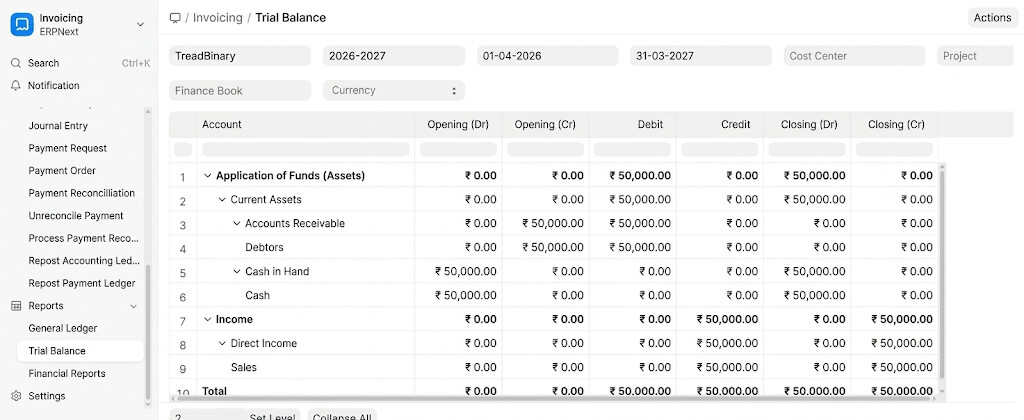
This is because the payment entry which is marked as Is opening “yes” is updated, however the dates of the GL
entries are correct but trial balance is showing in opening section instead of debit credit section.
Step to Re-Create
Select the checkbox for ‘Book Advance Payments in Separate Party Account’ in Organization > Accounts tab.
Set the respective Default Advance Received Account/Default Advance Paid Account.
-
Create an is opening payment entry with separate advance account as on 1/4/26
-
Create the Sales invoice with the debtors account as on 9/4/26
-
Check the trial balance without payment reconciliation - u will be able to see the correct trial balance
recorded in their respective accounts. -
Do the payment reconciliation and then again see the trial balance, now it is incorrect as the advance
from customer account which was initially there in the opening Debit side, is now not there, and the Debtor account which was 0 in opening credit which shows value now.
Current behavior:
Changing the opening trial balance account balances due to current period transactions.
Expected behavior:
Should not change the value of opening.
This will be sorted if the reconciliation entry, which is happening after payment reconciliation, should not be tagged as is opening.
Module : Accounts
Version
Frappe Version - 15.34.1
ERPNext Version - 15.29.3