As far as Link type is concerned, the options should contain a valid DocType name such as Customer or Supplier. Once you do it, and if you try it on the form, it shows you the dropdown list with the names of current documents made.
this name is the exact name of the attribute in the DB for the doctype which is stored as a table. Let me explain with an example.
This is from Customize Form on Customer Doctype
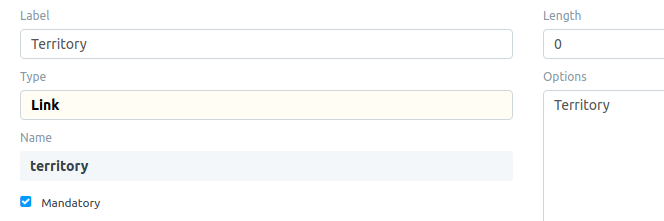
Now, the same in Database
MariaDB [627c579cf3496713]> desc `tabCustomer`
    -> ;
+------------------------------------------+---------------+------+-----+----------+-------+
| Field                                    | Type          | Null | Key | Default  | Extra |
+------------------------------------------+---------------+------+-----+----------+-------+
| territory                                | varchar(140)  | YES  |     | NULL     |       |
Hence, name is the label of the field in the table stored in DB.
If you change name, then you are changing the schema of the database, and in case you already have a lot of data, many things could break unless you manually fix them.
But, if you are in developer mode and also if you have all the correct roles, Edit Doctype will let you change the fieldname too but again that is on you adjust other doctypes or reports that may be using this field.
For the non-existent case,
If you are trying to create a new custom field via Customize Form, then this name is not available to you for editing. When you update, you will find that this will be a lowercase version of what you write in Label with spaces replaced by underscores.
You don’t need a password for protecting documents. You can restrict them on the basis of Roles and User Permissions.
You can set permission levels on different fields. These will help you understand this better.
https://erpnext.org/docs/user/manual/en/setting-up/users-and-permissions
Also, since you are into customizing you should have a look into Custom apps and Fixtures. These will help you preserve your customizations in cases of updates to ERPNext.
If you are on developer mode, don’t use edit doctype on the default documents, but customize form only and export them to your own app.