Understanding before_workflow_action in Frappe
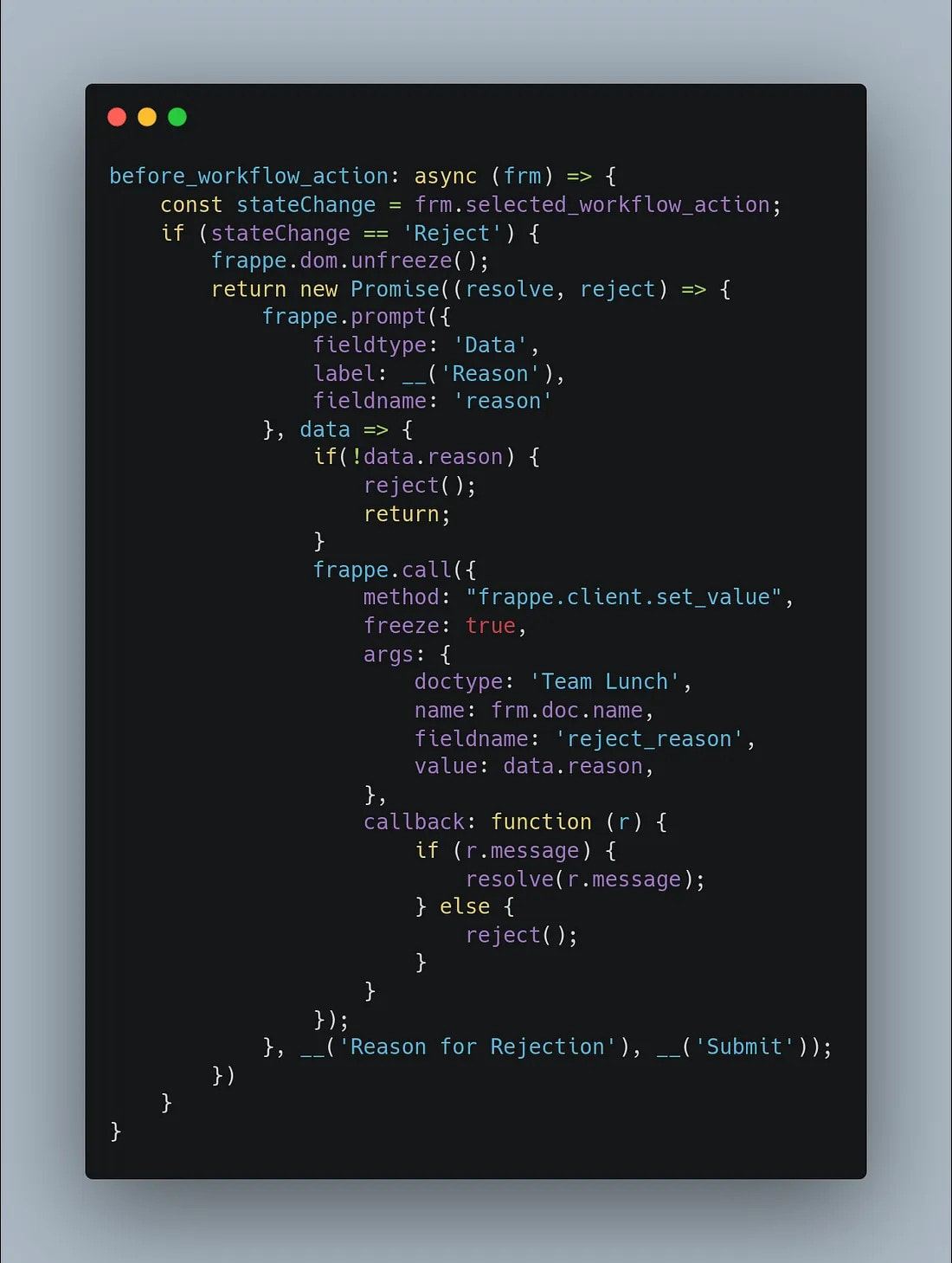
In Frappe Workflow, whenever you click Approve, Reject, or any workflow button, Frappe gives us a special hook called before_workflow_action.
This hook runs just before Frappe sends your workflow action to the server.
Think of it like a security guard standing at the gate, checking if everything is correct before allowing the action to proceed.
What Actually Happens Internally?
When you click a workflow button:
- Frappe freezes the screen (to avoid double-clicks).
- Frappe stores the button name in
frm.selected_workflow_action
(Ex: “Approve” / “Reject”). - Frappe runs your before_workflow_action script.
- If your script says OK, then the server workflow is applied.
- If your script says STOP, the workflow does not continue.
- After the server finishes, after_workflow_action runs.
So your hook is the last checkpoint before Frappe commits the workflow.
Why do we even need before_workflow_action?
Use it when you want to:
- Validate user input before allowing workflow
- Ask for confirmation (Yes/No)
- Ask for extra information (like “Rejection reason”)
- Stop workflow if something is not correct
- Run asynchronous operations like API calls
The Most Important Concept: It Can Be Asynchronous
This hook supports async code.
Which means you can:
- show dialogs
- wait for user input
- call APIs
- run background logic
And only AFTER all that, allow or stop the workflow.
That’s why we return a Promise.
Why Do We Return a Promise?
Because Frappe must wait for your operation.
Example:
If you ask the user: “Please enter rejection reason”
The workflow must pause until user submits the dialog.
JavaScript normally does not wait.
So we return a Promise to tell Frappe:
“Don’t continue the workflow. Wait until I resolve this promise.”
resolve()Means: “Everything is OK, continue workflow.”
reject()orfrappe.validated = falseMeans: “Stop the workflow, do NOT proceed.”
Without Promise → Frappe proceeds instantly → dialog won’t work.
Why Do We Use frappe.dom.unfreeze()?
When workflow buttons are clicked, Frappe automatically freezes the UI.
This is done before your hook runs.
But if you show a dialog (prompt/confirm), the freeze prevents clicking inside the dialog. So user cannot type or click “OK”.
Therefore: frappe.dom.unfreeze()
- removes the freeze
- allows user interaction with the prompt
- after workflow completes, Frappe automatically freezes/unfreezes again
So you must unfreeze only when you’re showing a custom dialog.
Example:
before_workflow_action: async (frm) => {
    // Get the workflow action the user clicked
    const action = frm.selected_workflow_action;

    // Check if this action needs custom handling
    if (action === '<Your_Action_Name>') {

        // Unfreeze UI (Frappe freezes it automatically)
        frappe.dom.unfreeze();

        return new Promise((resolve, reject) => {

            // Show a custom prompt to the user
            frappe.prompt(
                {
                    fieldtype: '<Field_Type>',
                    label: '<Your_Label>',
                    fieldname: 'input_value',
                    reqd: 1
                },

                async (data) => {
                    // Basic validation example
                    if (!data.input_value) {
                        frappe.msgprint('Input is required.');
                        reject();   // Stop workflow
                        return;
                    }

                    // Optional: Save something or run async logic
                    await frappe.call({
                        method: '<your.server.method or frappe.client.set_value>',
                        args: {
                            doctype: '<Your DocType>',
                            name: frm.doc.name,
                            fieldname: '<target_field>',
                            value: data.input_value
                        },
                        freeze: true
                    });

                    resolve();   // Allow workflow to continue
                },

                // Prompt title
                __('<Dialog Title>')
            );
        });
    }
};
Key Takeaways
| Concept | Meaning |
|---|---|
before_workflow_action |
Runs before workflow is submitted |
frm.selected_workflow_action |
Which workflow button user clicked |
frappe.validated = false |
Stop workflow synchronously |
return Promise |
Stop workflow asynchronously |
resolve() |
Workflow continues |
reject() |
Workflow stops |
frappe.dom.unfreeze() |
Required when showing any dialog inside this hook |