Hello , I am an Intern at Frappe , I am specifically working on improving / redesigning the supplier quotation comparision and I would love to know what exactly do you use it for and what actions are you performing?
How useful is supplier quotation comparision (all rants are welcomed).
We use it on a manufacturing client where purchase runs local and import RFQs every week. The standard Supplier Quotation Comparison report didn’t cover how their team actually buys, so we built a comparison page on top of our own RFQ. Sharing what we do with it in case it helps shape the standard one.
How the team actually works
Buyer pulls items from open Material Requests into an RFQ and sends each supplier a unique link (email or WhatsApp). Suppliers quote with or without a portal login, can revise until the deadline, offer an alternative item, or decline with a reason.
The end user (e.g. maintenance or production) opens the same comparison with prices hidden and accepts or rejects each offer against the spec, with a remark.
The buyer then sees prices only for accepted offers, enters a negotiated rate where they got a better price, and awards per line, often splitting one RFQ across 2 or 3 suppliers.
Management signs a printed comparison, and one click creates one draft PO per winning supplier, linked to the Material Requests, then the normal PO approval workflow runs.
What was missing in the standard report for us
It is read-only: you compare there, then open each Supplier Quotation
No step for the end user to verify specs, and no way to hide prices from them.
No negotiated rate kept next to the quoted rate.
No per-line award across suppliers.
Multi-currency offers are hard to compare side by side.
No comparison print for sign-off.
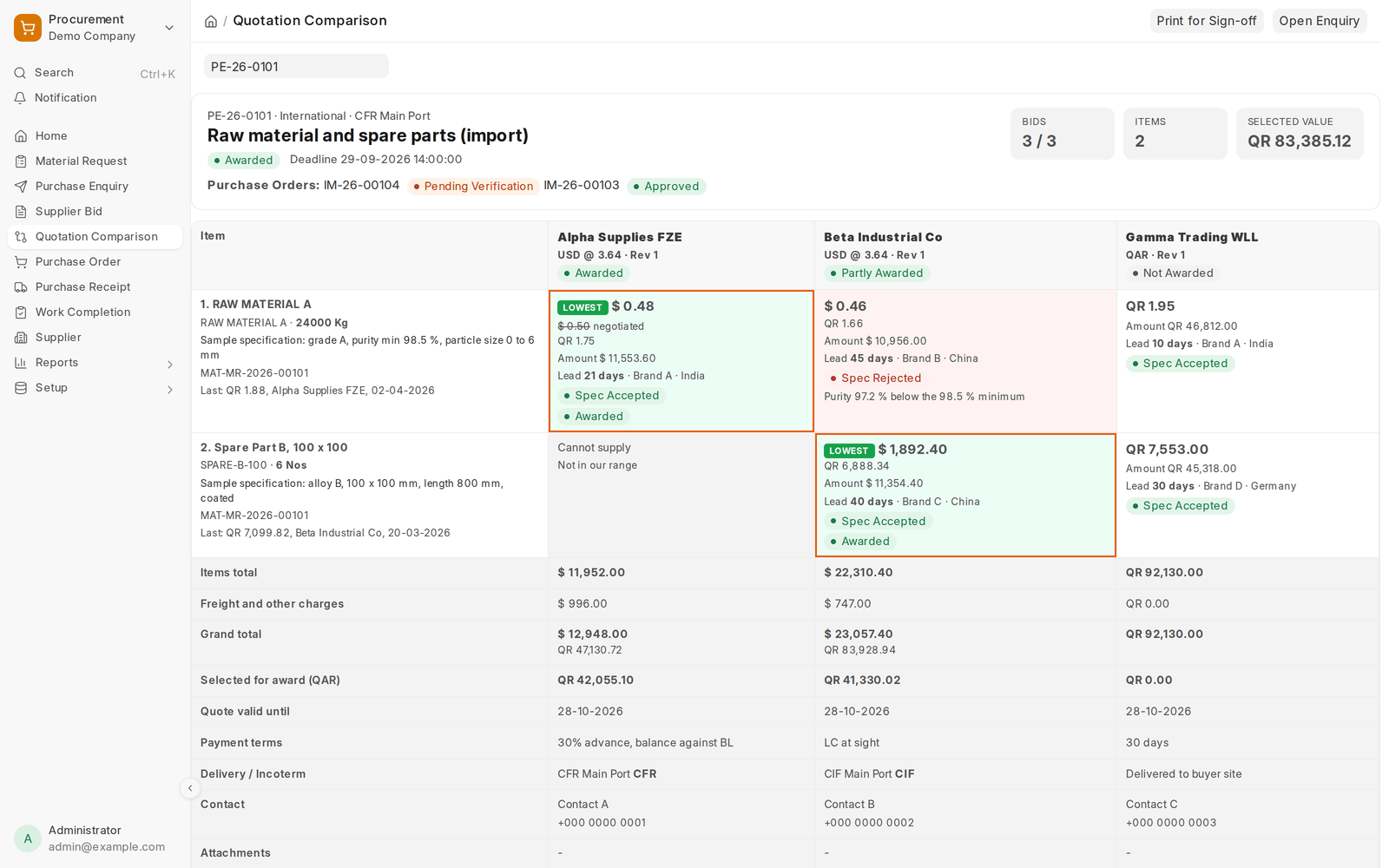
Things the grid shows per offer: rate (and in company currency), negotiated rate, lead time, brand, origin, spec status, alternative offered, “not quoted” / “cannot supply”. The lowest accepted offer is highlighted per line, and footer rows show totals, freight, validity, payment and delivery terms, and attachments.
Comparison matrix
Items by suppliers grid with sticky item column and supplier header, so long enquiries stay readable.
Every offer detail in the cell: rate, line amount, lead time in days, brand, country of origin, supplier remarks, and clear states for “Not quoted” and “Cannot supply”.
Multi-currency in one view: each supplier quotes in their own currency with the exchange rate shown; every rate and total is also shown in the company currency so offers compare like for like.
Lowest offer marked per line, calculated on the company-currency rate after negotiation, and ignoring offers that failed spec or cannot supply.
Last purchase reference on each item: last rate, supplier and date from submitted Purchase Orders.
Link back to the Material Request and the requested specification on each line.
Supplier footer rows: items total, freight and other charges, grand total (also in company currency), selected-for-award value, quote validity, payment terms, delivery terms and Incoterm, contact person and mobile, attachments, supplier remarks.
Header summary: bids received against suppliers invited, item count, running value of the current selection, quote deadline, suppliers still awaited, suppliers who declined with their reason, and the Purchase Orders already created with their workflow state.
Enquiry picker: opening the page without an enquiry lists open enquiries with status and bid count.
Negotiation and award
Negotiated rate per line: the buyer types the agreed rate in the cell; the original rate stays visible struck through, and the negotiated rate drives totals, “lowest” and the Purchase Order.
Award per line, split across suppliers: pick a winner for each item, or “No award”. Totals per supplier and the overall selection update live.
Award Lowest selects the lowest accepted offer on every line in one click, for review before saving.
Sign-off print
Print for Sign-off produces the same comparison as a print format with LOWEST and AWARDED marks, spec results, totals and terms, a recommendation box and signature blocks for Purchase, End User (spec verified), Production Director and Finance Manager.
Suggestions
An interactive comparison page on Request for Quotation, built on Supplier Quotation, with per-line award and “Create Purchase Orders” (one per supplier, MR links kept).
Negotiated rate and spec status fields on Supplier Quotation Item, with permission-based price hiding so end users can verify specs.
Token-based guest link as an alternative to the portal login for RFQ, with revision and decline.
Alternative item offers on the supplier side, mapped to an item code before ordering.
A standard comparison print format with approval signatures.