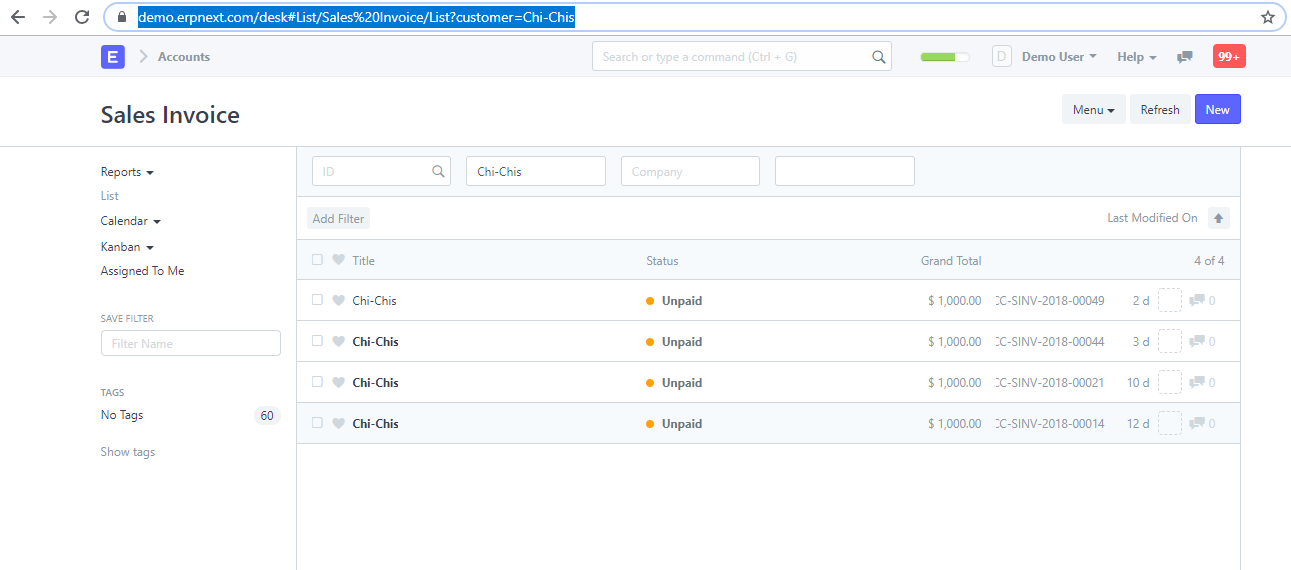
I’m looking for a way to use a URL to list Sales Invoices filtered by a customer.
Is there a way to do this with a URL? Something like:
https://erpnext.example.com/desk#List/Sales Invoice/List?customer=customer1
Any suggestion will be appreciated!
I’m looking for a way to use a URL to list Sales Invoices filtered by a customer.
Is there a way to do this with a URL? Something like:
https://erpnext.example.com/desk#List/Sales Invoice/List?customer=customer1
Any suggestion will be appreciated!
https://demo.erpnext.com/desk#List/Sales%20Invoice/List?customer=Chi-Chis
This is already supported by the framework.
It will cause the UI to add the value on the customer filter if it exists in the list view
Luck!
Terrific! Thank you.
Is there a way to filter for field values on child tables? Like fields on Sales Invoice Item? I would like to filter for any sales invoices linked to a Delivery Note.
Like:
https://erpnext.example.com/desk#List/Sales%20Invoice/List?Delivery%20Note=DN-10001
How might that be laid out in a URL?
OK, got it figured out. I needed to reference the field name in the filter like so:
https://erpnext.example.com/desk#List/Sales%20Invoice/List?delivery_note=DN-10001
Works like a champ!
Any idea on how to handle if it is a < or > filter?
You can try and replace the < and > with < and > codes.
Here’s a table of HTML character codes if you need others: HTML Symbols | HTML Emojis
@jvantslot thank you for your response. With what you said, this means the url will be like this below? because it does not work.
What am I missing here.
#List/Sales%20Order/List?transaction_date>2020-07-01
Hmmm… turns out it should require URL encoding not HTML Char encoding. The URL should be:
#List/Sales%20Order/List?transaction_date%3E2020-07-01
This does convert %3E to '>" however, it doesn’t seem to have the desired effect on the list. Apparently URL parameters can only be assigned with the “=” sign. So I’m not sure how to pass greater than or less than symbols through.
Yeah, its alright thank you for your response though. Because I wanted to do a hyperlink to a filtered doctype so user can open it on another tab. Instead of a frappe.set_route where it routes current tab.
Is there a way to create a report url with values for the filters in v13?
As I understand it, the URLs have changed significantly in v13
You use frappe.route_options = {} or set_route:
frappe.set_route('query-report', frm.report_name, {
	company: frm.doc.company,
	from_date: frm.doc.from,
	to_date: frm.doc.to
});
So does this mean that URL-based list filtering is simply no longer possible with ERPNext 13+?
I have the same question.
Has anyone figured out why this feature has been removed or not working already? Thanks