I know this is an issue that has been extensively discussed in this forum, however, having read through all this I am still facing issues which I would appreciate some guidance.
The typical example:
- I have an item set at item price = €17.00
- VAT is set to 19%
- Sales and Tax Charges Template I have enabled
“TAX included in Basic Rate”, and
“Considered in Paid Amount”
- System Setting have
Float Precision set a 4
Currency Precision set at 2
Rounding Method “Banker’s Rounding”
- In the Company Settings
Round off Account is set
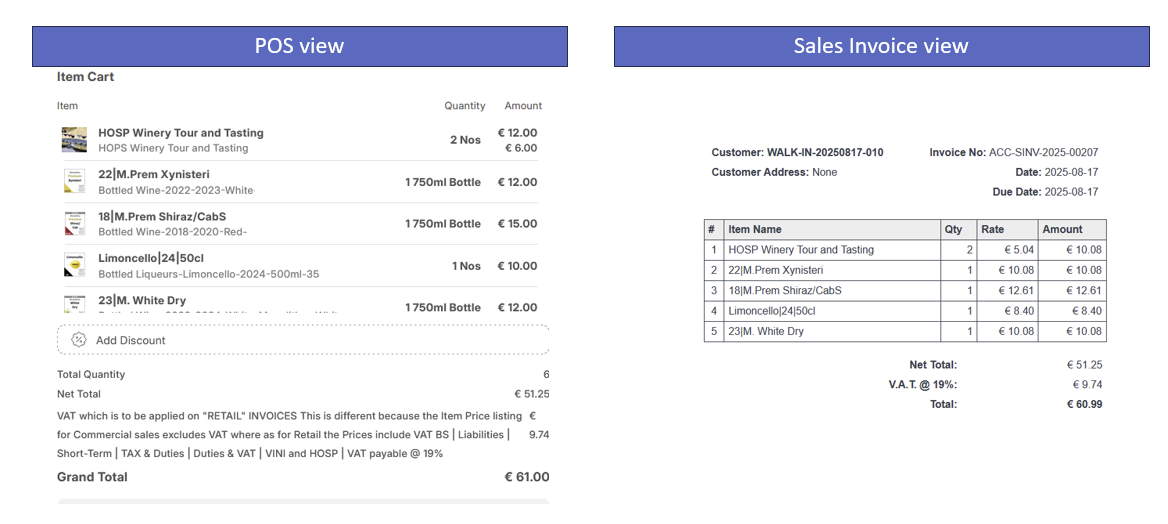
Now when I go to the POS, I see the item price at €17.00. The customer pays €17.00 however, when I go to sales invoice I see the amount rounding to €17.01.
Here is a live example
The solution could be to increase the Currency Precision to 3 digits however then the POS also starts working in 3 digits…
Am I doing something wrong?
Also FYI I am using:
Installed Apps
ERPNext: v15.44.0 (version-15)
Frappe Framework: v15.48.1 (version-15)
Frappe HR: v15.35.3 (version-15)
In a sense I believe that the solution to the above is to answer the question: How do I increase Rounding precision for Taxes at 3 or 4 decimal places and then Round those results to 2 decimal places for the purposes of POS / sales and invoicing
Has no one had a similar experience as me? Very surprised
Hi @ahsantareen,
Thank you for the reply. I appreciate the suggestions. To help me implement them correctly, I need some clarification on two points.
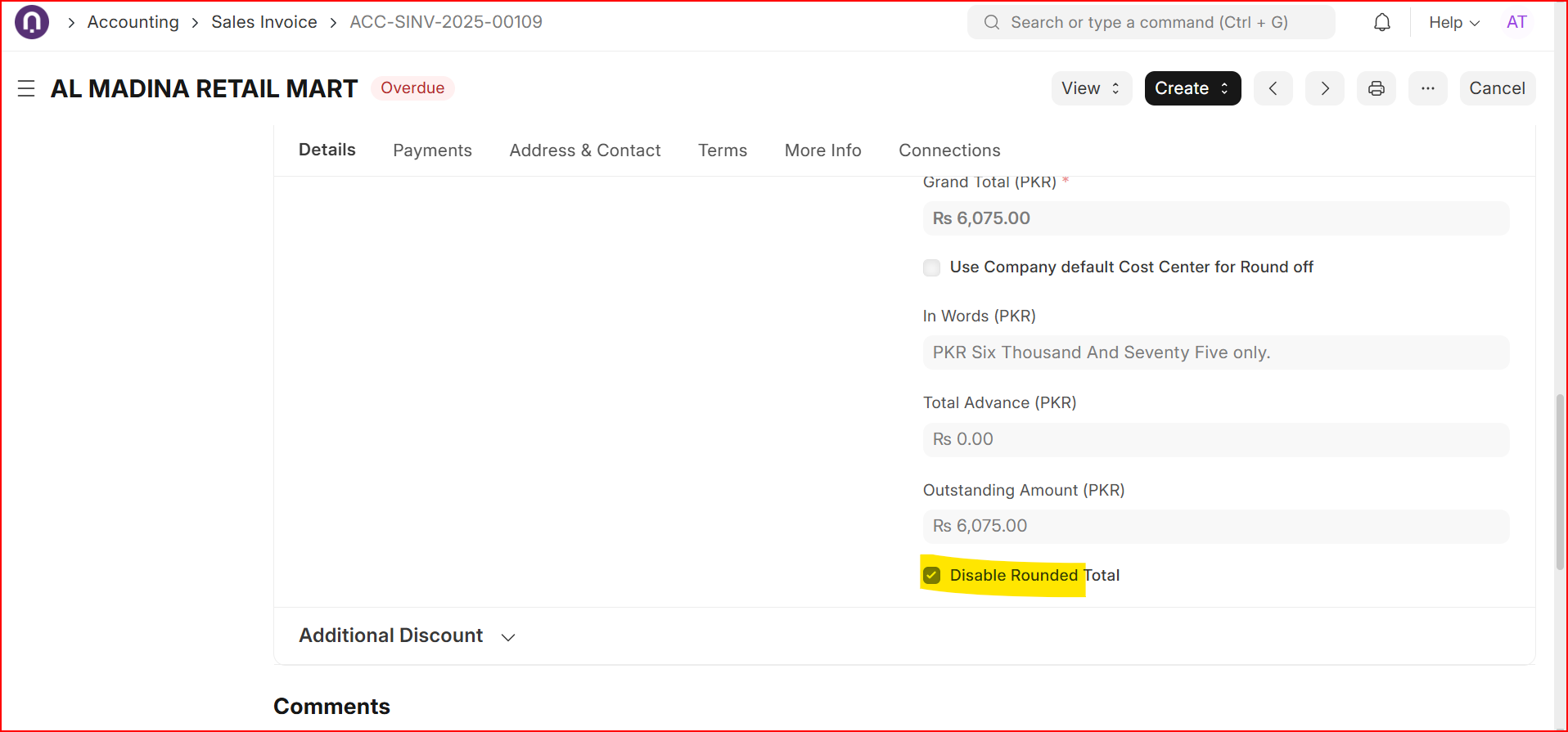
1. Question on Disabling Rounding
Your second point suggests disabling rounding. My goal is to have clean, rounded final totals on customer invoices without the underlying calculation discrepancies. Simply disabling rounding doesn’t seem to address the root cause—it might just hide the symptoms. Could you explain the intended mechanism here?
2. Status of Precision Customization (POS Invoice)
Regarding your first point, I have already attempted to set precision by extensively customizing the POS Sales Invoice doctype and its child tables (POS Invoice Item and Sales Taxes and Charges ). I applied 4 decimal places to relevant fields (Rate, Amount, Net Total, Total, Tax Amount, and more). Interestingly there are 2 fields for each of these (e.g. Amount and Amount (Company Currency)) which I have not managed to understand how they are different.
However, this process raised two issues:
- Confusion: It’s unclear whether changing precision affects the float, the displayed currency value, or both.
- Practicality: A 4-digit accuracy is excessive for final customer-facing invoices.
3. Suspected Root Cause: Rounding Inconsistency
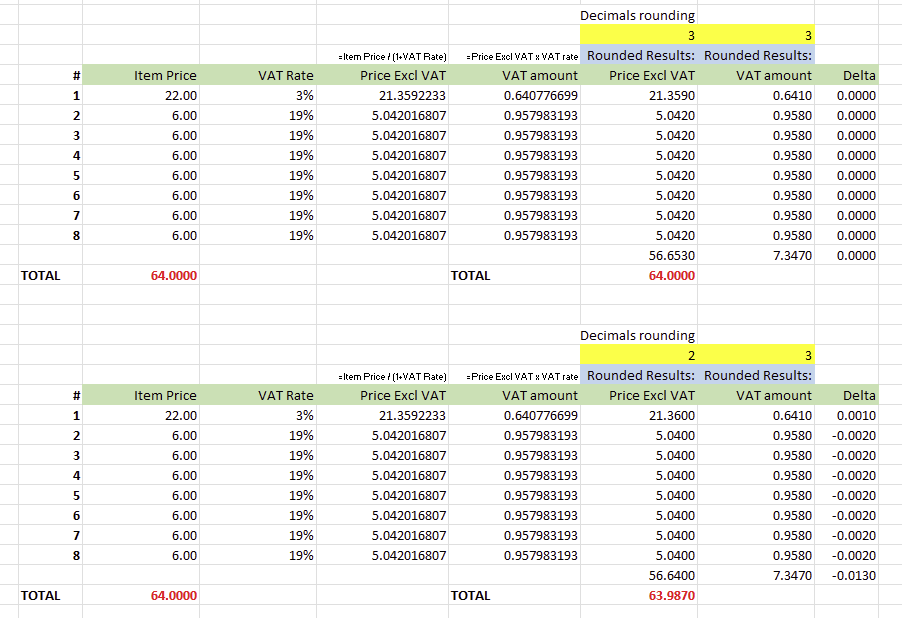
My manual calculations lead me to believe this is actually a bug related to inconsistent rounding in the tax calculation algorithm. When starting with a VAT-inclusive price, the sum of the calculated net price and VAT should always equal the original price if rounding is applied consistently. The discrepancy (shown in the attached image) suggests intermediate values are rounded at different stages.
I would appreciate your insight on this analysis and clearer guidance on customizing the POS Invoice specifically.
See image below which proves my point:
1 Like
Hi all, I still have not managed to resolve this. Does anyone else have similar experience or a different solution / approach?