ERPNext Insight – Service Items & Gross Profit Reporting
I’ve always noticed a gap in ERPNext’s Gross Profit reports when it comes to service items:
-
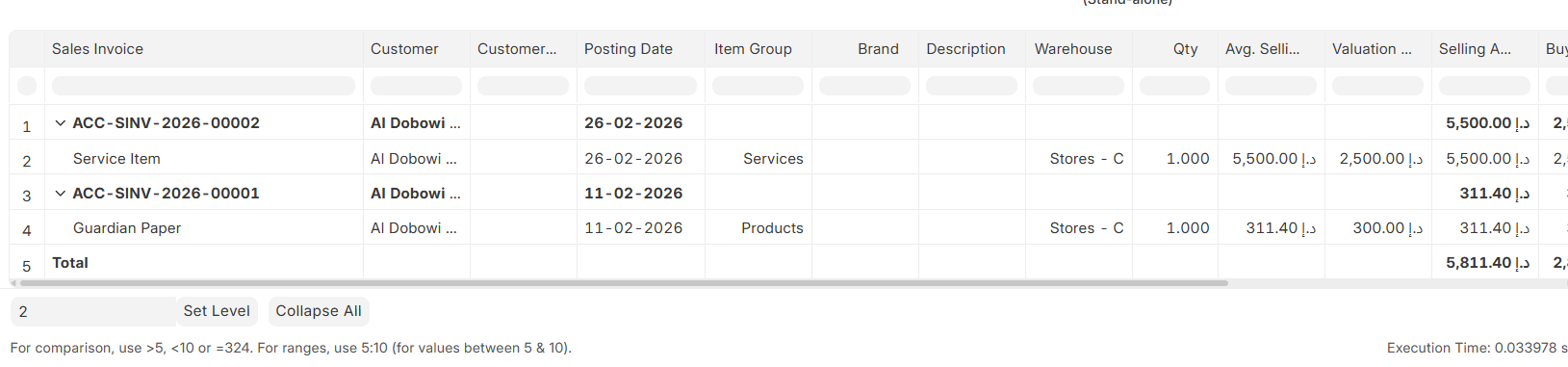
Currently, if we use a service item ID for purchase and sales, the valuation rate is picked from the last purchase rate, which skews the gross profit calculation.
-
This approach is incorrect, because service items should either:
 Show 100% margin by default, or
 Have a proper expense entry system tied to invoicing to reflect accurate gross profit.
Lemme know if there is a possible workaround for this.
Hi @TalhaButt2508
Service items do not go under valuation process and contribute nothing as far as COGS is concern.
This is not versioning issue as service item handling remain same conceptually over the years for all versions including V16 serving accounting purposes effectivley.
The table may help you get better idea of how service item being handled in ERPNext.
| Factor |
Service Item (Is Stock Item = No) |
Impact on COGS |
Explanation |
| Is Stock Item |
No |
No COGS generated |
COGS requires stock movement |
| Stock Ledger Entry |
Not created |
No |
No quantity reduction means no valuation impact |
| Valuation Rate |
Not applicable |
No |
COGS depends on valuation rate |
| Stock Asset Account |
Not used |
No |
Nothing to credit from inventory |
| Delivery Note |
Optional |
No |
Even if delivered, no stock movement |
| Sales Invoice Update Stock |
Not applicable |
No |
Update stock works only for stock items |
| Perpetual Inventory |
Irrelevant |
No |
Works only with stock items |
| Purchase Cost |
Expensed directly |
Indirect |
Cost hits expense account at purchase time |
| Gross Profit Report |
Revenue only |
Margin looks 100% |
Because no COGS is deducted |
| Project Costing |
Can track separately |
Yes, indirectly |
Costs captured via Timesheets or Expenses |
Hello,
Yes I do understand that COGs is not created for is stock item = No Items and Profit and Loss Statement doesn’t consider it but apart from P&L Statement Gross Profit Report is also of much concern.
The Standard Script Report - Gross Profit, fetches the last buying rate as valuation rate of sales invoice’s service Item. Hence creating the discrepancy in the Report.
Hi @TalhaButt2508
Valuation Rate is contributing as COGS in Gross Profit Report and Last Purchase Rate is not Valuation Rate.
Services Item’s Last Purchase Rate does not contribute anything in valuation process resulting NO COGS and that is why Gross Profit Report does not report COGS against services items sold.
Are you suggesting that valuation and COGS are two separate things?
The valuation being fetched for Service Items in the Gross Profit report appears to be incorrect.
COGS is calculated as:
Valuation Rate × Quantity Sold
If the Valuation Rate is being used in the Gross Profit report, it effectively represents the Cost of Goods Sold (COGS).
For your information, Service Items do not have Stock Ledger Entries (SLE), so the Valuation Rate for them is derived from the Last Purchase Rate.
If this understanding is incorrect, could you please clarify the following?
@TalhaButt2508
In ERPNext, service items are non stock items, which means:
• No Stock Ledger Entry (SLE)
• No valuation rate calculation
• No Stock ledger movement
On the other hand, Last Purchase Rate from Purchase Invoice / Purchase Order are updated on item master Last Purchase Rate field only as a reference value, not for inventory valuation.
Simple Question
Why Report Gross Profit is calculating the Profit / Loss for non stock items?