Hi,
I have been trying a work around to fix this issue, I couldn’t find a solution.
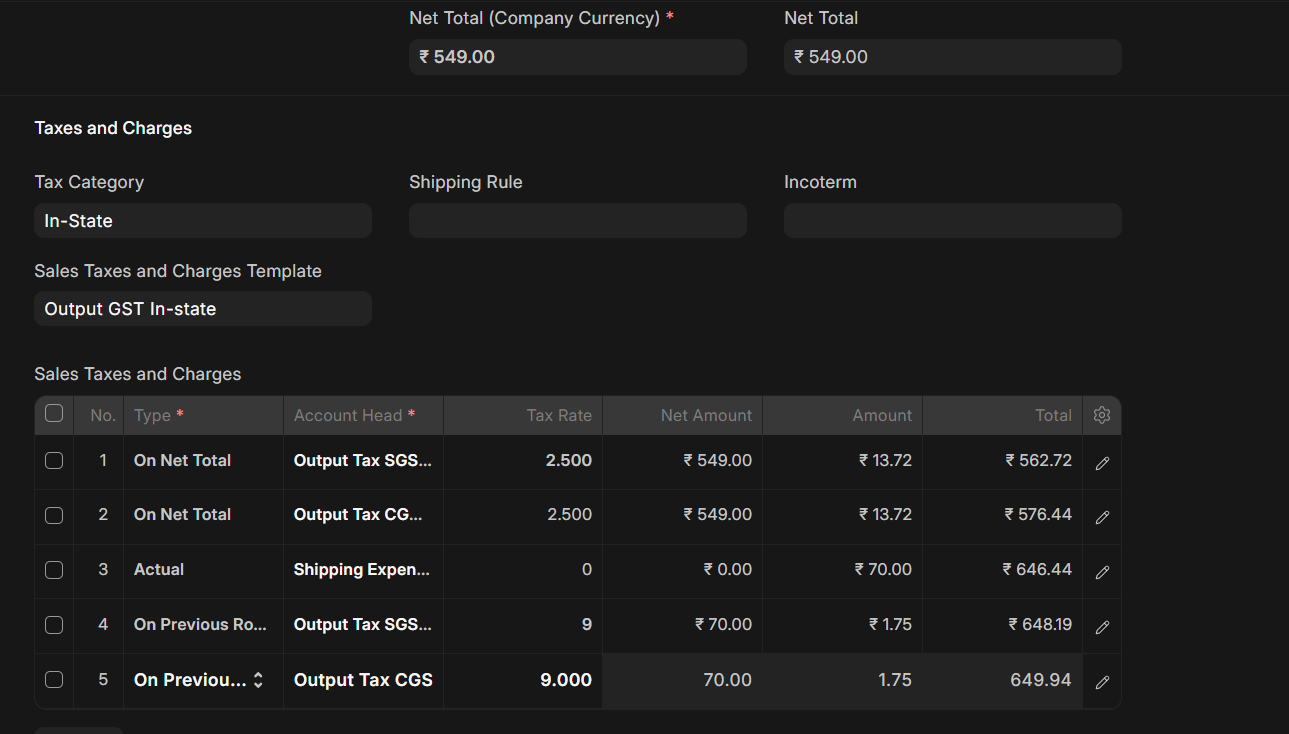
Please refer to the attached screenshot.
I am facing an issue with GST calculation in a Sales Invoice.
- The base item value is ₹549.
- 2.5% CGST and 2.5% SGST are correctly calculated on ₹549 as ₹13.72 each.
- I then add a ₹70 shipping charge.
- On this ₹70 shipping charge, I need to apply 9% CGST and 9% SGST.
- Therefore, the expected tax is ₹6.30 CGST and ₹6.30 SGST.
However, ERPNext is calculating ₹1.75 for each tax instead of ₹6.30.
₹1.75 = ₹70 × 2.5%, meaning ERPNext is using the 2.5% rate from the earlier tax rows / Item Tax Template, even though the tax rows for shipping are explicitly set to 9%.
In short
When I apply a different GST rate to a subsequent amount, ERPNext appears to ignore the rate specified in that tax row and instead uses the 2.5% rate configured for the same tax account in the earlier rows / Item Tax Template.
For example:
Expected: ₹70 × 9% = ₹6.30
Actual: ₹70 × 2.5% = ₹1.75
Could someone please confirm whether this is expected behavior or a bug? If it is a configuration issue, what is the correct way to apply different GST rates to different tax bases using the same CGST/SGST accounts?
frappe: 16.33.0
erpnext: 16.34.1
india_compliance: 16.9.0
Thanks 
The 1.75 result matches the account-level override in ERPNext 16.34.1: _get_tax_rate takes the rate from the item’s tax map before the rate shown on the tax row. That rule also applies to “On Previous Row Amount”, so the same CGST/SGST accounts mapped to 2.5% can override your 9% rows. Source.
There is another constraint: India Compliance 16.9.0 rejects “On Previous Row Amount” for recognized GST rows during its validation. Simply forcing 9% in the calculation would not resolve that. Validation.
The configuration route I would check is shipping as a separate non-stock service item, with its own 9% + 9% Item Tax Template, while the product retains 2.5% + 2.5%. Both can use the same CGST/SGST accounts through the normal item-based tax calculation. The old shipping charge must then be removed from that invoice flow to avoid charging it twice. This is supported by the source and template mechanism; I have not tested your installation.
If that representation fits your workflow, I can implement and validate the complete correction for USD 350 total, including my receipt fees, within 24 hours of a funded agreement and receipt of the required staging/configuration access and sample invoice. That includes the shipping configuration, any existing shipping rule involved, server-side invoice validation, tax breakup/ledger checks, the affected print output and handover. Your specified rates stay unchanged.
Before committing, does a store integration import shipping into the tax table, or can it be a service item? A redacted invoice/template example is enough to confirm the route here; please do not post credentials.
Add shipping row as a additional line item with item tax template