 Hi everyone — I’m a developer from China. Over the past year I built a print designer on top of the Frappe framework, and the whole thing is built around one principle: what you design is exactly what prints. Source is
here → https://gitee.com/gdzhiz/zhiz_print
The “how do I get Frappe to print nicely” question comes up here a lot, so I wanted to share both the tool and the WYSIWYG approach underneath it.
The problem
Frappe’s native Print Format is powerful, but it’s fundamentally hand-written Jinja + HTML + CSS. For us that kept breaking the “what I see = what I get” promise:
- Layout changes bounce back to a developer — business users can’t design their own templates.
- Preview ≠ PDF. When line items overflow, what you preview isn’t always what prints.
- Odd paper sizes (continuous forms like a 3-copy delivery note on 238×139mm), with barcodes, QR codes, signatures, and a header that repeats every page.
- Multiple layouts per print job (delivery copy / warehouse receipt / settlement).
WYSIWYG is the whole point
Every design decision in zhiz_print serves one goal — the design canvas, the preview, and the final PDF must be the same thing. Four things make that real:
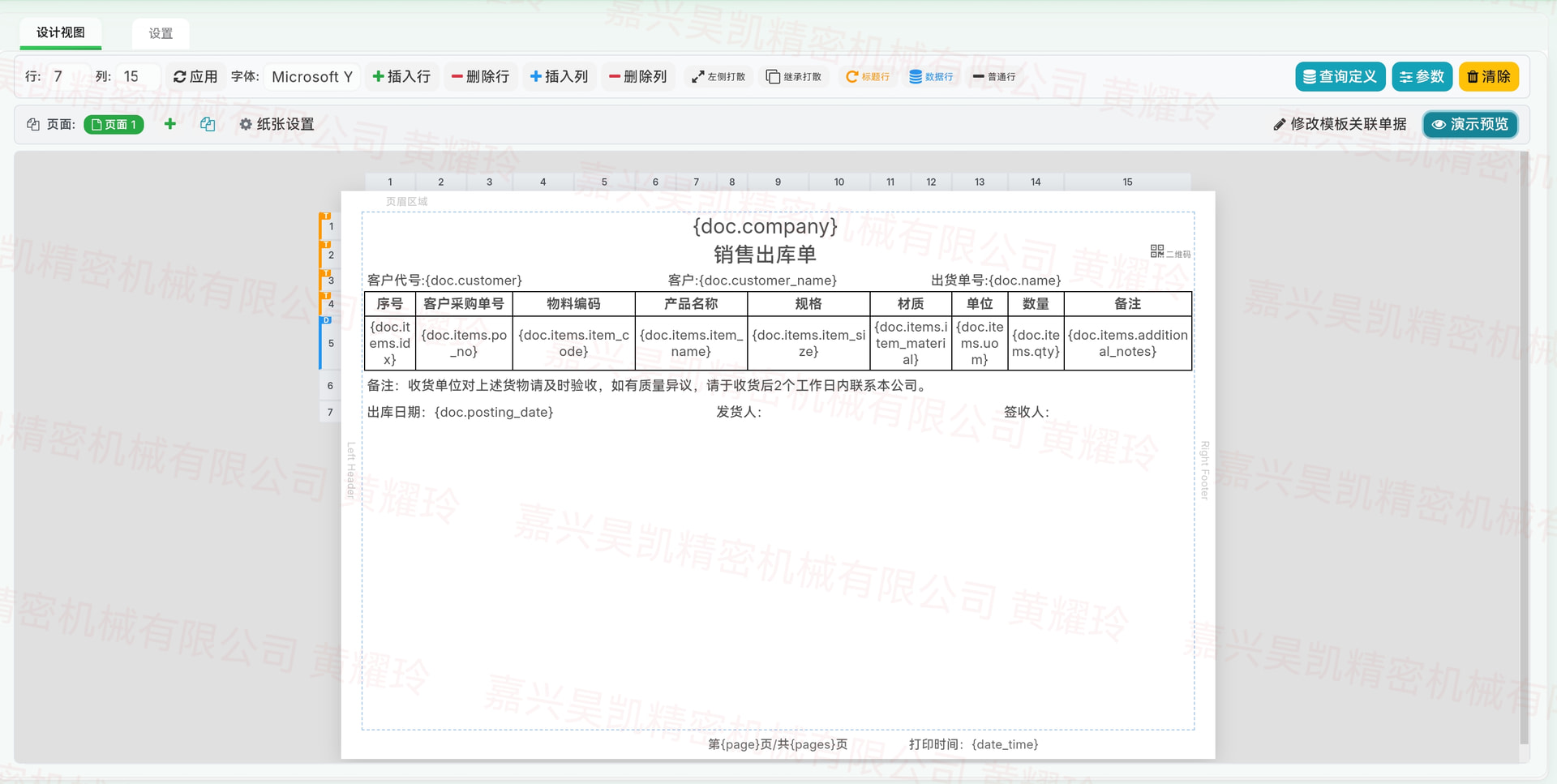
1. The canvas is the paper. The designer isn’t an abstract editor — it draws the actual sheet at millimeter accuracy, with the real margins overlaid (PX_PER_MM = 4 for px↔mm). A4, a 238×139mm continuous form, a custom
label: what you paint on is the physical page.
 [screenshot: designer grid showing the paper + margin lines, a few merged cells, a barcode and a QR cell]
2. One render path. Preview, PDF, Excel, and batch output all flow through a single server entry point (get_preview_for_document). Same HTML, same pagination logic — so they can’t drift apart by construction.
3. Pagination is measured, not estimated. Row heights aren’t guessed — the browser measures them. The server renders an unpaginated “measurement scaffold”; in a hidden iframe, after fonts load, JS reads each row’s real
offsetHeight; a greedy bin-packing pass fits rows into pages, with rowspan-joined rows locked together (union-find) so merged cells never tear across a break. The page-break map then goes back to the server for the final
render. So preview = print = PDF, down to the row.
[screenshot: print preview showing paginated paper pages with shadow]
4. Self-contained output. Barcodes, QR codes, and images are embedded as base64, so what you see in the designer is literally the bytes in the PDF — no relative /files/... URLs that vanish when an engine or server
changes.
What you can place on that paper
- Grid with cell merge (rowspan/colspan), per-row/column sizing, format painter.
- 6 cell types: static text,
logic(Python expression), data-query binding, barcode (CODE128/CODE39), QR code, image. - Three row roles: normal, repeat-as-header (re-emits every page), and data-driven (auto-expanded from a child table — one rendered row per
itemsline). - Three display modes: auto-wrap, fixed-height, and auto-shrink-font (canvas measures the text and shrinks the font to fit — again, measured, not guessed).
- Multi-page templates:
page_countgives you N independent grids in one template — delivery copy on page 1, receipt on page 2.
Data binding
Customer: {doc.customer}
{doc.items.item_code}   {doc.items.qty}   {doc.items.rate}   ← row auto-becomes data-driven
Remark: {param.remark}                                   ← collected in a pre-print dialog
Plus three “smart” value semantics on top of plain substitution:
={doc.items.qty}*{doc.items.weight_per_unit}   ← arithmetic after substitution
=rowsum(5:7)                                   ← sum column 7 across the expanded rows of data-row 5
…and a logic cell with helpers like get_value(doctype, name, field) for cross-doctype lookups. When a child table isn’t enough, a query child table takes frappe.qb code (or a function path) and binds the result into
cells.
Swappable PDF engines
| Engine | Notes |
|---|---|
| wkhtmltopdf (default) | Fast, via pdfkit |
| WeasyPrint | Best CSS support, pure Python |
| Chromium headless | Most accurate rendering |
Because output is self-contained HTML, you switch engines without touching templates — and the WYSIWYG contract holds across all three.
Other bits
- Batch print with auto-match: N documents, each picks its template via an
enable_condition, merged into one PDF or multi-sheet Excel. - Persistent print log: snapshots the rendered HTML at print time — editing the design later doesn’t rewrite history.
- Template store: share a design to a central hub; others browse, one-click install, comment.
- Draft-no-print: a
docstatus=0draft previews but won’t export.
Availability
Source is on Gitee: https://gitee.com/gdzhiz/zhiz_print
[TODO — one honest line on licensing, e.g.: “It uses a machine-bound license (the
app_license = MITin hooks.py is legacy); see the repo for terms. Battle-tested on Frappe v15; v14/v16 not yet validated. UI/docs are
Chinese-first, English in progress.”]
Happy to dig into the architecture, the pagination algorithm, or the WYSIWYG rendering path in the comments. If the mods feel this leans too far into self-promotion, tell me and I’ll trim — my main reason for posting is to
share the approach with anyone stuck on the same print problems. 

 Thanks for the nudge — it’s on the roadmap now.