Hi, I would appreciate some help. I’ve done the easy install on a fresh server. Everything went well till I run the command bench start and it has been more than 24 hours that it stuck at Wrote js/item-dashboard.min.js - 7.97 KB.
try bench build
I just tried to run bench build and then I ran again bench start and still I’m stuck at watch.1 | Wrote js/item-dashboard.min.js - 7.97 KB
echo fs.inotify.max_user_watches=524288 | sudo tee -a /etc/sysctl.conf && sudo sysctl -p
Nothing has changed. The process still get stucked at watch.1 | Wrote js/item-dashboard.min.js - 7.97 KB
Sometimes it happens to me as well, when I’m running on low memory server configuration. It often get solved automatically when you upgrade server RAM, plus creating at-least 2+GB Swap Memory. I would suggest creating something around 4GB Sway Memory.
Sometimes, It happens while I use “bench build” command. Than, I have to abort/kill that process by “ctrl + c” and reboot server. Then, I often try to clear cache by “bench clear-cache” and also redis by “bench setup redis” and then I use “bench build” command again. It almost helped every time to execute build command, to me.
I would like to say, try this hit n trial method and hope your command executes. Till, Someone professional reach you with the correct & exact answer. I hope this helps.
I have 7GB of RAM that are free. I followed your commands and still it is still stuck at that point. Thank you for your suggestions though
1 Like
That is the bench waiting for your input!
Fire your browser and go to http://localhost:8000 
2 Likes
Oh really?  how do I access it from other computer on the network? just but typing http://localhost:8000 in a computer in the network?
Would please tell me how to make ERP accessible outside of the network?
If you are using a VirtualBox virtual machine, the http://localhost:8000 will not work. On the VM, find your ip by typing this command:
ifconfig
Then use that command.
I used the solution of bench build here, but now when I try to access the development site, I get a RuntimeError
RuntimeError: no object bound to conf
So this is a normal behavior?
But I have installed it on a virtual machine on Google console.
the IP:8000 does not show me anything. neither https://IP.
How shall I resolve this issue.
Thanks
I have the same problem. I already reinstalled the bench and deleted the frappe-bench. 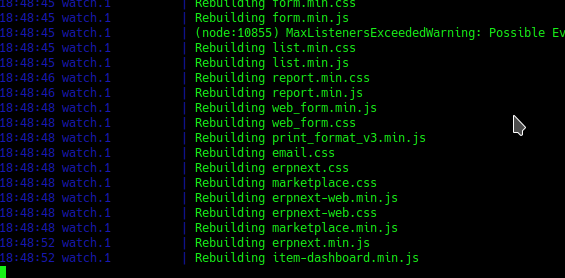
and
localhost:8000
says: Unable to connect
I just found out: erpnext is running on:
http://0.0.0.0:8001/
bump
same issue.
Please read the logs bench start is producing. The port is mentioned in it.

I have the same issue, however mine is a DNS based multitenant setup and when I try to access the site It says site can’t be reached
Thanks a lot… it worked for me 
I was also stuck at the same point. I tried all the solutions provided here. But nothing worked.
I tried $ bench --site set-maintenance-mode off
as instructed in the following post which finally helped.