thats great great keep it up team
1 Like
UI / UX Improvement Proposal – Navigation in Frappe v16
Problem
The current navigation flow in Frappe introduces unnecessary friction and excessive clicks, especially for users who work across multiple modules daily.
At the moment:
- Switching between apps or modules requires going back to the Desktop.
- App icons are only visible in the Desktop and become hidden once inside a module.
- To access Workspaces or Desktop from within a module, the user must:
- Open the module dropdown
- Click Desktop or Workspace
- Then re-select the target module
This breaks the user’s workflow and creates constant context switching.
Goal
Provide a more fluid and efficient navigation experience by minimizing clicks, reducing context changes, and keeping frequently used actions always accessible.
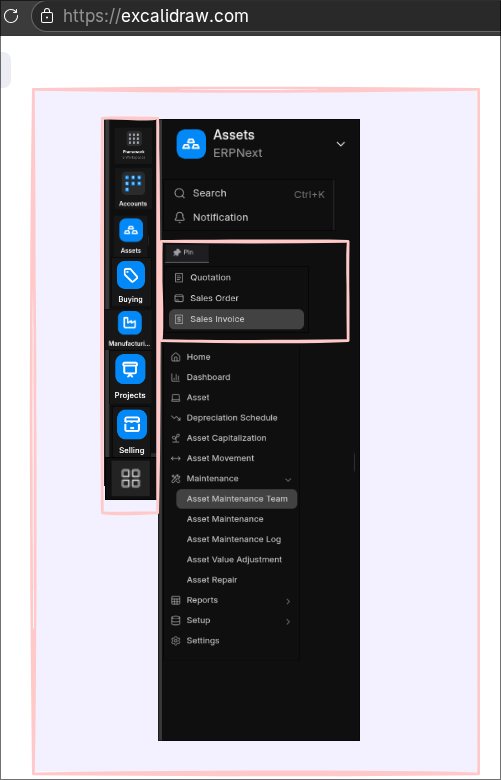
Proposed Improvements
1. Persistent Global App / Module Switcher
- Add a global, always-visible app/module selector (e.g. in the sidebar).
- Users should be able to switch apps without returning to the Desktop.
- This would act as a persistent “App Switcher”.
2. Global Pinning of Documents and Workspaces
- Allow users to pin documents and workspaces globally, not only within the current module.
- Example pinned items:
- Sales Invoice
- Purchase Invoice
- Journal Entry
- Assets
- These pinned items should remain accessible regardless of the active app.
3. Cross-Module Pins
- A pinned document should be reachable from any module.
- This is especially important for operational users (accounting, sales, purchasing) who work transversally across apps.
4. Reduce Desktop Dependency
- The Desktop should be an optional overview, not a required navigation step.
- Core navigation should be solvable directly from the sidebar.
Benefits
- Fewer clicks and less friction
- Faster daily operations
- Improved focus and reduced context switching
- Better UX for power users
- More modern ERP navigation pattern
Summary
The goal is to allow users to navigate across apps, documents, and workspaces without leaving their current context, making Frappe feel faster, more intuitive, and better suited for high-frequency operational workflows.
 Support this UX improvement
If you think Frappe needs faster navigation, fewer clicks, and a better cross-module workflow, please support this proposal by reacting  and commenting on the issue:
 https://github.com/frappe/frappe/issues/34734
Community feedback and engagement really help prioritize features for future releases.
Thanks for supporting a smoother Frappe UX  @Saqib_Ansari
7 Likes
Please review - hopefully resolves the issue (for now)….
2 Likes
Thank you for your time and for considering these suggestions.
Agree with the points raised here. The sidebar should stay fixed when navigating to DocTypes from other modules. Automatic context switching is confusing - you click a link and suddenly you’re in a different workspace with no easy way back.
Simple rule: sidebar changes only when user explicitly switches workspace, not when opening linked documents.
I suggest to add a setting option to let users choose this behavior:
- “Keep sidebar fixed - switch workspace only on explicit user action”
When enabled, users maintain their current sidebar context regardless of which DocTypes they open. The workspace switch would only occur when explicitly selecting a different workspace via Desktop or the workspace switcher.
Related GitHub issue:
https://github.com/frappe/frappe/issues/35221
Have added customization button and reset to defaults in the SlimBar. You can pin shortcuts, workspaces, doctypes, reports, etc… Those are persistent.
I know, that UI changes often cause discomfort with the users, before they re-learn, but this change to desktop I think is inherently worse as before, and needs to be addressed:
- Everything was nicely on the left side menu, understandable and easy to find.
Now:
- Once inside some module, you are stuck there, or you need to go back to desktop, click through the icons and then do work there. Our team now gets lost, spends time clicking and searching
ERP is meant to be one place to serve the company.. you do som work in selling,then some work in manufacturing, customer update, etc.. it’s rarely that you spend time on single module only. At least in the SME companies where one person handles more, things.
5 Likes