I want to add
_ Add Sales Inv.
_ Sales Invoice List Shortcuts to the sidebar.
etc.
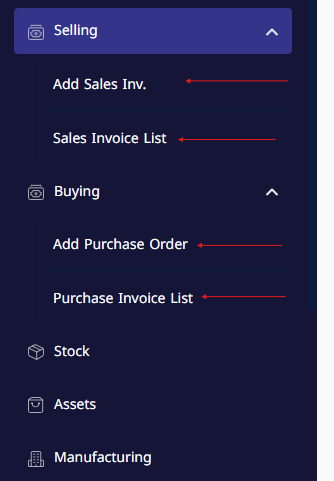
I want to add
_ Add Sales Inv.
_ Sales Invoice List Shortcuts to the sidebar.
etc.
This may help you!
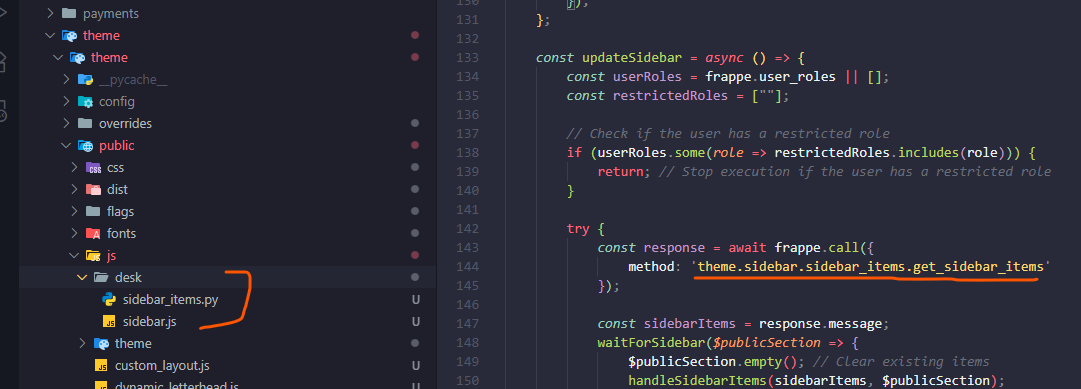
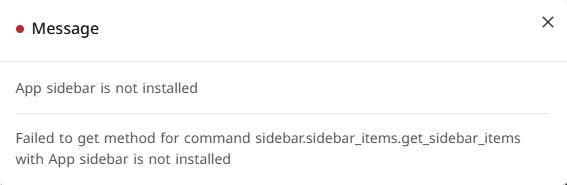
The method call wouldn’t be correct because your directory structure is different. I think it would be something like
method: 'theme.public.js.desk.sidebar_items.get_sidebar_items'
Also fix your hooks.py with
app_include_js = [
    "/assets/theme/public/js/desk/sidebar.js",
    ]
Hopefully that works. I’m like 75% sure on that. Not an expert
I want to add New Sales Invoice, or any other link that create new document
how to do it?
Hey @a7medalyousofi,
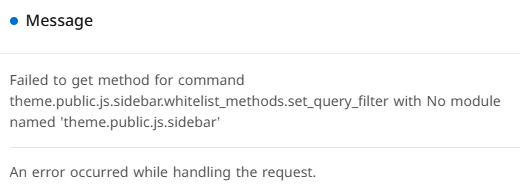
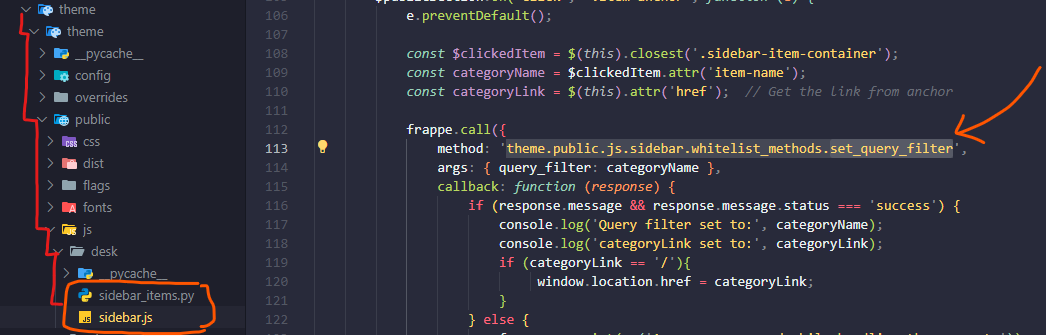
It seems like he didn’t include the file you need for this. I’m pretty sure whitelist_methods would be the file. Try what I have below, hopefully it works.
Create whitelist_methods.py in the desk directory
Change the method call to this in sidebar.js
'theme.public.js.desk.whitelist_methods.set_query_filter'
Paste this code into whitelist_methods.py
import frappe

@frappe.whitelist()
def set_query_filter(query_filter):
    """
    Sets a custom query filter in the user's session cache
    """
    try:
        cache_key = f"user_query_filter:{frappe.session.user}"
        frappe.cache.set_value(cache_key, query_filter)

        return {"status": "success"}
    except Exception as e:
        frappe.log_error(message=str(e), title="Failed to Set Query Filter")
        return {"status": "error"}
Thnx, it work
I want to add New Sales Invoice, or any other link that create new document
how to do it?
If all you want is something like the first picture. This whole custom sidebar is a little too much. You don’t really need the python files, you just need some JavaScript and inject the new HTML into the desk.
If you simplify @M.Toseef implementation, you achieve exactly what you want.
If i want to achieve like the first picture, and use new HTML & JS, where can i find the main sidebar HTML, Js files, so i can copy and update from them?
If you want to achieve the first picture. Here is a working example, I tested. Thanks to @M.Toseef I had an easier time making this. This is only for the selling module, you’ll need to do the buying module yourself! Hopefully this helps other who want to do this. Keep in mind you need to maintain the script as new updates can break the script.
Replace sidebar.js with the code below
frappe.provide('frappe.desk');

$(document).ready(function () {
    // This function runs only once to inject the custom items.
    const addCustomSellingItems = () => {
        // Define the HTML for our two new links.
        const newInvoiceLink = `
            <div class="sidebar-item-container" item-name="New Sales Invoice">
                <div class="desk-sidebar-item standard-sidebar-item">
                    <a href="#" class="item-anchor" title="New Sales Invoice" data-action="new-sales-invoice">
                        <span class="sidebar-item-icon" item-icon="add">
                            <svg class="icon icon-md" aria-hidden="true"><use href="#icon-add"></use></svg>
                        </span>
                        <span class="sidebar-item-label">New Sales Invoice</span>
                    </a>
                </div>
            </div>
        `;

        const invoiceListLink = `
            <div class="sidebar-item-container" item-name="Sales Invoice List">
                <div class="desk-sidebar-item standard-sidebar-item">
                    <a href="/app/sales-invoice" class="item-anchor" title="Sales Invoice List">
                        <span class="sidebar-item-icon" item-icon="list">
                            <svg class="icon icon-md" aria-hidden="true"><use href="#icon-list"></use></svg>
                        </span>
                        <span class="sidebar-item-label">Sales Invoice List</span>
                    </a>
                </div>
            </div>
        `;

        // 1. Find the parent container of the "Selling" workspace link.
        const $sellingModuleContainer = $("a.item-anchor[title='Selling']").closest('.sidebar-item-container');

        if ($sellingModuleContainer.length === 0) {
            // If Selling module isn't found, do nothing.
            return;
        }

        // 2. Find or create the container for child items.
        let $childContainer = $sellingModuleContainer.find('.sidebar-child-item.nested-container');
        if ($childContainer.length === 0) {
            $childContainer = $('<div class="sidebar-child-item nested-container" style="display: none;"></div>');
            $sellingModuleContainer.append($childContainer);
        }

        // 3. Find or create the collapse button.
        let $collapseBtn = $sellingModuleContainer.find('.collapse-btn');
        if ($collapseBtn.length === 0) {
            const collapseBtnHTML = `
                <button class="btn-reset collapse-btn drop-icon" title="Collapse/Expand">
                    <svg class="es-icon es-line icon-sm" aria-hidden="true"><use class="collapse-icon" href="#es-line-down"></use></svg>
                </button>
            `;
            // Insert it before the drag handle
            $sellingModuleContainer.find('.drag-handle').before(collapseBtnHTML);
        }

        // 4. Add our custom links to the child container.
        $childContainer.append(newInvoiceLink);
        $childContainer.append(invoiceListLink);

        // 5. Attach click handler for the collapse button.
        $sellingModuleContainer.off('click', '.collapse-btn').on('click', '.collapse-btn', function() {
            const $nestedContainer = $(this).closest('.sidebar-item-container').find('.sidebar-child-item');
            $nestedContainer.toggle();
            const iconHref = $nestedContainer.is(':hidden') ? '#es-line-down' : '#es-line-up';
            $(this).find('svg use').attr('href', iconHref);
        });

        // 6. Attach click handler for our new "New Sales Invoice" action link.
        $childContainer.off('click', 'a[data-action="new-sales-invoice"]').on('click', 'a[data-action="new-sales-invoice"]', function(e) {
            e.preventDefault();
            frappe.new_doc('Sales Invoice');
        });
    };

    // Use a MutationObserver to wait for the sidebar to be loaded, then run our function.
    const observer = new MutationObserver((mutations, me) => {
        const $sellingLink = $("a.item-anchor[title='Selling']");
        if ($sellingLink.length) {
            addCustomSellingItems();
            me.disconnect(); // We found it and added our items, so we can stop observing.
            return;
        }
    });

    // Start observing the body for changes.
    observer.observe(document.body, {
        childList: true,
        subtree: true
    });
});
Add this into hooks.py
app_include_js = [
    "/assets/theme/public/js/desk/sidebar.js"
]
Make sure to run bench migrate and bench restart after just in case.
Yes exaclty, this was just first attempt. Now I’m simlifying and soon I’ll share that version also…
waiting for new version
Yes, you should also create whitelist_methods.py at:
/home/xadmin/frappe-bench/apps/cus_app/cus_app/whitelist_methods.py
# -------------------------------------------
# Set the query filter for the user for filtering the list view
# -------------------------------------------
@frappe.whitelist()
def set_query_filter(query_filter):
    user = frappe.session.user

    # Upsert logic: Update if exists, otherwise insert
    query_filter_doc = frappe.get_value("User Query Filter", {"user": user}, "name")

    if query_filter_doc:
        # Update existing filter
        frappe.db.set_value("User Query Filter", query_filter_doc, {
            "filter": query_filter,
            "active": 1
        })
    else:
        # Insert new filter
        frappe.get_doc({
            "doctype": "User Query Filter",
            "user": user,
            "filter": query_filter,
            "active": 1
        }).insert(ignore_permissions=True)

    # Commit the changes to the database
    frappe.db.commit()
    return {"status": "success"}
There is an issue here in this line
const $sellingLink = $(“a.item-anchor[title=‘Selling’]”);
the target title change based on language, so we cannot use it
I didn’t think about different languages when making this! You can use href instead since that should not change. I tested this on my site and it works but I don’t have translations setup. Hopefully this works!
frappe.provide('frappe.desk');

$(document).ready(function () {
    // This function runs only once to inject the custom items.
    const addCustomSellingItems = () => {
        // Define the HTML for our two new links.
        const newInvoiceLink = `
            <div class="sidebar-item-container" item-name="New Sales Invoice">
                <div class="desk-sidebar-item standard-sidebar-item">
                    <a href="#" class="item-anchor" title="New Sales Invoice" data-action="new-sales-invoice">
                        <span class="sidebar-item-icon" item-icon="add">
                            <svg class="icon icon-md" aria-hidden="true"><use href="#icon-add"></use></svg>
                        </span>
                        <span class="sidebar-item-label">New Sales Invoice</span>
                    </a>
                </div>
            </div>
        `;

        const invoiceListLink = `
            <div class="sidebar-item-container" item-name="Sales Invoice List">
                <div class="desk-sidebar-item standard-sidebar-item">
                    <a href="/app/sales-invoice" class="item-anchor" title="Sales Invoice List">
                        <span class="sidebar-item-icon" item-icon="list">
                            <svg class="icon icon-md" aria-hidden="true"><use href="#icon-list"></use></svg>
                        </span>
                        <span class="sidebar-item-label">Sales Invoice List</span>
                    </a>
                </div>
            </div>
        `;

        // Find the parent container of the "Selling" workspace link.
        const $sellingModuleContainer = $("a.item-anchor[href='/app/selling']").closest('.sidebar-item-container');

        if ($sellingModuleContainer.length === 0) {
            // If Selling module isn't found, do nothing.
            return;
        }

        // Find or create the container for child items.
        let $childContainer = $sellingModuleContainer.find('.sidebar-child-item.nested-container');
        if ($childContainer.length === 0) {
            $childContainer = $('<div class="sidebar-child-item nested-container"></div>');
            $sellingModuleContainer.append($childContainer);
        }

        // Find or create the collapse button.
        let $collapseBtn = $sellingModuleContainer.find('.collapse-btn');
        if ($collapseBtn.length === 0) {
            const collapseBtnHTML = `
                <button class="btn-reset collapse-btn drop-icon" title="Collapse/Expand">
                    <svg class="es-icon es-line icon-sm" aria-hidden="true"><use class="collapse-icon" href="#es-line-down"></use></svg>
                </button>
            `;
            $sellingModuleContainer.find('.drag-handle').before(collapseBtnHTML);
            // Re-select the button now that it's been added
            $collapseBtn = $sellingModuleContainer.find('.collapse-btn');
        }


        // Ensure the container is hidden and the icon is set correctly on page load.
        $childContainer.hide();
        $collapseBtn.find('svg use').attr('href', '#es-line-down');


        // Add our custom links to the child container (if they aren't already there).
        if ($childContainer.find('a[data-action="new-sales-invoice"]').length === 0) {
            $childContainer.append(newInvoiceLink);
            $childContainer.append(invoiceListLink);
        }

        // Attach click handler for the collapse button.
        $sellingModuleContainer.off('click', '.collapse-btn').on('click', '.collapse-btn', function() {
            const $nestedContainer = $(this).closest('.sidebar-item-container').find('.sidebar-child-item');
            $nestedContainer.toggle();
            // After toggling, set the correct icon based on the new visibility state.
            const iconHref = $nestedContainer.is(':visible') ? '#es-line-up' : '#es-line-down';
            $(this).find('svg use').attr('href', iconHref);
        });

        // Attach click handler for our new "New Sales Invoice" action link.
        $childContainer.off('click', 'a[data-action="new-sales-invoice"]').on('click', 'a[data-action="new-sales-invoice"]', function(e) {
            e.preventDefault();
            frappe.new_doc('Sales Invoice');
        });
    };

    // Use a MutationObserver to wait for the sidebar to be loaded, then run our function.
    const observer = new MutationObserver((mutations, me) => {
        // Find the "Selling" link by its language-independent URL
        const $sellingLink = $("a.item-anchor[href='/app/selling']");
        if ($sellingLink.length) {
            // Check if we've already run this, to prevent it from running multiple times
            if (!$sellingLink.closest('.sidebar-item-container').data('custom-items-added')) {
                addCustomSellingItems();
                $sellingLink.closest('.sidebar-item-container').data('custom-items-added', true);
            }
        }
    });

    // Start observing the body for changes.
    observer.observe(document.body, {
        childList: true,
        subtree: true
    });
});
Any update about it, Have you completed that version?