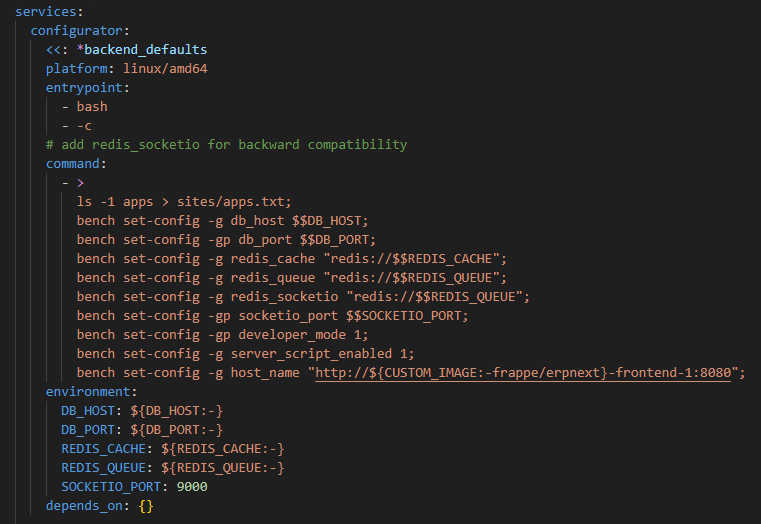
### Information about bug
When I enter a `DocType` and click the `Print` button… and then click the `PDF` button I get the reported error.
the original error was connection refused.
`Traceback (most recent call last):
File "apps/frappe/frappe/app.py", line 69, in application
response = frappe.api.handle()
File "apps/frappe/frappe/api.py", line 54, in handle
return frappe.handler.handle()
File "apps/frappe/frappe/handler.py", line 45, in handle
data = execute_cmd(cmd)
File "apps/frappe/frappe/handler.py", line 83, in execute_cmd
return frappe.call(method, **frappe.form_dict)
File "apps/frappe/frappe/__init__.py", line 1595, in call
return fn(*args, **newargs)
File "apps/frappe/frappe/utils/print_format.py", line 129, in download_pdf
pdf_file = frappe.get_print(
File "apps/frappe/frappe/__init__.py", line 2028, in get_print
return get_pdf(html, options=pdf_options, output=output)
File "apps/frappe/frappe/utils/pdf.py", line 38, in get_pdf
filedata = pdfkit.from_string(html, options=options or {}, verbose=True)
File "env/lib/python3.10/site-packages/pdfkit/api.py", line 75, in from_string
return r.to_pdf(output_path)
File "env/lib/python3.10/site-packages/pdfkit/pdfkit.py", line 201, in to_pdf
self.handle_error(exit_code, stderr)
File "env/lib/python3.10/site-packages/pdfkit/pdfkit.py", line 155, in handle_error
raise IOError('wkhtmltopdf reported an error:\n' + stderr)
OSError: wkhtmltopdf reported an error:
Exit with code 1 due to network error: ConnectionRefusedError`
i added `"host_name": "http://127.0.0.1",` to the site_config.json suggested by a forum post that then produced the below error.
### Module
selling
### Version
**Installed Apps**
ERPNext: v14.13.0 (version-14)
Frappe Framework: v14.23.0 (version-14)
Frappe HR: v1.0.0 (develop)
Frappe LMS: v0.0.1 (main)
Payments: v0.0.1 (develop)
Wiki: v0.0.1 (master)
### Installation method
docker
### Relevant log output / Stack trace / Full Error Message.
```shell
Traceback (most recent call last):
File "apps/frappe/frappe/utils/pdf.py", line 38, in get_pdf
filedata = pdfkit.from_string(html, options=options or {}, verbose=True)
File "env/lib/python3.10/site-packages/pdfkit/api.py", line 75, in from_string
return r.to_pdf(output_path)
File "env/lib/python3.10/site-packages/pdfkit/pdfkit.py", line 201, in to_pdf
self.handle_error(exit_code, stderr)
File "env/lib/python3.10/site-packages/pdfkit/pdfkit.py", line 155, in handle_error
raise IOError('wkhtmltopdf reported an error:\n' + stderr)
OSError: wkhtmltopdf reported an error:
Exit with code 1 due to network error: ContentNotFoundError
During handling of the above exception, another exception occurred:
Traceback (most recent call last):
File "apps/frappe/frappe/app.py", line 69, in application
response = frappe.api.handle()
File "apps/frappe/frappe/api.py", line 54, in handle
return frappe.handler.handle()
File "apps/frappe/frappe/handler.py", line 45, in handle
data = execute_cmd(cmd)
File "apps/frappe/frappe/handler.py", line 83, in execute_cmd
return frappe.call(method, **frappe.form_dict)
File "apps/frappe/frappe/__init__.py", line 1595, in call
return fn(*args, **newargs)
File "apps/frappe/frappe/utils/print_format.py", line 129, in download_pdf
pdf_file = frappe.get_print(
File "apps/frappe/frappe/__init__.py", line 2028, in get_print
return get_pdf(html, options=pdf_options, output=output)
File "apps/frappe/frappe/utils/pdf.py", line 46, in get_pdf
frappe.throw(_("PDF generation failed because of broken image links"))
File "apps/frappe/frappe/__init__.py", line 525, in throw
msgprint(
File "apps/frappe/frappe/__init__.py", line 493, in msgprint
_raise_exception()
File "apps/frappe/frappe/__init__.py", line 442, in _raise_exception
raise raise_exception(msg)
frappe.exceptions.ValidationError: PDF generation failed because of broken image links
```