[Release v3.85] SlimDesk Persistent Navigator (v16)

SlimDesk Persistent Navigator: for v16 (Solve Context Switching Fatigue)

Hi everyone,

Like many of you testing the new v16 UI, I found myself getting “lost” when navigating between different modules. The new design is beautiful, but the constant need to click “Home” or “Desk” just to switch was getting confusing - I missed the structure and “anchor” of a persistent navigation sidebar.

This has been a pain point for many

“Navigation inefficiency… need to return to Desk to switch modules.”

“Confusing module switching… context changes make it difficult to stay oriented.”

Based on that discussion and the feedback - I built SlimDesk Navigator** to solve this. AI assisted - rapid development .

What is it?

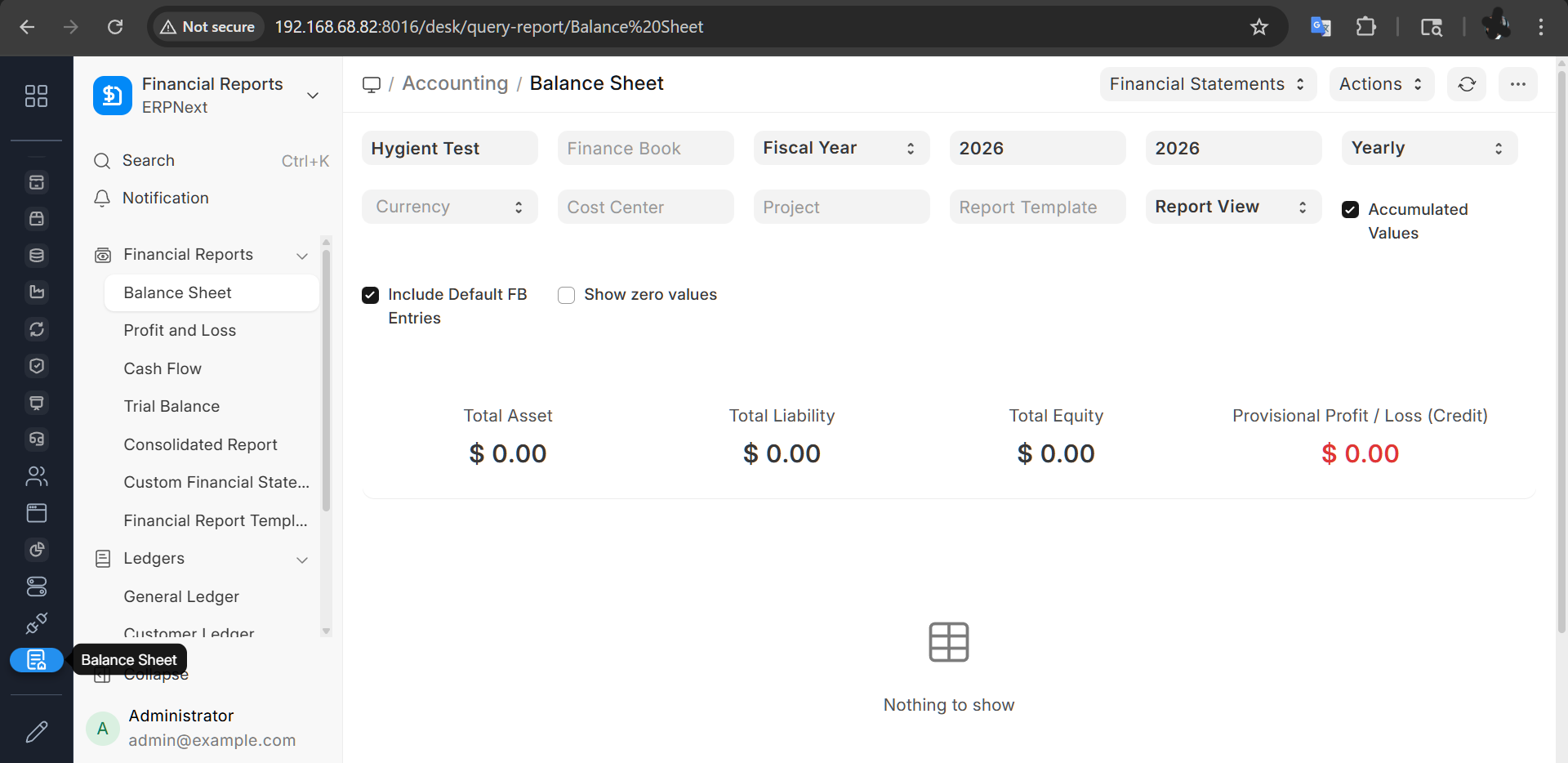
It’s a simple, unobtrusive app that injects a **persistent, slim sidebar** on the left side of your screen.

Result:** You can jump from *Accounting* to *Manufacturing* in **one click**, without ever losing your current page context or going back to the grid. And the bar highlights your current position.

Key Features

Persistent & Unobtrusive: Always there, but takes up minimal space and does not alter original frappe or erpnext code (works on display side).

Smart Icons: Uses a professional darker grayscale “subtle” theme that matches the v16 aesthetic. Tile is colored when selected. Changed to dark theme based on feedback. Icon list is scrollable.

Auto-Discovery: Automatically detects icons for your installed apps (no configuration needed).

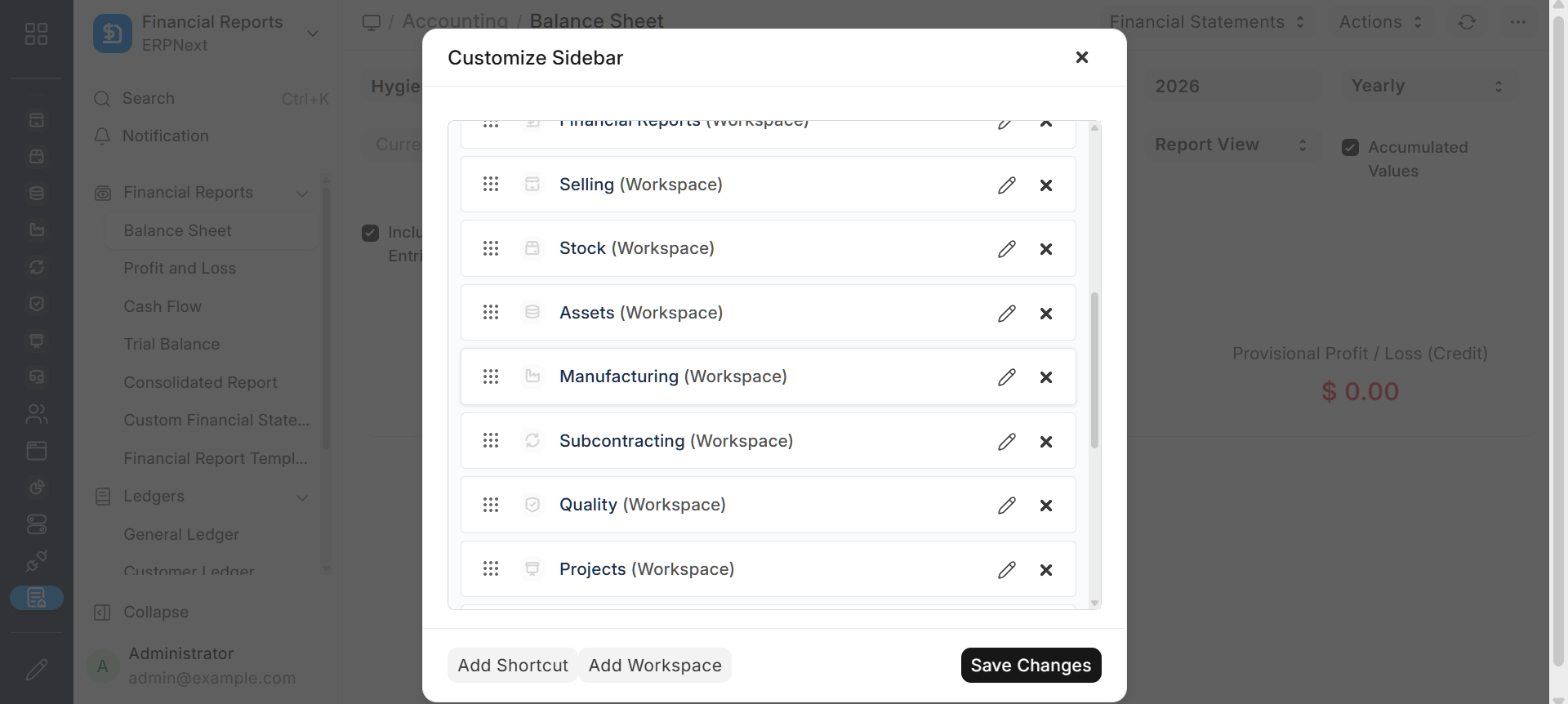
Fully Customizable:** Drag & drop reordering and custom links via a simple “Edit” dialog. Shortcuts - can choose different link types including Reports.

Native Feel:** Sorts alphabetically and respects standard Frappe Desk permissions and hidden workspaces.

Screenshots
Installation

The app is open source and public.

bench get-app https://github.com/zerodiscount/v16_slimdesk_navigator

bench --site [your-site] install-app v16_slimdesk_navigator

Repository

Sincerely hope this helps - until we get resolution. My contribution to the community. Feedback is always welcome.

15 Likes

Thanks for sharing this. I too am very flustered with this new navigation and will be curious to see how other users at the company will feel about it.

I installed your solution and like where you are going with this and will let you know what others think.

1 Like

It’s working beautifully and is customizable.

Thank you very much. The effect is very good

I was not able to install it in the frappe_docker container version…
It does not install the app, keeps complaining about translation path and do not go ahead…
Any advices ?

1 Like

Fixed the issue with including a translation folder in app. bumped version to 3.47. Enjoy!

1 Like

Great work @zerodiscount!!
It does solve a big navigation related UX issue in the new v16. The app looks promising, good luck!

Also, I suggest you to please correct your post content as right now it’s rendering the markdown syntax as-is.

2 Likes

Seems to be a great work indeed..
But Docker does not let it work.
I can install the app, but when I build it it behaviour different from the other apps in the frappe-docker version of erpNext… the translations list does not show up…
When I copy the locale directory from one of the working apps into the v16_slim_desk folder it builds similar as I would build other app showing the translations during build, but in the end v16_slim_desk does not work, right after bench down and bench up -d the app disapears from apps folder, and the frappe.log shows the translation files where not found and the v16_slim_desk module was not found because it could not be loaded…
It is really frustrating for the vps users like me which need to install erpNext through docker…

I use VPS - but with lxd containers - it is a lot easier and native to linux. No docker to install, commands to learn and all benefits of containerization.
Have updated to v3.49 - may have been nesting issue of the translation folder - per AI model that I use… please test and let me know if it worked.

1 Like

No worries - the purpose of this effort is to help as many users…. I am using AI - this app is entirely coded by the agent and so sometimes it has hiccups… like you just identified…. A folder was mistakenly deleted. Thank you for your patience. Please test version 3.50 - and let me know if it works. I do not have Docker environment to test.

Please try v3.56. Apologies for the iteration. I had the same module nesting error for another integration - the requirements of frappe trip up the AI for some reason. Added missing manifest.in. Appreciate the help in testing / resolving this…

@nunesfl
In docker bench get-app does not work as the image is immutable and volumes are non-persistent
Try the sollution below

wow, thank you so much asief for that.
I read some articles saying that thing about not persistent app installation be anoying.. and that is really what it is, anoying…
I read you had the erpNext in lxc container and I tried that too, but my vps is ARM and I am not being able to make it work in lxc, and incus neither…
so I only need to run tha easy app install py application ? that will make the app persist ?
best regards,

1 Like

@nunesfl apologies - could not fix your problem. Seems your errors are related /specific to your ARM setup. Appreciate if you could please delete your error messages - as they could confuse other readers. PM me directly (as we have been). Thanks for your diligence and welcome to the community.

Thank you Asief

I Ended up installing in a lxc container, and migrated manually the site from docker, now almost everything is working well, your app is working!

I tried to delete the long text from my messages but the forum doesn’t let me do it, I will try again in a minute…

Quick question… your erpNext in the lxc has the option to backup into a S3 repository? In the v15 it was under integrations module, now in v16 I have just installed I can not find it anywhere…

Thanks again for your help!

@nunesfl
Most Welcome .. dont forget to spread the FOSS love :heart:
Help others as you have been helped

The script I showed you belongs to Frappe and is a docker easy-install
The app belongs to @zerodiscount as per his OP so you can thank him for that
As for backup iinto S3 repository I have no ideas but I suggest you open a new thread and maybe someone more knowledgeable can helo you

Best of luck

2 Likes

I am glad it worked out for you. May I ask you to create a new thread to share / post the lxc installation procedure you used? many budget conscious users could benefit from an updated guide (especially if you did it on ARM cpu - raspberry pi?).

@shashank_shirke thanks for the review… you were amongst the first to identify the UI/UX issues when in V16 was in the dev branch. That discussion about the UI flow from left to right - Apps –> Modules –> Doctypes resonated with me and others…

1 Like

Frappe should consider merging this app in core.

3 Likes

Hello @asieftejani
Hope you are doing well.
I have applied the material_theme in my erpNext, nice theme…
But I am trying to customize the v16_slim_desk in order to have the blue stell color as like the material theme. Is it possible ?
Best regards,