I have tax-inclusive pricing working correctly using item-level tax templates (10%, 5%, exempt) combined with sales tax templates at 0% rate with included_in_print_rate = 1.
That setup works fine for regular customers:
Item priced at $110 with “VAT 10%” Item Tax Template
Result: Base $100 + Tax $10 = Total $110 (correct)
But the issue is that for tax-exempt customers (e.g., exports, certain customer types), I need:
Same item priced at $110 (10% VAT tax included)
Customer should pay only the base $100 (the base price without tax)
No tax should be applied.
I already tried a few approaches:
Assigning “Exempt” Item Tax Template (0% rate) - but this treats the full $110 as base price, customer pays $110 instead of $100. Selecting that Except tax with tax categories.
Separate Price Lists - requires maintaining duplicate prices for all items
Is there a way to make ERPNext recognize that when a tax-exempt customer buys an item priced at $110 (which normally includes 10% tax), they should pay only $100?
The system should:
Detect tax-exempt customer/transaction somehow (maybe tax category or something else)
Back-calculate: $110 ÷ 1.10 = $100
Apply 0% tax on that $100 base (important for accounting)
My setup.
ERPNext Version: 16.0.1
All prices are stored tax-inclusive in price lists - Mandatory for my country.
Is there a configuration or approach I’m missing, or does this require custom code?
If you can get around this requirement I would advice removing the included_in_print_rate = 1 and then implementing the below sollution. Otherwise maybe apply a pricing & tax rule to exempt customers
Let us know if it works so that others benefit in the future
Moving to included_in_print_rate = 0 would solve this, but it introduces some really weird product pricing. For example, an item priced at 50 (tax included) would be configured as 45.45 (base), and when that final 10% tax is added, you end up with a price of 49.995. No good.
The best solution I’ve found so far that doesn’t involve custom code is this:
Create an additional COA account called something like “Exempt VAT adjustment.”
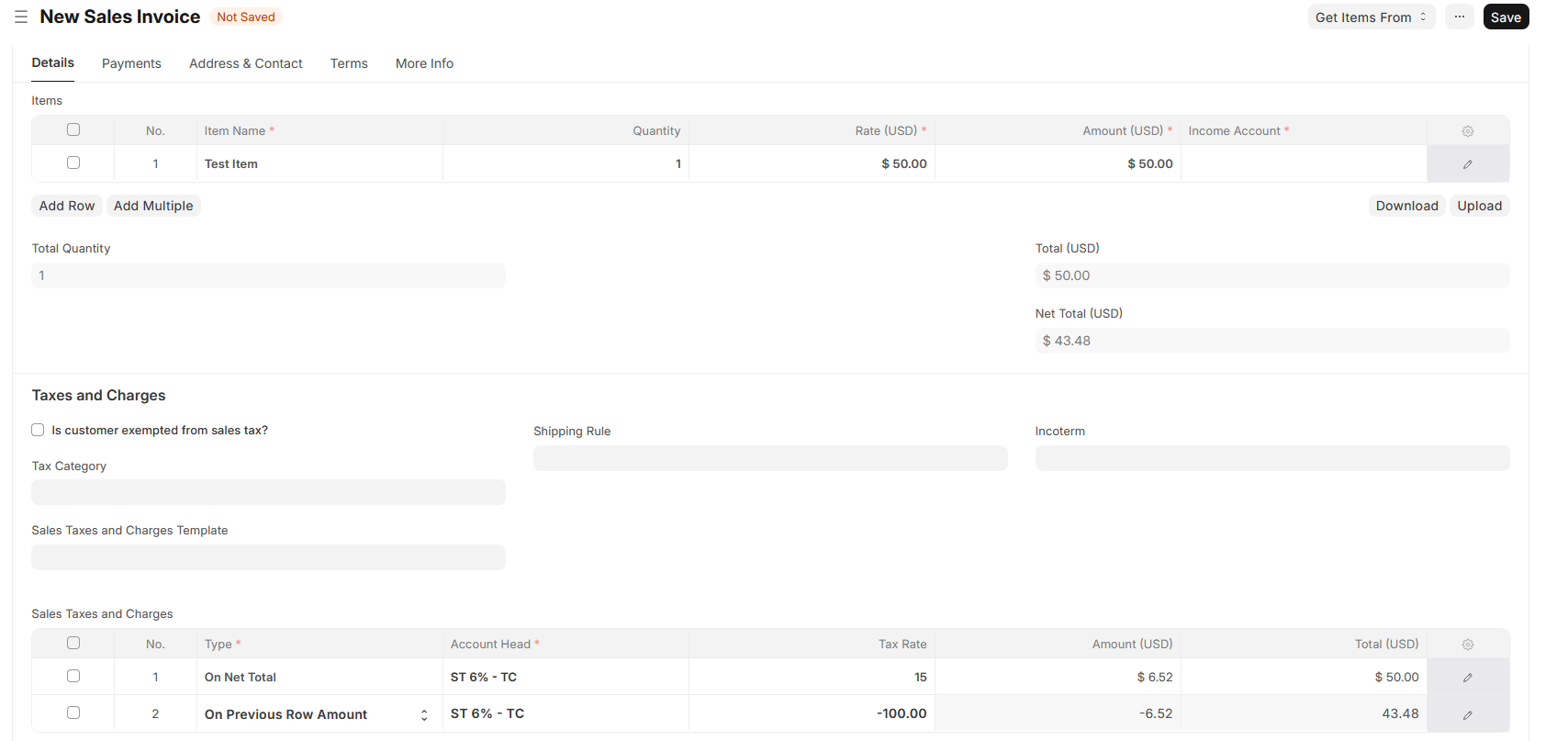
Create a sales tax template with these two lines:
First line: On Net Total | Account: VAT 10% | Rate: 0 (so the item rate takes over) | included_in_print_rate = 1
Second line: On Previous Row Amount | Account: Exempt VAT Adjustment | Rate: -100
The trick here is using that extra account to dump the discount and using the -100 in the second row to offset the tax. It’s not the most straightforward way to do it, and you’ll need to make sure whoever manages the accounts understands what that adjustment row is doing, but it keeps the pricing clean.
If tax is built into the price, and some people don’t pay tax, I feel like there are only two correct answers:
Use a different price list for tax exempt customers, or
Refund the tax on tax exempt invoices
In your second post, you’re basically doing (2), though it’s not totally clear to me why you need a second contra account. Couldn’t you just do the adjustment directly to the standard VAT account?
If I use the same account with -100% tax refund of the previous line. At some point of the tax calculation the item tax percentage of 10% takes over for that refund line, overwriting the -100 with +10, and instead of subtracting 100%, it adds 10%. This results in paying tax on taxes. This is solved (sadly) by adding an auxiliary adjustment account.
I guess the only other viable path is option 1, having 2 price lists. Generating more administrative work.
I would really want to request this scenario to be supported on the core. Is there a place where I can make feature requests? I’m new to this.
Feature requests go on github. I can’t say I’m following the logic of the scenario as it’s laid out here, though.
If you want tax-exempt customers to pay a different base price (option 1), there are mechanisms for that. If you want tax-exempt customers to pay the same base price but have the tax refunded to them (option 2), there are mechanisms for that too.
The idea that the base price is $110 but tax exempt customers only pay $100 doesn’t make sense to me. I can’t really think of how the accounting would look for that.
I see it working for you. Although I have that tax rate to 0 in the first line so the tax is controlled by the item tax; maybe that’s the mistake I’m making. In any case I think I have more testing to do.
Regarding the last part. In the example, the product’s price is set to 110$ tax inclusive 10%, that’s not the base. What I’m trying to do is to get tax exempt customers to pay 100$ tax removed.
Apparently your scenario is exactly that. I’ll be testing more scenarios/configurations.
In any case, I created a feature request on github because I believe tax exempt customers should be managed more easily. In my country’s accounting, when a transaction is tax-exempt, the tax is not generated and then refunded; it simply isn’t recorded at all because there’s no tax liability.
I’ll test a few more scenarios and post results here.
It is, though. If you set the price to $110, the basic rate is $110. That’s just how ERPNext defines and uses these terms.
Indeed, and in this thread people have already suggested three different ways of doing it. I understand that you want a different fourth way, but I genuinely don’t understand what you’re asking the software to do.